Firefox Browser Add-ons
  • Extensions
  • Themes
    • for Firefox
    • Dictionaries & Language Packs
    • Other Browser Sites
    • Add-ons for Android
Log in
Preview of Femmage

Femmage by eliaspourquoi

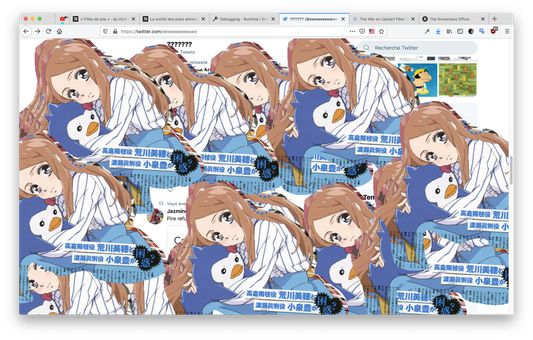
Make any web page a canvas to select, copy and paste anywhere else. Works using Shortcuts Keys.

0 (0 reviews)0 (0 reviews)
No UsersNo Users
Download Firefox and get the extension
Download file

Extension Metadata

Screenshots
Copy Paste anything from any tabs
About this extension
Works in any tabs, you can copy from a tab and paste in another tab, or in an other software, anywhere.

Ctrl/Cmd+D: Switch modes (Hidden, Clip and Paste)
Ctrl/Cmd+V (Paste mode): Paste any image into the screen and use the mouse to drag it over.
Ctrl/Cmd+C (Clip mode): Copy any clip you did using the mouse in clip mode.
Mouse-Left (Clip mode): Draw an area you want to select for copy.
Mouse-Left (Paste mode): Drag any image you paste from your clipboard.

Name Inspiration: https://fr.wikipedia.org/wiki/Femmage
Rated 0 by 0 reviewers
Sign in to rate this extension
There are no ratings yet

Star rating saved

5
0
4
0
3
0
2
0
1
0
No reviews yet
Permissions and data

Required permissions:

  • Input data to the clipboard
  • Access your data for all websites
Learn more
More information
Add-on Links
  • Homepage
  • Support site
  • Support Email
  • Copy add-on ID
Version
0.1
Size
85.99 KB
Last updated
6 years ago (Jun 27, 2020)
Related Categories
  • Appearance
  • Games & Entertainment
License
GNU General Public License v3.0 only
Version History
  • See all versions
Add to collection
Report this add-on
Go to Mozilla’s homepage

Add-ons

  • About
  • Firefox Add-ons Blog
  • Extension Workshop
  • Developer Hub
  • Developer Policies
  • Community Blog
  • Forum
  • Report a bug
  • Review Guide

Download

  • Download Firefox
  • Windows
  • macOS
  • iOS
  • Android
  • Linux
  • All

Latest Builds

  • Nightly
  • Beta

Firefox for Business

  • Enterprise

Community

  • Connect
  • Contribute
  • Developer

Follow

  • Instagram
  • YouTube
  • TikTok
  • Bluesky
  • Podcast
  • Privacy
  • Cookies
  • Legal

Except where otherwise noted, content on this site is licensed under the Creative Commons Attribution Share-Alike License v3.0 or any later version.