Salesforce Id CopyPasteGo by Danny Summerlin
Copy the current Salesforce record's ID to the clipboard, or paste your way to the record's page from where you are!
8 Users8 Users
Extension Metadata
Screenshots
About this extension
Navigate Salesforce records by ID with keyboard shortcuts and the right-click menu:
- Alt+Shift+C copies the current page's cleaned up URL
- Alt+Ctrl+C copies the current page's record ID
- Alt+Ctrl+V opens the record page for the ID on your clipboard (copied from any source)
- Alt+Ctrl+B opens the record page for the ID on your clipboard in a new tab
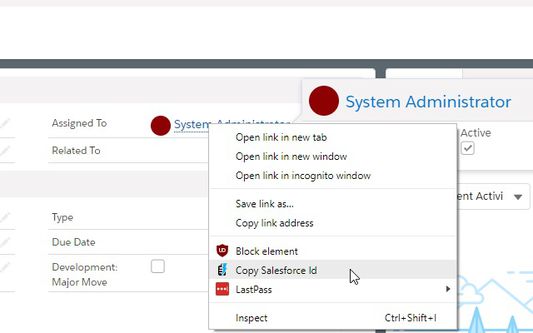
- Right click on any Salesforce link to copy just the Salesforce ID from it or grab a clean version of the URL
This extension works with Classic and Lightning interfaces
- Alt+Shift+C copies the current page's cleaned up URL
- Alt+Ctrl+C copies the current page's record ID
- Alt+Ctrl+V opens the record page for the ID on your clipboard (copied from any source)
- Alt+Ctrl+B opens the record page for the ID on your clipboard in a new tab
- Right click on any Salesforce link to copy just the Salesforce ID from it or grab a clean version of the URL
This extension works with Classic and Lightning interfaces
Rated 0 by 0 reviewers
Permissions and data
Required permissions:
- Get data from the clipboard
- Input data to the clipboard
- Access your data for sites in the force.com domain
- Access your data for sites in the salesforce.com domain
- Access your data for sites in the cloudforce.com domain
More information
- Add-on Links
- Version
- 1.4.10resigned1
- Size
- 18.4 KB
- Last updated
- 2 years ago (Apr 26, 2024)
- Related Categories
- License
- MIT License
- Version History
- Add to collection