
Auto Swiper for Tinder, Badoo and more! by Andreas Reinhold / surtic86
Auto Swiper Extension to Swipe Tinder, Badoo, Lovoo, PoF and OkCupid Profiles.
Available on Firefox for Android™Available on Firefox for Android™
153 Users153 Users
Scan the QR code to open this extension in Firefox for Android

Extension Metadata
Screenshots

About this extension
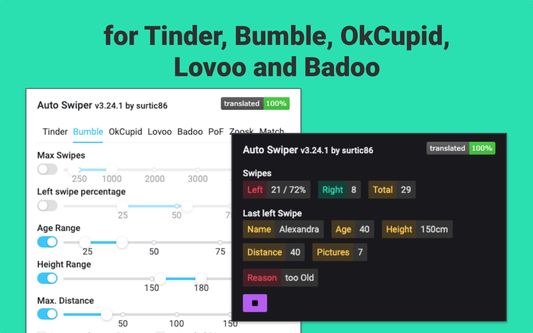
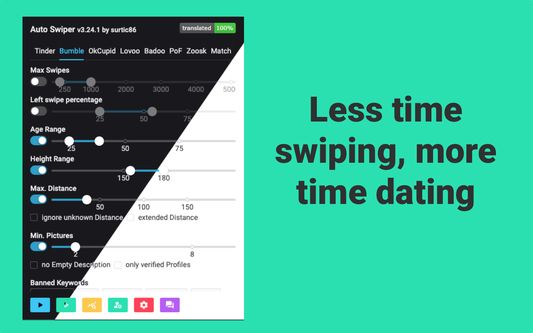
Auto Swiper takes the repetitive part of online dating off your hands. Set
the filters that matter to you — age, distance, required photo count, banned
or required keywords — and let the extension swipe right only on the profiles
you'd swipe right on yourself.
Supported dating sites
What you get
Free vs paid
Core swiping is free forever — no credit card, no account needed to start.
A free account unlocks longer sessions and cloud-saved settings. AI messaging
and advanced filters require a Pro or Ultimate subscription, which you can
cancel any time from your dashboard.
Privacy first
The extension only runs on the dating sites it supports — it never observes
any other browsing. (The current list of supported sites is on
https://auto-swiper.ch.) While you're anonymous, only an anonymous swipe
count is sent to enforce free-tier daily limits. When you sign in, your
filter settings and swipe sessions sync to your account so you can see stats
in the dashboard and use them across devices. AI messaging is opt-in and
only sends each match's name and bio (never photos, never conversation
history with other matches). Full details at
https://auto-swiper.ch/privacy-policy.
Dating sites change — we keep up
Dating platforms update their websites often, and a change on their side can
sometimes break the extension's automation. If something stops working, just
let us know — most issues are fixed within 1-2 weeks, depending on how big the
change is. Keeping Auto Swiper working across all eight sites is exactly what we
do.
Support
Questions or bug reports? Email support@auto-swiper.ch or open an issue
through the Help section of the popup. Recent updates and known issues are
at https://auto-swiper.ch/changelog.
the filters that matter to you — age, distance, required photo count, banned
or required keywords — and let the extension swipe right only on the profiles
you'd swipe right on yourself.
Supported dating sites
- Tinder
- Lovoo
- Badoo
- OkCupid
- PoF (Plenty of Fish)
- Zoosk
- Match
What you get
- Auto-swipe with rich, configurable filters (age, distance, photo count, bio
keywords, required terms, banned terms) - Human-like timing: randomized delays, configurable breaks, optional page
reloads to mimic real usage - AI-assisted opening messages on Tinder, Lovoo and Badoo (Pro & Ultimate)
- Auto-messaging that replies to existing conversations and writes openers to
new matches (Ultimate) - Daily swipe caps, session stats, and an export for your data
- Dark and light themes
- 27 languages, full keyboard accessibility, screen-reader friendly
Free vs paid
Core swiping is free forever — no credit card, no account needed to start.
A free account unlocks longer sessions and cloud-saved settings. AI messaging
and advanced filters require a Pro or Ultimate subscription, which you can
cancel any time from your dashboard.
Privacy first
The extension only runs on the dating sites it supports — it never observes
any other browsing. (The current list of supported sites is on
https://auto-swiper.ch.) While you're anonymous, only an anonymous swipe
count is sent to enforce free-tier daily limits. When you sign in, your
filter settings and swipe sessions sync to your account so you can see stats
in the dashboard and use them across devices. AI messaging is opt-in and
only sends each match's name and bio (never photos, never conversation
history with other matches). Full details at
https://auto-swiper.ch/privacy-policy.
Dating sites change — we keep up
Dating platforms update their websites often, and a change on their side can
sometimes break the extension's automation. If something stops working, just
let us know — most issues are fixed within 1-2 weeks, depending on how big the
change is. Keeping Auto Swiper working across all eight sites is exactly what we
do.
Support
Questions or bug reports? Email support@auto-swiper.ch or open an issue
through the Help section of the popup. Recent updates and known issues are
at https://auto-swiper.ch/changelog.
Rated 1 by 1 reviewer
Permissions and data
Required permissions:
- Block content on any page
- Display notifications to you
Optional permissions:
- Monitor extension usage and manage themes
- Access your data for sites in the auto-swiper.ch domain
- Access your data for auto-swiper.ch
- Access your data for app.auto-swiper.ch
More information
- Add-on Links
- Version
- 3.50.0
- Size
- 800.33 KB
- Last updated
- 13 days ago (Aug 13, 2026)
- Related Categories
- License
- All Rights Reserved
- Privacy Policy
- Read the privacy policy for this add-on
- Version History
- Tags
- Add to collection