Firefox Browser Add-ons
  • Extensions
  • Themes
    • for Firefox
    • Dictionaries & Language Packs
    • Other Browser Sites
    • Add-ons for Android
Log in
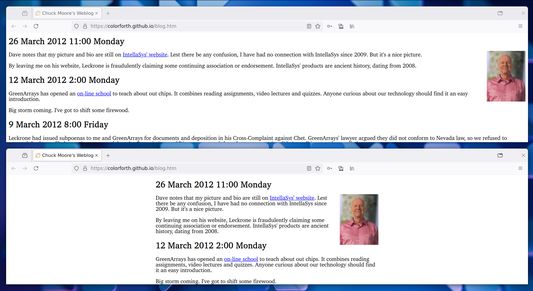
Preview of Narrow Page

Narrow Page by b.

Adjust the width of your webpages with a shortcut.

5 (1 review)5 (1 review)
33 Users33 Users
Download Firefox and get the extension
Download file

Extension Metadata

Screenshots
Resize your webpage width dynamically.
About this extension
Use Shift+Alt+W (configurable shortcut) or click the toolbar icon to cycle through some preset width modes (720px, 900px, 1080px, "Fit Content"). This add-on affects the style of the <body> tag, namely the width and max-width properties, and adds a subtle status bar at the top.

Keywords: resize shrink view small large full widescreen browsing center wide narrow fit-content configure column decrease
Rated 5 by 1 reviewer
Log in to rate this extension
There are no ratings yet

Star rating saved

5
1
4
0
3
0
2
0
1
0
Read 1 review
More information
Add-on Links
  • Homepage
  • Support site
  • Support Email
  • Copy add-on ID
Version
0.1.0
Size
13.33 KB
Last updated
2 years ago (Oct 1, 2024)
Related Categories
  • Appearance
License
Mozilla Public License 2.0
Version History
  • See all versions
Add to collection
Report this add-on
Go to Mozilla's homepage

Add-ons

  • About
  • Firefox Add-ons Blog
  • Extension Workshop
  • Developer Hub
  • Developer Policies
  • Community Blog
  • Forum
  • Report a bug
  • Review Guide

Download

  • Download Firefox
  • Windows
  • macOS
  • iOS
  • Android
  • Linux
  • All

Latest Builds

  • Nightly
  • Beta

Firefox for Business

  • Enterprise

Community

  • Connect
  • Contribute
  • Developer

Follow

  • Instagram
  • YouTube
  • TikTok
  • Bluesky
  • Podcast
  • Privacy
  • Cookies
  • Legal

Except where otherwise noted, content on this site is licensed under the Creative Commons Attribution Share-Alike License v3.0 or any later version.