
hardwax-autoplay por zeddan
A Firefox addon for autoplaying previews at https://hardwax.com
Metadata de la extensión
Capturas de pantalla
Sobre esta extensión
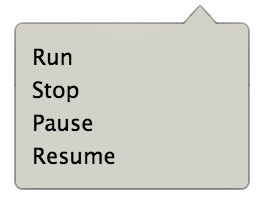
First, go to http://hardwax.com and select a page that you want to autoplay. Then, open the menu and you will see four flow controls:
Run
Starts autoplaying. This will continue until all the previews on the page have been played unless no other action from the menu is taken. When the script is running, you can select any preview and the autoplay will continue from that position.
Stop
Interrupts the autoplay and resets all values. This means that the autoplay will start from the first preview on the page the next time Run is triggered.
Pause
Pauses the autoplay and prepares for resuming at the position where it was paused.
Resume
Resumes the autoplay from the position where it was paused, and continues until all the previews on the page have been played unless no other action from the menu is taken.
Run
Starts autoplaying. This will continue until all the previews on the page have been played unless no other action from the menu is taken. When the script is running, you can select any preview and the autoplay will continue from that position.
Stop
Interrupts the autoplay and resets all values. This means that the autoplay will start from the first preview on the page the next time Run is triggered.
Pause
Pauses the autoplay and prepares for resuming at the position where it was paused.
Resume
Resumes the autoplay from the position where it was paused, and continues until all the previews on the page have been played unless no other action from the menu is taken.
Rated 0 by 0 reviewers
Permissions and data
Más información
- Enlaces del complemento
- Versión
- 1.0
- Tamaño
- 14,32 KB
- Última actualización
- hace 5 años (17 de oct. de 2021)
- Categorías relacionadas
- Licencia
- MIT License
- Historial de versiones
- Añadir a la colección