Modules pour le navigateur Firefox
  • Extensions
  • Thèmes
    • pour Firefox
    • Dictionnaires et paquetages linguistiques
    • Sites pour les autres navigateurs
    • Modules pour Android
Connexion
Aperçu de Amazon DP and ASIN Only

Amazon DP and ASIN Only par DBSH

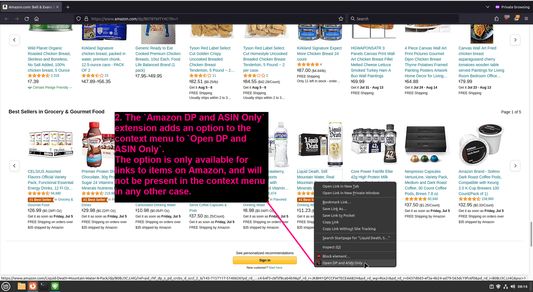
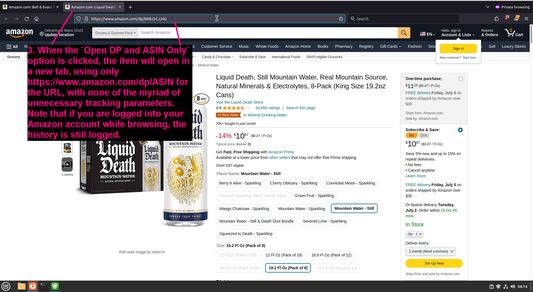
Adds an option to the context menu to open links to items on Amazon in a new tab, using only DP and the ASIN, stripping away all the, ref, tracking, and other unnecessary URL parameters so URLs look like https://www.amazon.com/dp/ASIN

0 (0 critiques)0 (0 critiques)
2 utilisateurs·trices2 utilisateurs·trices
Télécharger Firefox et obtenir l’extension
Télécharger le fichier

Métadonnées de l’extension

Captures d’écran
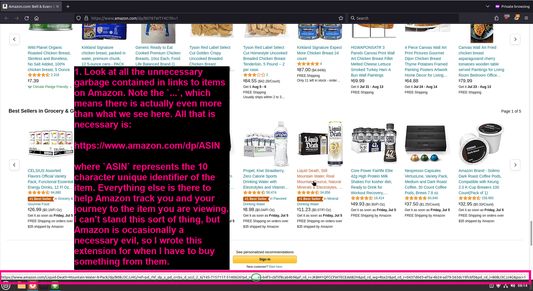
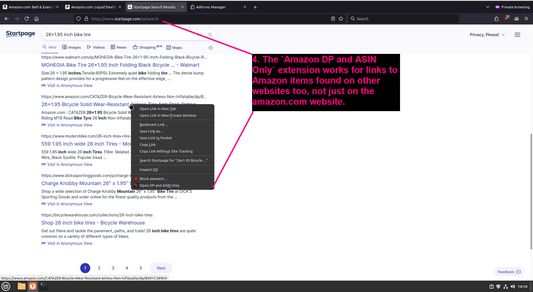
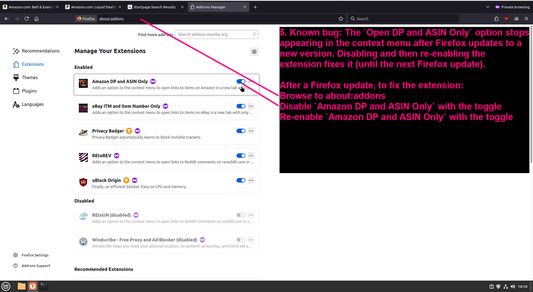
Look at all the unnecessary garbage contained in links to items on AmazonThe `Amazon DP and ASIN Only` extension adds an option to the context menu to `Open DP and ASIN Only`When the `Open DP and ASIN Only` option is clicked, the item will open in a new tab, using only https://www.amazon.com/dp/ASIN for the URL, with none of the myriad of unnecessary tracking parametersThe `Amazon DP and ASIN Only` extension works for links to Amazon items found on other websites too, not just on the amazon.com websiteKnown bug: The `Open DP and ASIN Only` option stops appearing in the context menu after Firefox updates to a new version
À propos de cette extension
Adds an option to the context menu to open links to items on Amazon in a new tab, using only DP and the ASIN, stripping away all the, ref, tracking, and other unnecessary URL parameters so URLs look like https://www.amazon.com/dp/ASIN
Commentaires du développeur
To view this extension's source code:
  1. In a Firefox instance that already has this extension installed, type `about:profiles` in the Firefox address bar, then press Enter
  2. Under the profile labeled `This is the profile in use and it cannot be deleted`, click on the `Open Directory` button (appears as `Open Folder` on Windows) next to `Root Directory`
  3. In the file explorer window that opens, go into the `extensions` directory (the `extensions` folder)
  4. Copy the file `{91f0f467-2cdb-4bab-b460-652b7aceaacd}.xpi` and paste it somewhere else, such as your Desktop
  5. Rename the file, changing the extension to `.zip` - so `{91f0f467-2cdb-4bab-b460-652b7aceaacd}.xpi` becomes `{91f0f467-2cdb-4bab-b460-652b7aceaacd}.zip`
  6. Unzip the file `{91f0f467-2cdb-4bab-b460-652b7aceaacd}.zip`. The extracted files are the source, especially the .json and .js files.
Noté 0 par 1 personne
Connectez-vous pour noter cette extension
Il n’y a aucune note pour l’instant

Le nombre d’étoiles est enregistré

5
0
4
0
3
0
2
0
1
0
Aucune critique pour l’instant
Autorisations et données

Autorisations nécessaires :

  • Accéder aux onglets du navigateur
En savoir plus
Plus d’informations
Liens du module
  • Copier l’identifiant du module
Version
1.0.1
Taille
27,53 Ko
Dernière mise à jour
il y a 2 ans (29 juin 2024)
Catégories associées
  • Sécurité et vie privée
  • Shopping
Licence
GNU General Public License v3.0 uniquement
Politique de confidentialité
Lire la politique de confidentialité de ce module
Historique des versions
  • Voir toutes les versions
Ajouter à la collection
Signaler ce module
Aller à la page d’accueil de Mozilla

Modules complémentaires

  • À propos
  • Blog des modules complémentaires Firefox
  • Atelier sur les extensions
  • Pôle développeur
  • Politiques à destination des développeurs
  • Blog de la communauté
  • Forum
  • Signaler un problème
  • Guide de revue

Navigateurs

  • Desktop
  • Mobile
  • Enterprise

Produits

  • Browsers
  • VPN
  • Relay
  • Monitor
  • Pocket
  • Bluesky (@firefox.com)
  • Instagram (Firefox)
  • YouTube (firefoxchannel)
  • Confidentialité
  • Cookies
  • Mentions légales

Sauf mention contraire, le contenu de ce site est disponible sous licence Creative Commons Attribution Share-Alike v3.0 ou toute version supérieure.