De-Troll YouTube - Hide Unwanted Commenters par jscher2000
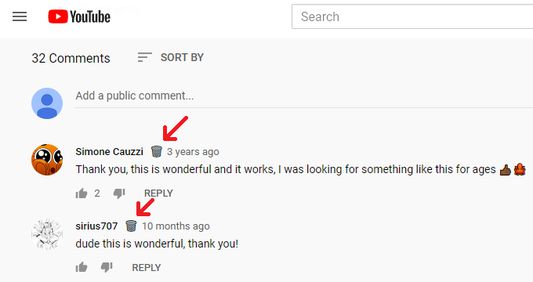
Easily hide comments from a troll using the right-click context menu or trash can icon next to the poster's name. Not an official YouTube extension.
134 utilisateurs·trices134 utilisateurs·trices
Métadonnées de l’extension
Captures d’écran
À propos de cette extension
This extension doesn't use artificial intelligence, you decide what to block. Hide "trolls" and other unwanted commenters on all YouTube watch pages.
I recently became aware of another add-on that has this feature AND many more. I haven't tried it myself, but feel free to take a look: BlockTube.
Button option (version 0.6)
Click the trash can to add that commenter to your troll list. To manage your toll list, or to turn off the trash cans, Shift+click one of the buttons to open the Options page.
Context menu option
Right-click the comment and either:
* Click "Hide Commenter's Comments" to hide all of their comments
* Shift+click "Hide Commenter's Comments" to open the Options page to manage your list
I recently became aware of another add-on that has this feature AND many more. I haven't tried it myself, but feel free to take a look: BlockTube.
Button option (version 0.6)
Click the trash can to add that commenter to your troll list. To manage your toll list, or to turn off the trash cans, Shift+click one of the buttons to open the Options page.
Context menu option
Right-click the comment and either:
* Click "Hide Commenter's Comments" to hide all of their comments
* Shift+click "Hide Commenter's Comments" to open the Options page to manage your list
Noté 4,8 par 18 personnes
Autorisations et données
Plus d’informations
- Version
- 0.9
- Taille
- 22,61 Ko
- Dernière mise à jour
- il y a 2 ans (2 juin 2024)
- Catégories associées
- Licence
- Mozilla Public License 2.0
- Historique des versions
- Ajouter à la collection