Modules pour le navigateur Firefox
  • Extensions
  • Thèmes
    • pour Firefox
    • Dictionnaires et paquetages linguistiques
    • Sites pour les autres navigateurs
    • Modules pour Android
Connexion
Aperçu de FetchFox - Curation Collector

FetchFox - Curation Collector par wolfpaw

Collects metadata of the current page and saves it to Local Browser Storage for content curation.

5 (1 critique)5 (1 critique)
1 utilisateur·trice1 utilisateur·trice
Télécharger Firefox et obtenir l’extension
Télécharger le fichier

Métadonnées de l’extension

Captures d’écran
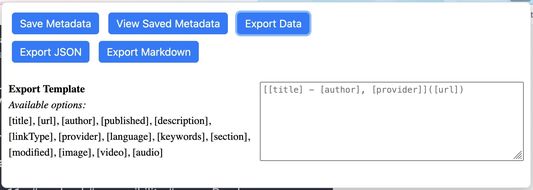
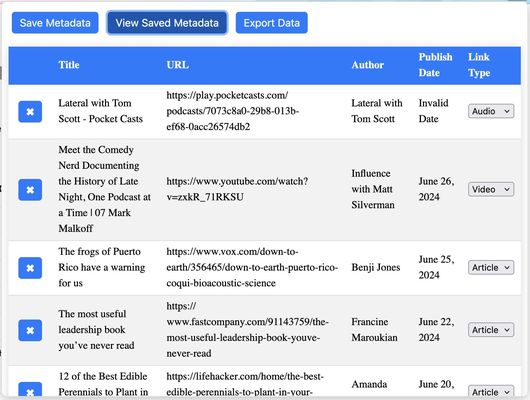
FetchFox screenshot showing main popup with export optionsFetchFox screenshot showing main popup with saved metadata
À propos de cette extension
The goal for this browser extension is to allow me to save the metadata of an article, video, or podcast for sharing to browser storage. I can then filter and sort those links and send them where I will end up using them in the format that I want most. The goal is to save articles and save time!

To use the extension:
  • Click "Save Metadata" to save the metadata of the current tab
  • Click "View Saved Metadata" to see the existing saved pages in a table
  • Drag and drop rows into the order that you want
  • Click the "x" button next to a row to delete it
  • Select a content type to organize your links
  • Click "Clear All Data" to delete all rows
  • Click "Export Data" to get export options (currently JSON or Markdown)
  • Click "Export JSON" to get a JSON file of all saved metadata
  • Click "Export Markdown" to get a markdown file of select metadata
  • Use the input and shortcodes under the export buttons to design the format of the Markdown that is exported

Metadata collected:
  • title
  • description
  • url
  • author
  • language
  • type
  • provider
  • keywords
  • section
  • published date
  • modified date
  • copyright
  • image
  • video
  • audio
  • link sorting type
Noté 5 par 1 personne
Connectez-vous pour noter cette extension
Il n’y a aucune note pour l’instant

Le nombre d’étoiles est enregistré

5
1
4
0
3
0
2
0
1
0
Lire 1 critique
Autorisations et données

Autorisations nécessaires :

  • Télécharger des fichiers, et consulter et modifier l’historique des téléchargements du navigateur
  • Accéder aux onglets du navigateur
  • Accéder à vos données pour tous les sites web

Collecte de données :

  • Le développeur indique que cette extension n’a pas besoin de collecter de données.
En savoir plus
Plus d’informations
Liens du module
  • Site d’assistance
  • E-mail d’assistance
  • Copy add-on ID
Version
0.3
Taille
1,36 Mo
Dernière mise à jour
il y a 8 mois (2 oct. 2025)
Catégories associées
  • Flux, nouvelles et blogs
  • Marque-pages
  • Social et communication
Licence
Licence MIT
Historique des versions
  • Voir toutes les versions
Ajouter à la collection
Signaler ce module
Aller à la page d’accueil de Mozilla

Modules complémentaires

  • À propos
  • Blog des modules complémentaires Firefox
  • Atelier sur les extensions
  • Pôle développeur
  • Politiques à destination des développeurs
  • Blog de la communauté
  • Forum
  • Signaler un problème
  • Guide de revue

Navigateurs

  • Desktop
  • Mobile
  • Enterprise

Produits

  • Browsers
  • VPN
  • Relay
  • Monitor
  • Pocket
  • Bluesky (@firefox.com)
  • Instagram (Firefox)
  • YouTube (firefoxchannel)
  • Confidentialité
  • Cookies
  • Mentions légales

Sauf mention contraire, le contenu de ce site est disponible sous licence Creative Commons Attribution Share-Alike v3.0 ou toute version supérieure.