
ChatGPT Folders for GPT, Gemini, Grok par Talha Shaikh
Organize ChatGPT, Gemini, Grok chats in unlimited folders. Drag, drop, color-code, & manage chats directly from the ChatGPT sidebar.
129 utilisateurs·trices129 utilisateurs·trices
Métadonnées de l’extension
Captures d’écran


À propos de cette extension
ChatGPT FolderMate – Organize Your AI Conversations with Ease
FolderMate is the all-in-one conversation manager for ChatGPT, Gemini, Grok, and Claude.
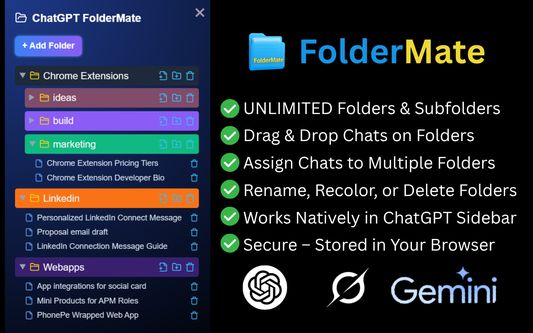
Create folders, subfolders, and custom categories to keep your AI chats tidy, searchable, and instantly accessible — right inside the sidebar.
🔑 Powerful Features:
✅ Organize ChatGPT, Gemini, Grok, and Claude chats in one unified interface
✅ Create unlimited folders & subfolders for projects, topics, or clients
✅ Drag & drop chats for fast organization
✅ Assign chats to multiple folders without duplication
✅ Rename, recolor, and delete folders or chats with a right-click
✅ Choose custom colors with palette & picker support
✅ Secure local storage with chrome.storage.local — your data stays private
✅ Clean, responsive design that blends with each AI’s look & feel
✅ Quick-access popup from Chrome toolbar to browse folders anywhere
💡 Why FolderMate?
Whether you’re a researcher, marketer, developer, student, or power user, FolderMate helps you manage dozens — or hundreds — of AI conversations effortlessly.
No more endless scrolling or lost chats — just instant, organized access to the insights that matter.
🚀Future Updates:
-Cloud sync across devices
-Export & import folders and chats
-Shared folders & public links
-Smart AI-powered folder suggestions
-Semantic search across chats
-Folder icons & pinned folders
-Keyboard shortcuts & themes
-Multilingual and accessibility support
📬 Contact & Support
For feedback or support: stalha423@gmail.com
Keywords: ChatGPT folders, organize ChatGPT chats, ChatGPT conversation manager, Gemini folders, Grok chat organizer, Claude conversation folders, AI chat organizer, ChatGPT productivity tool, AI chat management, ChatGPT sidebar folders, ChatGPT workspace, organize AI conversations, ChatGPT Chrome extension, Gemini productivity extension, Grok productivity tool, Claude folder manager, AI research organization tool, AI workspace organizer.
FolderMate is the all-in-one conversation manager for ChatGPT, Gemini, Grok, and Claude.
Create folders, subfolders, and custom categories to keep your AI chats tidy, searchable, and instantly accessible — right inside the sidebar.
🔑 Powerful Features:
✅ Organize ChatGPT, Gemini, Grok, and Claude chats in one unified interface
✅ Create unlimited folders & subfolders for projects, topics, or clients
✅ Drag & drop chats for fast organization
✅ Assign chats to multiple folders without duplication
✅ Rename, recolor, and delete folders or chats with a right-click
✅ Choose custom colors with palette & picker support
✅ Secure local storage with chrome.storage.local — your data stays private
✅ Clean, responsive design that blends with each AI’s look & feel
✅ Quick-access popup from Chrome toolbar to browse folders anywhere
💡 Why FolderMate?
Whether you’re a researcher, marketer, developer, student, or power user, FolderMate helps you manage dozens — or hundreds — of AI conversations effortlessly.
No more endless scrolling or lost chats — just instant, organized access to the insights that matter.
🚀Future Updates:
-Cloud sync across devices
-Export & import folders and chats
-Shared folders & public links
-Smart AI-powered folder suggestions
-Semantic search across chats
-Folder icons & pinned folders
-Keyboard shortcuts & themes
-Multilingual and accessibility support
📬 Contact & Support
For feedback or support: stalha423@gmail.com
Keywords: ChatGPT folders, organize ChatGPT chats, ChatGPT conversation manager, Gemini folders, Grok chat organizer, Claude conversation folders, AI chat organizer, ChatGPT productivity tool, AI chat management, ChatGPT sidebar folders, ChatGPT workspace, organize AI conversations, ChatGPT Chrome extension, Gemini productivity extension, Grok productivity tool, Claude folder manager, AI research organization tool, AI workspace organizer.
Noté 3,7 par 12 personnes
Autorisations et données
Autorisations nécessaires :
- Accéder à vos données pour chatgpt.com
- Accéder à vos données pour gemini.google.com
- Accéder à vos données pour grok.com
- Accéder à vos données pour x.ai
Plus d’informations
- Liens du module
- Version
- 1.0.3
- Taille
- 156,83 Ko
- Dernière mise à jour
- il y a un an (28 sept. 2025)
- Catégories associées
- Licence
- Tous droits réservés
- Historique des versions
- Ajouter à la collection