Keyboard.cool - emoji & symbol keyboard par blade.sk
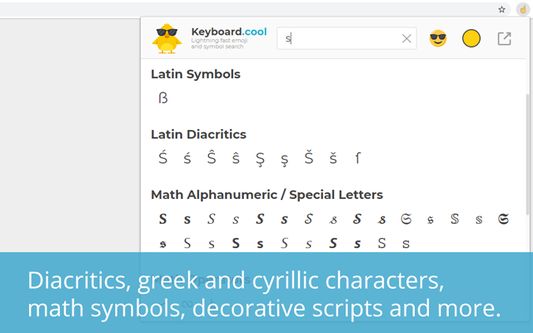
Insert emoji and symbols directly into text fields. Use super fast search to pick from over 7500 symbols.
111 utilisateurs·trices111 utilisateurs·trices
Métadonnées de l’extension
Captures d’écran
À propos de cette extension
Insert emoji and symbols directly into text fields. Use super fast search to pick from over 7500 symbols.
Take your texting to the next level.
🤯 use the most up-to-date emoji (version 15.1 - 2023).
🔣 search in over 7500 symbols - pictograms, math operators, accented characters, 𝑺𝑷𝑬𝑪𝑰𝑨𝑳 scripts, ∫Ψ🅜⧖⌬⎱§... Go nuts.
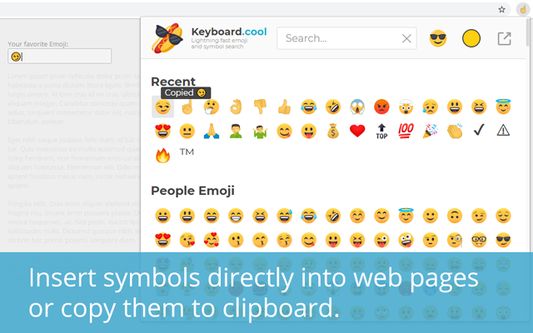
⌨ insert symbols directly into the focused web page or copy them to clipboard.
💨 built for speed - loads fast, searches even faster, bring up the keyboard with customizable hotkey (defaults to 𝙲𝚃𝚁𝙻+𝙰𝙻𝚃+𝚉 / ⌘+⌥+𝚉) and navigate using arrows and enter.
☝🏿 selectable skin tones and emoji styles (NotoEmoji and native).
🥶 arguably has the coolest logos.
Word of advice: the emoji and symbols you copy may or may not display correctly to you or the recipient, depending on what device they're using. Most new(-ish) devices should be fine. Some websites using non-standard input methods may not accept the inserted characters, in which case you can use the clipboard (𝙲𝚃𝚁𝙻+𝚅 or ⌘+𝚅).
Take your texting to the next level.
🤯 use the most up-to-date emoji (version 15.1 - 2023).
🔣 search in over 7500 symbols - pictograms, math operators, accented characters, 𝑺𝑷𝑬𝑪𝑰𝑨𝑳 scripts, ∫Ψ🅜⧖⌬⎱§... Go nuts.
⌨ insert symbols directly into the focused web page or copy them to clipboard.
💨 built for speed - loads fast, searches even faster, bring up the keyboard with customizable hotkey (defaults to 𝙲𝚃𝚁𝙻+𝙰𝙻𝚃+𝚉 / ⌘+⌥+𝚉) and navigate using arrows and enter.
☝🏿 selectable skin tones and emoji styles (NotoEmoji and native).
🥶 arguably has the coolest logos.
Word of advice: the emoji and symbols you copy may or may not display correctly to you or the recipient, depending on what device they're using. Most new(-ish) devices should be fine. Some websites using non-standard input methods may not accept the inserted characters, in which case you can use the clipboard (𝙲𝚃𝚁𝙻+𝚅 or ⌘+𝚅).
Noté 5 par 1 personne
Plus d’informations
- Liens du module
- Version
- 1.1.5
- Taille
- 3,1 Mo
- Dernière mise à jour
- il y a 9 mois (28 août 2025)
- Catégories associées
- Licence
- Tous droits réservés
- Historique des versions
- Étiquettes
- Ajouter à la collection