
PotPlayer YouTube Shortcut, Open Links par HelgeApps
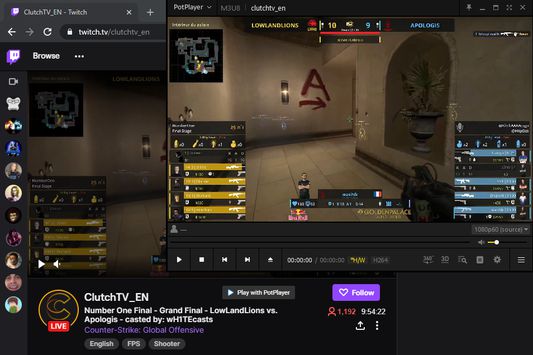
Quickly play or add a Youtube video (playlist), Twitch, direct video links to Potplayer from the context menu or using the buttons on the site and also via middle-click
938 utilisateurs·trices938 utilisateurs·trices
Métadonnées de l’extension
Captures d’écran




À propos de cette extension
> HOW TO USE IT: You need to install the latest version of PotPlayer to get it working - https://potplayer.daum.net <
PotPlayer is a media player developed for Windows by South Korean Internet company Kakao (formerly Daum Communications). Player can play Youtube videos and videos from any other urls if it's direct video links.
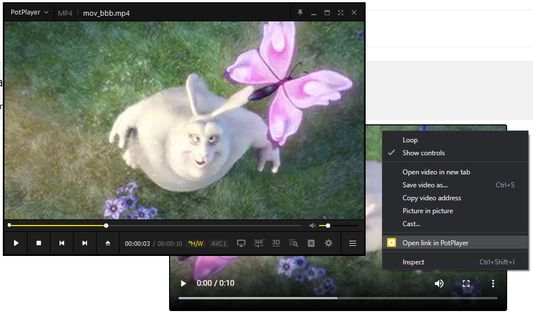
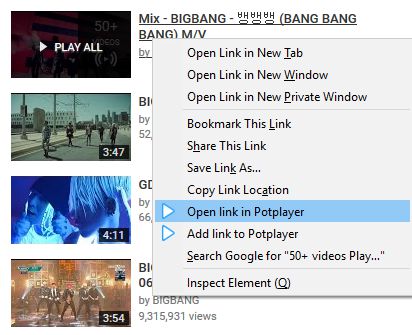
To open a Youtube video (playlist) in PotPlayer you can use the buttons on the site or you can use the menu items from the context menu (the right-click popup bar) on a Youtube link or on the actual Youtube page.
You can also use middle click on a Youtube page or a link to open it directly in the player. In order for that to work, you need to open the extension's preferences and enable the necessary features.
Optional features (disabled by default):
- auto-pause a video in Youtube player;
- pause Youtube player when Potplayer starts;
- play video using middle mouse click on youtube.com/watch* page;
- sync current video position (time) with PotPlayer;
- open a Youtube link in the player using middle mouse click on a link;
- «Open/Add link to player» in the context menu for any link, html5 video player
If it doesn't work for you then try to open the player's settings (key "F5"), then go to "Association" tab and check any association (e.g. ".mp4") and finally press Apply or OK button (after applying the settings you can uncheck previously checked association).
It's recommended to always update the player to the latest version of Potplayer (get the latest version: https://potplayer.daum.net).
Twitch PotPlayer requirements: https://github.com/23rd/TwitchPotPlayer
If Firefox 84+ always asks for permission to open video in PotPlayer then do the next steps:
1) open "about:config"
2) find "network.protocol-handler.external.potplayer"
3) set it to " true"
PotPlayer is a media player developed for Windows by South Korean Internet company Kakao (formerly Daum Communications). Player can play Youtube videos and videos from any other urls if it's direct video links.
To open a Youtube video (playlist) in PotPlayer you can use the buttons on the site or you can use the menu items from the context menu (the right-click popup bar) on a Youtube link or on the actual Youtube page.
You can also use middle click on a Youtube page or a link to open it directly in the player. In order for that to work, you need to open the extension's preferences and enable the necessary features.
Optional features (disabled by default):
- auto-pause a video in Youtube player;
- pause Youtube player when Potplayer starts;
- play video using middle mouse click on youtube.com/watch* page;
- sync current video position (time) with PotPlayer;
- open a Youtube link in the player using middle mouse click on a link;
- «Open/Add link to player» in the context menu for any link, html5 video player
If it doesn't work for you then try to open the player's settings (key "F5"), then go to "Association" tab and check any association (e.g. ".mp4") and finally press Apply or OK button (after applying the settings you can uncheck previously checked association).
It's recommended to always update the player to the latest version of Potplayer (get the latest version: https://potplayer.daum.net).
Twitch PotPlayer requirements: https://github.com/23rd/TwitchPotPlayer
If Firefox 84+ always asks for permission to open video in PotPlayer then do the next steps:
1) open "about:config"
2) find "network.protocol-handler.external.potplayer"
3) set it to " true"
Noté 4,5 par 94 personnes
Autorisations et données
Autorisations nécessaires :
- Accéder aux onglets du navigateur
- Accéder à vos données pour tous les sites web
Plus d’informations
- Liens du module
- Version
- 1.28
- Taille
- 208,51 Ko
- Dernière mise à jour
- il y a un an (12 oct. 2025)
- Catégories associées
- Licence
- Mozilla Public License 2.0
- Historique des versions
- Ajouter à la collection