
Power Tabs par Danny Y.
Vertical tab groups with tab searching.
86 utilisateurs·trices86 utilisateurs·trices
Métadonnées de l’extension
Captures d’écran




À propos de cette extension
A re-imagination of the old Tab Groups extension combined with vertical tabs.
To enable the tab hiding feature, you must use Firefox 59.0b3 or higher and set extensions.webextensions.tabhide.enabled to true in about:config
Features
For feature requests and suggestions please visit the GitHub page.
Keybindings:
These keybindings use Alt+Shift instead of the usual Ctrl+Shift due to a rather lackluster commands API not allowing overriding default keybindings. For more info see https://bugzilla.mozilla.org/show_bug.cgi?id=1215061
To enable the tab hiding feature, you must use Firefox 59.0b3 or higher and set extensions.webextensions.tabhide.enabled to true in about:config
Features
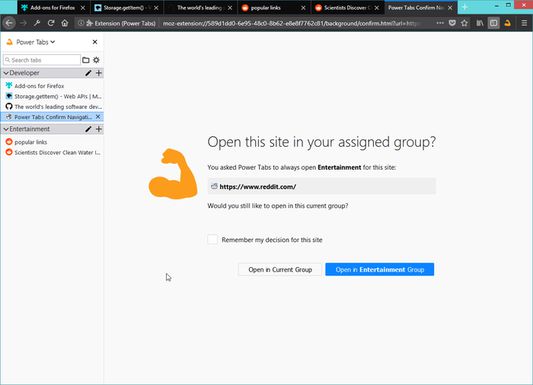
- See tabs in a vertical manner via sidebar.
- Automatically hide tabs that don't belong in the active group.
- Powerful Quick Switcher feature to fuzzy search tabs with keyboard navigation.
- Right click context menu on tabs and groups to do actions.
- See which tabs are actually discarded.
- Sort tabs in a group by URL or title (accessed via right click on the group in the sidebar).
- Assign a domain to always open in a specified group.
For feature requests and suggestions please visit the GitHub page.
Keybindings:
- Ctrl + Shift + Comma: Open sidebar
- Ctrl + Shift + L: Open Quick Switcher popup
- Alt+Shift+PageUp: Switch to previous group.
- Alt+Shift+PageDown: Switch to next group.
- Alt+Shift+Insert: Create and switch to new group.
- Alt+Shift+Home: Switch to last active group.
- Alt+Shift+1: Switch to first group.
- Alt+Shift+2: Switch to second group.
- Alt+Shift+3: Switch to third group.
- Alt+Shift+4: Switch to fourth group.
- Alt+Shift+5: Switch to fifth group.
- Alt+Shift+6: Switch to sixth group.
- Alt+Shift+7: Switch to seventh group.
- Alt+Shift+8: Switch to eighth group.
- Alt+Shift+9: Switch to ninth group.
- Alt+Shift+0: Switch to tenth group.
These keybindings use Alt+Shift instead of the usual Ctrl+Shift due to a rather lackluster commands API not allowing overriding default keybindings. For more info see https://bugzilla.mozilla.org/show_bug.cgi?id=1215061
Noté 3,7 par 27 personnes
Autorisations et données
Autorisations nécessaires :
- Accéder à votre historique de navigation
- Accéder aux onglets récemment fermés
- Afficher ou masquer les onglets du navigateur
- Accéder aux onglets du navigateur
- Accéder à vos données pour tous les sites web
Plus d’informations
- Version
- 1.8.1resigned1
- Taille
- 69,76 Ko
- Dernière mise à jour
- il y a 2 ans (25 avr. 2024)
- Licence
- Licence MIT
- Historique des versions
- Ajouter à la collection