
PrintFriendly - Print, PDF & Full Page Screenshot par Print Friendly & PDF
Make web pages printer-friendly, convert to PDFs, or capture full page screenshots. Remove ads for clean pages ready to print or save as PDFs.
47 835 utilisateurs·trices47 835 utilisateurs·trices
Métadonnées de l’extension
Captures d’écran




À propos de cette extension
Join the millions who use PrintFriendly to print or save any web page as a clean, high-quality PDF. You can adjust text size, remove unwanted images, and customize layouts. It works like Reader Mode, but gives you more control and better results.
PrintFriendly is perfect for teachers, students, researchers, or anyone who needs printable, shareable, and clutter-free content. Whether you’re printing, saving, or sharing, it’s never been easier to convert web pages to PDF with precision. Print articles, recipes, research, and even content from sites like ChatGPT.
🪄 PDF Conversion Made Easy
Convert web pages into clean, professional PDF documents without ads, headers, or sidebars. Preserve formatting including text, images, and links. Supports non-Latin characters and right-to-left languages.
You can also log into the extension and sync your account with our website, where you’ll find additional tools to convert, compress, edit, and sign PDFs. Your settings and preferences sync between the extension and website. Our online PDF viewer is available there as well.
💾 Save to Dropbox or Google Drive
Send the finished PDF straight to where you already keep things. Save to Dropbox, where files land in a PrintFriendly folder we can write to and nothing else, or to Google Drive, where PrintFriendly only ever sees the files it creates. Set a default once and every save after that is a single click.
🎉 Effortless Printing
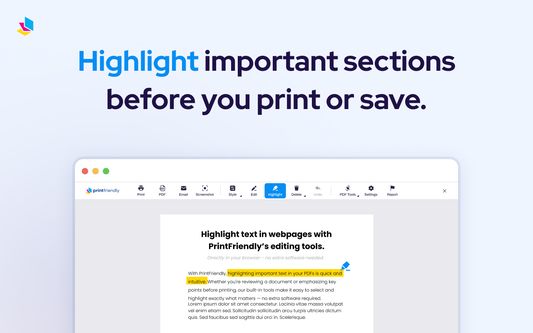
Print clutter-free web pages by removing unwanted elements like ads, navigation bars, pop-ups, and footers. Use our Delete function to easily remove unwanted sections of the page or the Highlight feature to emphasize key content. You can even edit the text before printing or downloading the page as a PDF. PrintFriendly supports page size detection, including A4 and Letter formats. Great for preparing clean printouts of ChatGPT conversations.
📸 Full Page Screenshot & Screen Capture
Take a full page screenshot or a current view screenshot of any web page with one click. Full page screen capture scrolls the page for you, so you capture all of it, not just what fits on screen. Works on sites with iframes, dynamic content, and layouts like ChatGPT. Export screenshots as PNG, JPG, or PDF, or turn a capture into a PDF whose text you can select and search. Ideal for archiving, sharing, or saving a visual record of the page exactly as it appears.
💯 Edit Before You Print or Save as PDF
Make changes directly on the page using our Edit feature. Modify text, adjust font size, remove images, delete headers or footers, and highlight important information. All tools are optimized for full-screen mode, responsive design, and include Undo support.
Upgrade your printing, PDF conversion, and screenshot experience today with PrintFriendly!
==============================
By using this extension, you agree to our Terms of Service and Privacy Policy:
Terms of Service:
https://www.printfriendly.com/terms
Privacy Policy:
https://www.printfriendly.com/privacy
PrintFriendly is perfect for teachers, students, researchers, or anyone who needs printable, shareable, and clutter-free content. Whether you’re printing, saving, or sharing, it’s never been easier to convert web pages to PDF with precision. Print articles, recipes, research, and even content from sites like ChatGPT.
🪄 PDF Conversion Made Easy
Convert web pages into clean, professional PDF documents without ads, headers, or sidebars. Preserve formatting including text, images, and links. Supports non-Latin characters and right-to-left languages.
You can also log into the extension and sync your account with our website, where you’ll find additional tools to convert, compress, edit, and sign PDFs. Your settings and preferences sync between the extension and website. Our online PDF viewer is available there as well.
💾 Save to Dropbox or Google Drive
Send the finished PDF straight to where you already keep things. Save to Dropbox, where files land in a PrintFriendly folder we can write to and nothing else, or to Google Drive, where PrintFriendly only ever sees the files it creates. Set a default once and every save after that is a single click.
🎉 Effortless Printing
Print clutter-free web pages by removing unwanted elements like ads, navigation bars, pop-ups, and footers. Use our Delete function to easily remove unwanted sections of the page or the Highlight feature to emphasize key content. You can even edit the text before printing or downloading the page as a PDF. PrintFriendly supports page size detection, including A4 and Letter formats. Great for preparing clean printouts of ChatGPT conversations.
📸 Full Page Screenshot & Screen Capture
Take a full page screenshot or a current view screenshot of any web page with one click. Full page screen capture scrolls the page for you, so you capture all of it, not just what fits on screen. Works on sites with iframes, dynamic content, and layouts like ChatGPT. Export screenshots as PNG, JPG, or PDF, or turn a capture into a PDF whose text you can select and search. Ideal for archiving, sharing, or saving a visual record of the page exactly as it appears.
💯 Edit Before You Print or Save as PDF
Make changes directly on the page using our Edit feature. Modify text, adjust font size, remove images, delete headers or footers, and highlight important information. All tools are optimized for full-screen mode, responsive design, and include Undo support.
Upgrade your printing, PDF conversion, and screenshot experience today with PrintFriendly!
==============================
By using this extension, you agree to our Terms of Service and Privacy Policy:
Terms of Service:
https://www.printfriendly.com/terms
Privacy Policy:
https://www.printfriendly.com/privacy
Noté 4,2 par 652 personnes
Autorisations et données
Autorisations facultatives :
- Télécharger des fichiers, et consulter et modifier l’historique des téléchargements du navigateur
- Accéder à l’activité du navigateur pendant la navigation
Collecte de données nécessaire, selon le développeur :
- Activité de navigation
- Contenu des sites web
Plus d’informations
- Version
- 7.2.4
- Taille
- 3,95 Mo
- Dernière mise à jour
- il y a 8 jours (25 août 2026)
- Catégories associées
- Licence
- Custom License
- Historique des versions
- Ajouter à la collection