
Save private window cookies par Adam777
Save the cookies in private windows and restore them when a new private window is opened.
151 utilisateurs·trices151 utilisateurs·trices
Métadonnées de l’extension
Captures d’écran
À propos de cette extension
For saving website data (settings, to stay logged in to websites, etc.) in private windows.
How to use:
1. Install the extension and enable it in private windows
2. Open a new private window
3. Configure and/or log in to websites in the private window
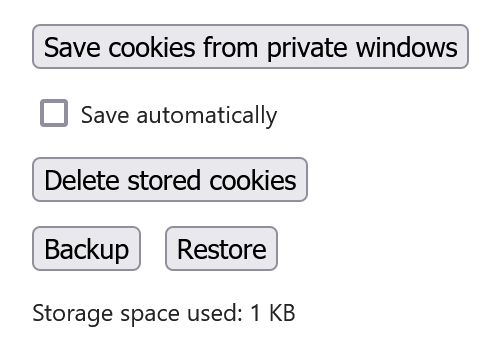
4. Use the Save cookies from private windows button or Save automatically in the extension's Options
5. The private window can be closed now, the saved cookies will be restored automatically when a new private window is opened
This is a simple extension.
Cookies are stored locally.
No data is collected.
Permissions:
- Access data for all websites: to save and restore cookies in private windows for all websites
- Download files and read and modify the browser's download history: to backup the saved cookies
- Clear recent browsing history, cookies, and related data: only used to clear all cookies in open private windows when using the Delete stored cookies button and on Restore, before restoring the saved cookies
How to use:
1. Install the extension and enable it in private windows
2. Open a new private window
3. Configure and/or log in to websites in the private window
4. Use the Save cookies from private windows button or Save automatically in the extension's Options
5. The private window can be closed now, the saved cookies will be restored automatically when a new private window is opened
This is a simple extension.
Cookies are stored locally.
No data is collected.
Permissions:
- Access data for all websites: to save and restore cookies in private windows for all websites
- Download files and read and modify the browser's download history: to backup the saved cookies
- Clear recent browsing history, cookies, and related data: only used to clear all cookies in open private windows when using the Delete stored cookies button and on Restore, before restoring the saved cookies
Noté 5 par 2 personnes
Autorisations et données
Autorisations nécessaires :
- Effacer l’historique de navigation récent, les cookies et les données liées
- Télécharger des fichiers, et consulter et modifier l’historique des téléchargements du navigateur
Autorisations facultatives :
- Accéder à vos données pour tous les sites web
Plus d’informations
- Version
- 1.3.0
- Taille
- 14,76 Ko
- Dernière mise à jour
- il y a 2 ans (27 juil. 2024)
- Catégories associées
- Licence
- Licence MIT
- Historique des versions
- Ajouter à la collection