
Send to Todoist par Hipsterbrown
Quickly create tasks in Todoist using a context menu shortcut and access keys.
73 utilisateurs·trices73 utilisateurs·trices
Métadonnées de l’extension
Captures d’écran



À propos de cette extension
Send to Todoist helps you quickly add tasks to your projects
The official Todoist extension is great for managing your projects and completing tasks, however it is missing useful shortcuts for adding tasks quickly to your various projects.
The API key stays stored in secure browser storage and never leaves your computer. You can find this key here: https://todoist.com/prefs/integrations
This extension adds context menus that appear for highlighted text, links, or just right-clicking on the page.
If you have multiple projects, you can use the shortcut keys (numbers next to the project name) to quickly choose a project and due date! See the screenshots for examples.
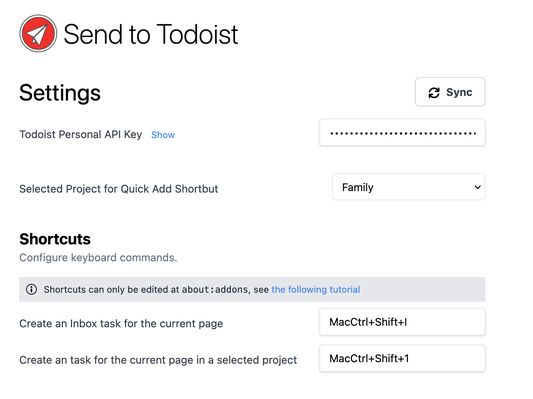
To quickly add a page as a task in your Inbox, use the keyboard shortcut: Cmd+Shift+I (Ctrl+Shift+I on Linux and Windows)
To quickly add a page as a task to a different project, select a project in the extension settings and use the keyboard shortcut: Cmd+Shift+1 (Ctrl+Shift+1 on Linux and Windows)
The official Todoist extension is great for managing your projects and completing tasks, however it is missing useful shortcuts for adding tasks quickly to your various projects.
The API key stays stored in secure browser storage and never leaves your computer. You can find this key here: https://todoist.com/prefs/integrations
This extension adds context menus that appear for highlighted text, links, or just right-clicking on the page.
- Highlighted text will be used as the title for the created task.
- Link text will be used as the content, with the URL for the link appended to the end of the task name.
- The page title will be used as the task title, with the page URL used to make that title a link.
If you have multiple projects, you can use the shortcut keys (numbers next to the project name) to quickly choose a project and due date! See the screenshots for examples.
To quickly add a page as a task in your Inbox, use the keyboard shortcut: Cmd+Shift+I (Ctrl+Shift+I on Linux and Windows)
To quickly add a page as a task to a different project, select a project in the extension settings and use the keyboard shortcut: Cmd+Shift+1 (Ctrl+Shift+1 on Linux and Windows)
Noté 4 par 2 personnes
Autorisations et données
Plus d’informations
- Version
- 1.13.0
- Taille
- 1,69 Mo
- Dernière mise à jour
- il y a un an (14 juil. 2025)
- Catégories associées
- Licence
- Mozilla Public License 2.0
- Historique des versions
- Ajouter à la collection