
Tab Limiter par Paul Morris
Limit the number of tabs a given window can have (i.e. set a maximum number of tabs on a per-window basis) and automatically open additional tabs in a different window.
141 utilisateurs·trices141 utilisateurs·trices
Métadonnées de l’extension
Captures d’écran
À propos de cette extension
This add-on lets you prevent any additional tabs from being opened in a given window. If you try to open a tab in that "tab limited" window (say by clicking a link), the new tab will "bounce" and open in a different window instead.
The main use case is to have a window that only ever has one tab open in it. For example, a tab with an email or chat website that you want to always be able to access really easily by just switching to its window (rather than having to switch to its window and then to its tab). Like a pinned tab, but going further than just pinned.
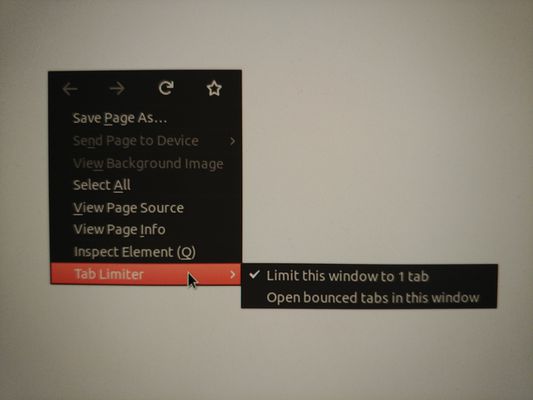
To use the add-on, right-click on a web page to reveal the context menu, and then select "Tab Limiter" > "Limit this window to N tabs" to prevent additional tabs from being opened in that window. You can "unlimit" the window using the same context menu item.
When you try to open tabs in a "tab limited" window, they "bounce" and are opened in the "overflow window". If there is no overflow window yet, a new one is opened. You can change which window is the overflow window by right-clicking and then selecting "Tab Limiter" > "Open bounced tabs in this window" in the context menu.
There is never more than one overflow window at a time. Well, except private/incognito windows are handled correctly, so that private/incognito tabs are opened in a private/incognito overflow window. So it is possible to have two overflow windows, one regular and one private/incognito.
The main use case is to have a window that only ever has one tab open in it. For example, a tab with an email or chat website that you want to always be able to access really easily by just switching to its window (rather than having to switch to its window and then to its tab). Like a pinned tab, but going further than just pinned.
To use the add-on, right-click on a web page to reveal the context menu, and then select "Tab Limiter" > "Limit this window to N tabs" to prevent additional tabs from being opened in that window. You can "unlimit" the window using the same context menu item.
When you try to open tabs in a "tab limited" window, they "bounce" and are opened in the "overflow window". If there is no overflow window yet, a new one is opened. You can change which window is the overflow window by right-clicking and then selecting "Tab Limiter" > "Open bounced tabs in this window" in the context menu.
There is never more than one overflow window at a time. Well, except private/incognito windows are handled correctly, so that private/incognito tabs are opened in a private/incognito overflow window. So it is possible to have two overflow windows, one regular and one private/incognito.
Noté 4 par 7 personnes
Autorisations et données
Plus d’informations
- Liens du module
- Version
- 0.2.1resigned1
- Taille
- 14,9 Ko
- Dernière mise à jour
- il y a 2 ans (25 avr. 2024)
- Licence
- Mozilla Public License 2.0
- Historique des versions
- Ajouter à la collection