
Tabbie : easy tab viewer par 010 Pixel
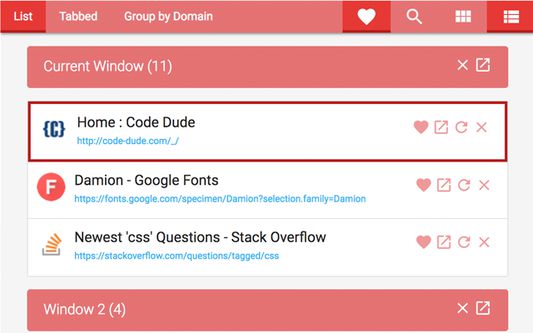
Tabbie helps you to view, refresh, activate, search, favourite and group all your open tabs by domains from single interface.
38 utilisateurs·trices38 utilisateurs·trices
Métadonnées de l’extension
Captures d’écran


À propos de cette extension
Hotkeys: Alt+Shift+T
Are you someone with many windows and tabs open at the same time? Do you often get lost between many tabs and take longer time to find the tab you want? Then this is the extension just for you.
Tabbie helps you to view, refresh, discard, activate, search, favorite, group tabs by domains and manage all your open tabs and windows from a single interface.
Manage your Windows + Tabs in one place.
Avoid the hassle of toggling between windows to search for the tab you are looking for.
Click on the "Tabbie" and view all your windows and tabs at a glance and have the ability take action on any window or tab from Tabbie itself.
Features:
=========
- Consolidate all the Windows and Tab into one place. View in a nicely formatted and categorized view of the tabs under their parent windows.
- Activate (go to) any window/tab from the extension itself
- Reload/Refresh any tab without going to the tab
- Discard (suspend) a tab to save memory
- Close a particular window/tab
- Search Tabs
- Group Tabs by Domain
- Favorite tabs to access them quickly
- Available in Grid and List Layouts
- Compact design option
- Different themes selection
How-to:
=======
- Search: Click on 'search' icon and start typing. Tabbie search in title and url of pages in all tabs
- Favorite: Click on 'heart' icon for any tab you want to favourite. You can see all your favorites by clicking on 'heart' icon on navigation bar.
- Group by Domain: Click 'Group by Domain' option on navigation bar and tabbie will list down all the different domains open in your tabs. By clicking any domain, tabbie will show tabs open with that domain.
- Close a window: Click Close button next to the window title
- Activate a tab: Click Activate button next to the window title
- Close a tab: Hover over the tab you want to close and some action buttons will appear and click Close button
- Activate a tab: Hover over the tab you want to activate and some action buttons will appear and click Activate button
- Reload (refresh) a tab: Hover over the tab you want to reload/refresh and some action buttons will appear and click Reload button
- Discard a tab: Click discard (cloud icon) button to discard a tab. Clicked the same button on a discarded tab will reload the tab
- For each window, the active tab will be highlighted all the time
- Copy link: Click copy icon on any tab and it will copy link to clipboard
- Copy all open links: Click 'Copy all Links' icons from sidebar and it will copy all open tab links to clipboard
Change Log:
===========
Version:1.0.0 (2018/08/21)
--------------------------
- Initial upload
Version:1.0.1 (2018/09/24)
--------------------------
- Updated code structure
Version:1.0.2 (2018/09/29)
--------------------------
- Updated style so action icons won't overlap page link in list view
Version:1.1.0 (2018/10/03)
--------------------------
## Added
- Confirm action for closing any window
- Hide other windows
- Tabs without javascript
- Discard/Suspend Tab feature
- Titles and close buttons when filtering by favourite and discarded
## Updated
- Tabs without javascript
## Fixed
- Issue of domain filter crashing
Are you someone with many windows and tabs open at the same time? Do you often get lost between many tabs and take longer time to find the tab you want? Then this is the extension just for you.
Tabbie helps you to view, refresh, discard, activate, search, favorite, group tabs by domains and manage all your open tabs and windows from a single interface.
Manage your Windows + Tabs in one place.
Avoid the hassle of toggling between windows to search for the tab you are looking for.
Click on the "Tabbie" and view all your windows and tabs at a glance and have the ability take action on any window or tab from Tabbie itself.
Features:
=========
- Consolidate all the Windows and Tab into one place. View in a nicely formatted and categorized view of the tabs under their parent windows.
- Activate (go to) any window/tab from the extension itself
- Reload/Refresh any tab without going to the tab
- Discard (suspend) a tab to save memory
- Close a particular window/tab
- Search Tabs
- Group Tabs by Domain
- Favorite tabs to access them quickly
- Available in Grid and List Layouts
- Compact design option
- Different themes selection
How-to:
=======
- Search: Click on 'search' icon and start typing. Tabbie search in title and url of pages in all tabs
- Favorite: Click on 'heart' icon for any tab you want to favourite. You can see all your favorites by clicking on 'heart' icon on navigation bar.
- Group by Domain: Click 'Group by Domain' option on navigation bar and tabbie will list down all the different domains open in your tabs. By clicking any domain, tabbie will show tabs open with that domain.
- Close a window: Click Close button next to the window title
- Activate a tab: Click Activate button next to the window title
- Close a tab: Hover over the tab you want to close and some action buttons will appear and click Close button
- Activate a tab: Hover over the tab you want to activate and some action buttons will appear and click Activate button
- Reload (refresh) a tab: Hover over the tab you want to reload/refresh and some action buttons will appear and click Reload button
- Discard a tab: Click discard (cloud icon) button to discard a tab. Clicked the same button on a discarded tab will reload the tab
- For each window, the active tab will be highlighted all the time
- Copy link: Click copy icon on any tab and it will copy link to clipboard
- Copy all open links: Click 'Copy all Links' icons from sidebar and it will copy all open tab links to clipboard
Change Log:
===========
Version:1.0.0 (2018/08/21)
--------------------------
- Initial upload
Version:1.0.1 (2018/09/24)
--------------------------
- Updated code structure
Version:1.0.2 (2018/09/29)
--------------------------
- Updated style so action icons won't overlap page link in list view
Version:1.1.0 (2018/10/03)
--------------------------
## Added
- Confirm action for closing any window
- Hide other windows
- Tabs without javascript
- Discard/Suspend Tab feature
- Titles and close buttons when filtering by favourite and discarded
## Updated
- Tabs without javascript
## Fixed
- Issue of domain filter crashing
Noté 4,8 par 13 personnes
Autorisations et données
Plus d’informations
- Version
- 1.1.1resigned1
- Taille
- 1,31 Mo
- Dernière mise à jour
- il y a 2 ans (26 avr. 2024)
- Licence
- Tous droits réservés
- Historique des versions
- Ajouter à la collection