Modules pour le navigateur Firefox
  • Extensions
  • Thèmes
    • pour Firefox
    • Dictionnaires et paquetages linguistiques
    • Sites pour les autres navigateurs
    • Modules pour Android
Connexion
Aperçu de Take Youtube Video Screenshots (+ GIF Maker)

Take Youtube Video Screenshots (+ GIF Maker) par znwyrz

How to use - Download File : Left Click on Button - Download File with Prompt : Alt/Option + Left Click on Button - Copy to Clipboard : Shift + Left Click on Button - Selecting the Capture Area: Ctrl/Command + Left Click on Button

4.6 (38 critiques)4.6 (38 critiques)
577 utilisateurs·trices577 utilisateurs·trices
Télécharger Firefox et obtenir l’extension
Télécharger le fichier

Métadonnées de l’extension

Captures d’écran
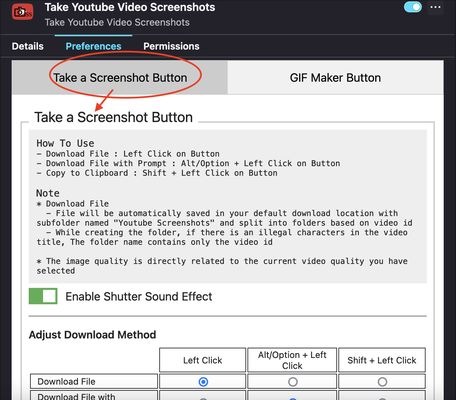
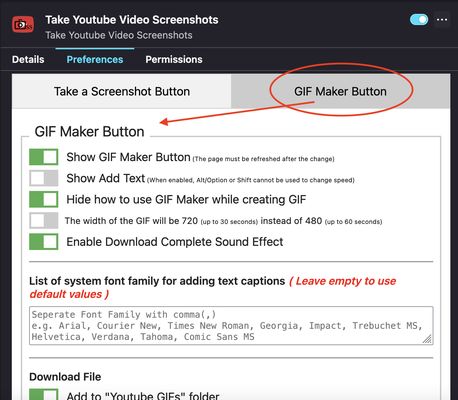
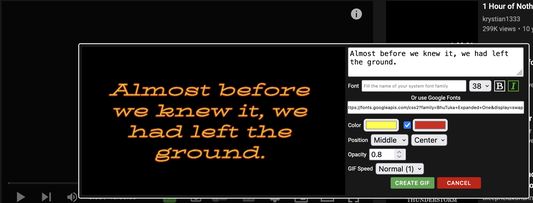
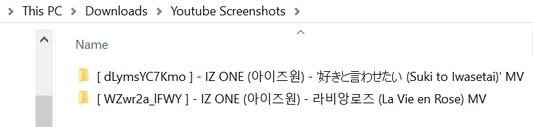
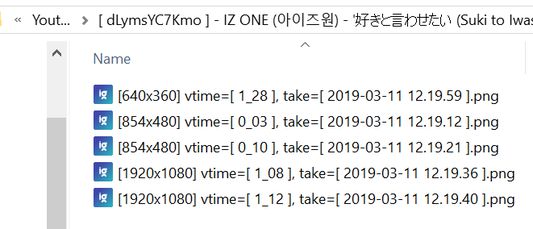
Add button to video toolbarAdd-on Preferences - Take a Screenshot ButtonAdd-on Preferences - GIF Maker ButtonGIF Maker Add Caption text PreviewSplit screenshot into folders based on video id and video titleFilename based on resolution, video time, current date and time
À propos de cette extension
A toolbar button for easier take youtube video screenshots.

How to use
- Download File : Left Click on Button
- Download File with Prompt : Alt/Option + Left Click on Button
- Copy to Clipboard : Shift + Left Click on Button
- Selecting the Capture Area: Ctrl/Command + Left Click on Button
* For "Selecting the Capture Area" when rotating video or entering and exiting fullscreen mode, you should close the selection box first and open it again. Due to changes in the size of the video and the player, the previous code specifying the size of the area that can be dragged must be changed
* "Download File" / "Download File with Prompt" / "Copy to Clipboard" can be done on the capture button of "Selecting the Capture Area" with the same shortcuts
* Shutter sound can be disabled in the add-on Preferences
* Download Method can be adjust in the add-on Prefereces
* Added "GIF Maker" button to create simple GIFs

Note
* Download File
  - File will be automatically saved in your default download location with subfolder named "Youtube Screenshots" and split into folders based on video id
  - While creating the folder, if there is an illegal characters in the video title, The folder name contains only the video id
  • The image quality is directly related to the current video quality you have selected
If you want to create MPC-like "Save Thumbnails", try <a href="https://addons.mozilla.org/en-US/firefox/addon/youtube-storyboard/" target="_blank">this</a> add-on.
Noté 4,6 par 38 personnes
Connectez-vous pour noter cette extension
Il n’y a aucune note pour l’instant

Le nombre d’étoiles est enregistré

5
32
4
3
3
0
2
0
1
3
Lire les 38 critiques
Autorisations et données

Autorisations nécessaires :

  • Télécharger des fichiers, et consulter et modifier l’historique des téléchargements du navigateur
  • Surveiller l’utilisation des extensions et gérer les thèmes
  • Accéder aux onglets du navigateur
  • Accéder à vos données pour www.youtube.com

Autorisations facultatives :

  • Accéder à vos données pour www.youtube.com
En savoir plus
Plus d’informations
Liens du module
  • Site d’assistance
  • Copier l’identifiant du module
Version
3.0.6.0
Taille
272,03 Ko
Dernière mise à jour
il y a 8 mois (14 oct. 2025)
Catégories associées
  • Gestion des téléchargements
  • Photos, musique et vidéos
  • Jeux et divertissements
Licence
Custom LicenseCustom License for Take Youtube Video Screenshots (+ GIF Maker)
Historique des versions
  • Voir toutes les versions
Ajouter à la collection
Signaler ce module
Aller à la page d’accueil de Mozilla

Modules complémentaires

  • À propos
  • Blog des modules complémentaires Firefox
  • Atelier sur les extensions
  • Pôle développeur
  • Politiques à destination des développeurs
  • Blog de la communauté
  • Forum
  • Signaler un problème
  • Guide de revue

Navigateurs

  • Desktop
  • Mobile
  • Enterprise

Produits

  • Browsers
  • VPN
  • Relay
  • Monitor
  • Pocket
  • Bluesky (@firefox.com)
  • Instagram (Firefox)
  • YouTube (firefoxchannel)
  • Confidentialité
  • Cookies
  • Mentions légales

Sauf mention contraire, le contenu de ce site est disponible sous licence Creative Commons Attribution Share-Alike v3.0 ou toute version supérieure.