Modules pour le navigateur Firefox
  • Extensions
  • Thèmes
    • pour Firefox
    • Dictionnaires et paquetages linguistiques
    • Sites pour les autres navigateurs
    • Modules pour Android
Connexion
Aperçu de Time-Sync

Time-Sync par rakshith111

Auto Time Sync is a Firefox plugin that automatically converts dates and times on web pages to the user's local timezone or a preferred timezone in a fixed format. Select text and right-click to manually or toggle Auto Convert for seamless browsing.

5 (3 critiques)5 (3 critiques)
46 utilisateurs·trices46 utilisateurs·trices
Télécharger Firefox et obtenir l’extension
Télécharger le fichier

Métadonnées de l’extension

Captures d’écran
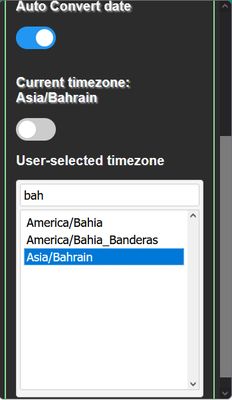
Auto Converted page, one can hover over the converted, underlined date to see original textHere is a mail before converted in a different formatThe text is selected and when you right click, a drop down menu with the option to "Convert Date and time" is availableUpon converting , one can hover over to see the original textMinimalistic menuSearch feature to find non local timezone, can be selected by double clicking
À propos de cette extension
Features
  • Automatic date/time conversion: Converts any date/time format and timezone on web pages to the user's local time.
  • Auto-conversion toggle: Users can enable/disable auto-conversion according to their preferences.
  • Local and user-selected timezones: Users can choose between local timezones or select a specific timezone for conversion. (Can search by toggling to user-selected and double click the timezone you want)
  • Right-click conversion: Select any text on a page and right-click to convert it to local time if the text is a valid date.
  • Original date/time display: Hover over any text to see the original date/time before conversion.
  • Comprehensive timezone support: Lists all timezones and provides a search functionality for easy timezone selection.
  • Natural language processing: Uses advanced libraries to parse and convert various date formats and timezones.
  • Custom whitelisting option to disallow auto convert script

USAGE
- Select any text on the page and right click to convert it to local time, it will only convert if the text is a valid date
- Click on the plugin icon to open the popup
- Toggle the `Auto Convert` switch to enable/disable auto conversion
- Toggle the `Local Timezones` switch to enable/disable local timezones
 - If enabled, the plugin will only convert timezones to local timezone (enabled by default)
 - If disabled, the plugin will convert any timezone to the selected timezone
  - Select any timezone from the list or search for it by typing in the search bar and double click to select it
- Hover over any text on the page to see the Original date.
- Go to the Options page to add/remove domains to the whitelist to control whether the auto converter should run on the domain

GitHub Repository
Noté 5 par 3 personnes
Connectez-vous pour noter cette extension
Il n’y a aucune note pour l’instant

Le nombre d’étoiles est enregistré

5
3
4
0
3
0
2
0
1
0
Lire les 3 critiques
Autorisations et données

Autorisations nécessaires :

  • Accéder à vos données pour tous les sites web
En savoir plus
Plus d’informations
Liens du module
  • E-mail d’assistance
  • Copy add-on ID
Version
1.0.8
Taille
508,91 Ko
Dernière mise à jour
il y a 3 ans (12 avr. 2023)
Catégories associées
  • Outils linguistiques
  • Alertes et mises à jour
Licence
Licence MIT
Historique des versions
  • Voir toutes les versions
Étiquettes
  • container
  • dark mode
  • scholar
  • search
  • translate
  • user scripts
Ajouter à la collection
Signaler ce module
Aller à la page d’accueil de Mozilla

Modules complémentaires

  • À propos
  • Blog des modules complémentaires Firefox
  • Atelier sur les extensions
  • Pôle développeur
  • Politiques à destination des développeurs
  • Blog de la communauté
  • Forum
  • Signaler un problème
  • Guide de revue

Navigateurs

  • Desktop
  • Mobile
  • Enterprise

Produits

  • Browsers
  • VPN
  • Relay
  • Monitor
  • Pocket
  • Bluesky (@firefox.com)
  • Instagram (Firefox)
  • YouTube (firefoxchannel)
  • Confidentialité
  • Cookies
  • Mentions légales

Sauf mention contraire, le contenu de ce site est disponible sous licence Creative Commons Attribution Share-Alike v3.0 ou toute version supérieure.