
Unique Passwords par Sándor Balázsi
Use strong and unique passwords for every website without storing them. Remember only your single master password, and the site-specific password is generated every time.
Aucun utilisateurAucun utilisateur
Métadonnées de l’extension
Captures d’écran
À propos de cette extension
Using different passwords on different sites is not only good practice, it's necessary to keep your accounts safe.
When using the same password everywhere and one site database with sensitive information becomes compromised, then all of your other accounts are at the potential to become compromised.
Besides that, each of your passwords should be long and strong (contain special characters, numbers, non-dictionary based lower and uppercase letters).
But choosing good passwords and remembering all of them is not an easy task.
To store your many individual passwords you could use a password manager service (e.g. 1Password, LastPass).
These services are storing your passwords in an encrypted database on their own servers that needs to be synchronized between all of your devices.
Although they take security seriously, these services could be the victim of a data breach (as already happened in the past).
This tool is using a different approach. It does not store your passwords at all. Moreover, it does not require a network connection either.
You have to remember only your single master password, and the addon generates on the fly a strong and unique website-specific password.
(recommended that your master password is being "strong" as well.)
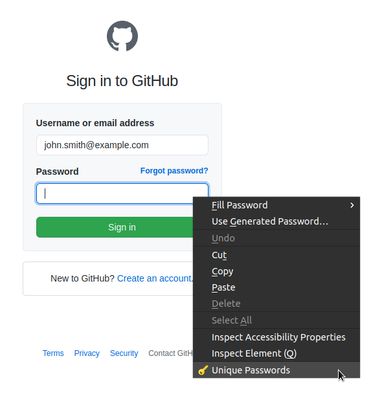
To generate the password, click with the right mouse button to a password input field on a webpage and select Unique Passwords from the menu.
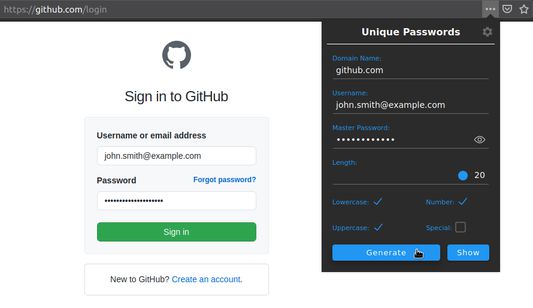
In the appearing popup window, type your master password and click on the generate button. The generated password is automatically copying to the related password input field.
This addon creates a one-way hash from the domain name, username, and your master password and translates the bytes to letters based on the used character table.
Every site has different requirements regarding the accepted passwords. For example, some of them do not allow to use of special characters; others allow to use of only 16 characters long passwords.
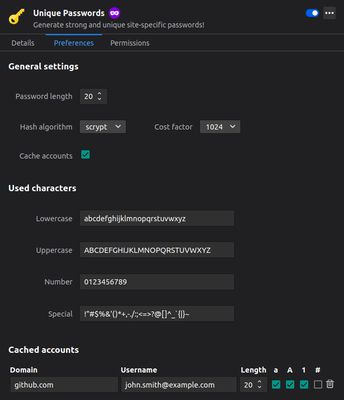
Therefore you can choose the used character type groups and the password length for every site. Tailoring the characters inside the groups can be done by the settings page (for increase uniqueness, you can randomize the characters in the groups as well).
On the settings page, there is an option to enable caching of username, password length, and used characters for each site. So you don't have to remember the website-specific password requirements. These cached accounts are stored locally in your browser.
This tool is open-source; you can find the complete source code here:
https://github.com/wolandmaster/unique-passwords-firefox
When using the same password everywhere and one site database with sensitive information becomes compromised, then all of your other accounts are at the potential to become compromised.
Besides that, each of your passwords should be long and strong (contain special characters, numbers, non-dictionary based lower and uppercase letters).
But choosing good passwords and remembering all of them is not an easy task.
To store your many individual passwords you could use a password manager service (e.g. 1Password, LastPass).
These services are storing your passwords in an encrypted database on their own servers that needs to be synchronized between all of your devices.
Although they take security seriously, these services could be the victim of a data breach (as already happened in the past).
This tool is using a different approach. It does not store your passwords at all. Moreover, it does not require a network connection either.
You have to remember only your single master password, and the addon generates on the fly a strong and unique website-specific password.
(recommended that your master password is being "strong" as well.)
To generate the password, click with the right mouse button to a password input field on a webpage and select Unique Passwords from the menu.
In the appearing popup window, type your master password and click on the generate button. The generated password is automatically copying to the related password input field.
This addon creates a one-way hash from the domain name, username, and your master password and translates the bytes to letters based on the used character table.
Every site has different requirements regarding the accepted passwords. For example, some of them do not allow to use of special characters; others allow to use of only 16 characters long passwords.
Therefore you can choose the used character type groups and the password length for every site. Tailoring the characters inside the groups can be done by the settings page (for increase uniqueness, you can randomize the characters in the groups as well).
On the settings page, there is an option to enable caching of username, password length, and used characters for each site. So you don't have to remember the website-specific password requirements. These cached accounts are stored locally in your browser.
This tool is open-source; you can find the complete source code here:
https://github.com/wolandmaster/unique-passwords-firefox
Noté 0 par 1 personne
Autorisations et données
Plus d’informations
- Version
- 1.3.6
- Taille
- 39,63 Ko
- Dernière mise à jour
- il y a 3 ans (5 janv. 2023)
- Catégories associées
- Licence
- Apache License 2.0
- Historique des versions
- Ajouter à la collection