
UsableHomeButton par Marat Tanalin
Button for opening home page of any current site, with menu with parent URLs, items for opening in private window, copying titles and URLs, forgetting site or page, etc.
356 utilisateurs·trices356 utilisateurs·trices
Métadonnées de l’extension
Captures d’écran

À propos de cette extension
Pressing the extension’s toolbar button or
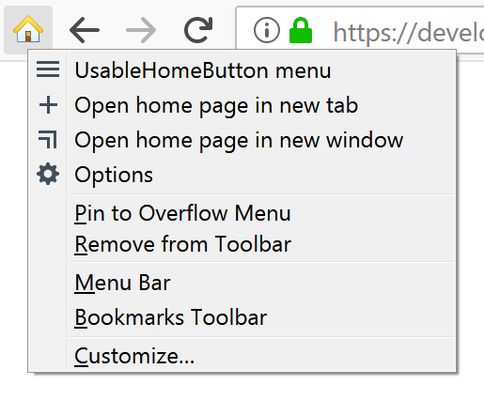
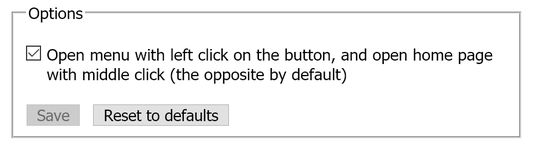
The extension’s options allow to rebind pressing the button to opening the extension’s menu instead of opening the home page of the site.
In Firefox 72+, pressing the button while holding down the Ctrl key opens the site’s home page in a new tab, and while holding down Shift — in a new window. Pressing the button while holding down Alt opens the current page in a private window.
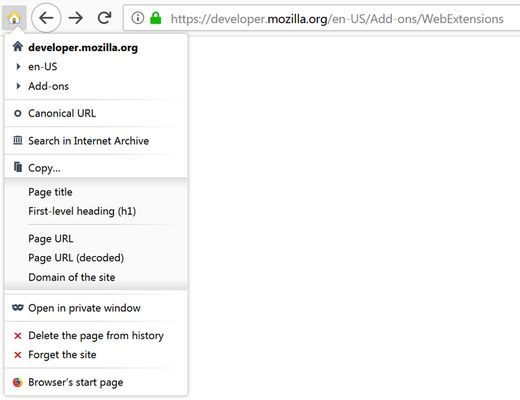
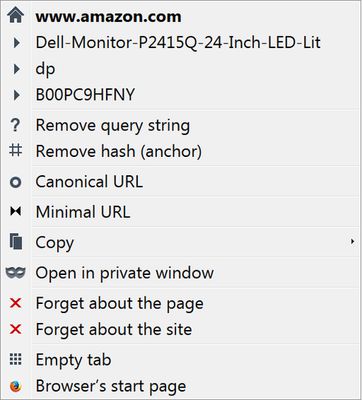
The extension button’s menu contains a list of hierarchical parts of the current page’s URL with ability to go to any of the corresponding parent pages, and other useful items:
“Remove query string”, “Remove hash (anchor)”, “Canonical URL”, “Minimal URL”, “Search in Internet Archive”, “Copy” submenu, “Open in private window”, “Delete the page from history”, “Forget the site”, “Browser’s start page” (Firefox 58+).
For details, see the project page on the author’s website.
Note for ANDROID users: availability of all features of the extension in Firefox for Android is not tested and not guaranteed.
Alt+H keyboard shortcut (hotkey) opens home page (domain root) of the site opened in currently active tab. For example, it’s easy to go from the page http://example.com/some/page/ directly to http://example.com/.The extension’s options allow to rebind pressing the button to opening the extension’s menu instead of opening the home page of the site.
In Firefox 72+, pressing the button while holding down the Ctrl key opens the site’s home page in a new tab, and while holding down Shift — in a new window. Pressing the button while holding down Alt opens the current page in a private window.
The extension button’s menu contains a list of hierarchical parts of the current page’s URL with ability to go to any of the corresponding parent pages, and other useful items:
“Remove query string”, “Remove hash (anchor)”, “Canonical URL”, “Minimal URL”, “Search in Internet Archive”, “Copy” submenu, “Open in private window”, “Delete the page from history”, “Forget the site”, “Browser’s start page” (Firefox 58+).
For details, see the project page on the author’s website.
Note for ANDROID users: availability of all features of the extension in Firefox for Android is not tested and not guaranteed.
Noté 4,8 par 22 personnes
Autorisations et données
Autorisations nécessaires :
- Consulter et modifier les paramètres du navigateur
- Effacer l’historique de navigation récent, les cookies et les données liées
- Ajouter des données dans le presse-papiers
- Accéder à votre historique de navigation
- Vous afficher des notifications
- Accéder aux onglets du navigateur
- Accéder à vos données pour tous les sites web
Plus d’informations
- Version
- 2.6
- Taille
- 57,96 Ko
- Dernière mise à jour
- il y a 5 ans (7 mars 2021)
- Catégories associées
- Licence
- Custom License
- Contrat de licence d’utilisateur final
- Lire le contrat de licence de ce module
- Historique des versions
- Ajouter à la collection