
VisiOS - Tab / Bookmark Manager OS par Exis
The Legendary Tab/Bookmark Manager OS
51 utilisateurs·trices51 utilisateurs·trices
Métadonnées de l’extension
Captures d’écran


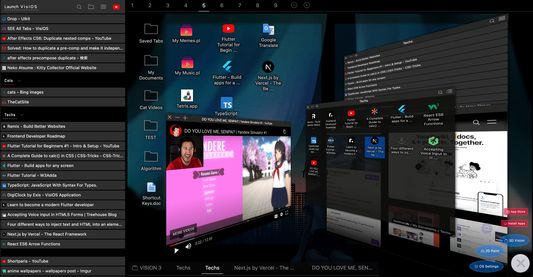


À propos de cette extension
🚀 VisiOS offers two main features: 🚀
A tab manager of epic proportions and an OS that legends are made of.
🟢 Main functions of the tab manager:
✅ Sort tabs and tab groups
✅ Search tab titles and copy tab links
✅ Directly restore 404 tabs with Internet Archive
✅ YouTube top mode
🟢 Main functions of the OS
✅ 20+ languages available
✅ 9 desktops (toggle between 2D and 3D modes)
✅ Save bookmarks from the tab list, toolbar, and HTML files
✅ Generate bookmark HTML files for all browsers
✅ Sync, add, and merge bookmarks to your browser
✅ Create folders that maintain the hierarchy of all currently open tabs or all bookmarks
✅ Password-lock desktops and folders
✅ Built-in video player (37 video sites supported, including YouTube, TED, and Spotify)
✅ Create video playlists (supports YouTube playlist URLs)
✅ Playlist lets YouTube work like an iPod, with shuffle support
✅ Free App Store (download various apps to your OS for free)
✅ Draw on desktops, apps, and folders with 2D painting functionality
✅ Code editor for developing your own apps on the OS
✅ Quicklook like on MacOS
✅ Hypersearch (search across all 9 desktops at once)
✅ Robo-sort (sort folder hierarchies all at once)
✅ Word processor (supports LaTeX for advanced formula editing)
✅ Fully customizable fonts and icons
✅ Wide range of backup and reset options
✅ Add texts and lists anywhere on your desktops and folders
✅ Infinite scrolling (desktops behave almost like Google Maps)
✅ ChatGPT and various AIs will be more easier to use
✅ Warp points (navigate directly to specific coordinates across all desktops)
✅ Sidebar OS
✅ Customize themes and designs, including Windows XP and macOS
✅ Place RSS feeds anywhere you like ← New!!
✅ Pin websites, folders and apps anywhere you like ← New!!
You can save bookmarks anywhere on the 9 desktops.
It's really easy to import, export, sync, and merge bookmarks.
You can also install various VisiOS apps for free, including games, utilities, language learning apps, cryptocurrency tools, and more.
<VisiOS Official Tutorials:>
https://beta-japan.com/tutorials
🚀 Usage Instructions (VisiOS): 🚀
When you first install the extension, click on the extension icon, and then select "Launch VisiOS" in the pop-up menu. (NOTE: Recommended to pin the VisiOS extension)
🚀 How to change your preferred language: 🚀
Right-click anywhere on any desktop and select “Settings” to change your preferred language.
A tab manager of epic proportions and an OS that legends are made of.
🟢 Main functions of the tab manager:
✅ Sort tabs and tab groups
✅ Search tab titles and copy tab links
✅ Directly restore 404 tabs with Internet Archive
✅ YouTube top mode
🟢 Main functions of the OS
✅ 20+ languages available
✅ 9 desktops (toggle between 2D and 3D modes)
✅ Save bookmarks from the tab list, toolbar, and HTML files
✅ Generate bookmark HTML files for all browsers
✅ Sync, add, and merge bookmarks to your browser
✅ Create folders that maintain the hierarchy of all currently open tabs or all bookmarks
✅ Password-lock desktops and folders
✅ Built-in video player (37 video sites supported, including YouTube, TED, and Spotify)
✅ Create video playlists (supports YouTube playlist URLs)
✅ Playlist lets YouTube work like an iPod, with shuffle support
✅ Free App Store (download various apps to your OS for free)
✅ Draw on desktops, apps, and folders with 2D painting functionality
✅ Code editor for developing your own apps on the OS
✅ Quicklook like on MacOS
✅ Hypersearch (search across all 9 desktops at once)
✅ Robo-sort (sort folder hierarchies all at once)
✅ Word processor (supports LaTeX for advanced formula editing)
✅ Fully customizable fonts and icons
✅ Wide range of backup and reset options
✅ Add texts and lists anywhere on your desktops and folders
✅ Infinite scrolling (desktops behave almost like Google Maps)
✅ ChatGPT and various AIs will be more easier to use
✅ Warp points (navigate directly to specific coordinates across all desktops)
✅ Sidebar OS
✅ Customize themes and designs, including Windows XP and macOS
✅ Place RSS feeds anywhere you like ← New!!
✅ Pin websites, folders and apps anywhere you like ← New!!
You can save bookmarks anywhere on the 9 desktops.
It's really easy to import, export, sync, and merge bookmarks.
You can also install various VisiOS apps for free, including games, utilities, language learning apps, cryptocurrency tools, and more.
<VisiOS Official Tutorials:>
https://beta-japan.com/tutorials
🚀 Usage Instructions (VisiOS): 🚀
When you first install the extension, click on the extension icon, and then select "Launch VisiOS" in the pop-up menu. (NOTE: Recommended to pin the VisiOS extension)
🚀 How to change your preferred language: 🚀
Right-click anywhere on any desktop and select “Settings” to change your preferred language.
Noté 5 par 3 personnes
Autorisations et données
Autorisations nécessaires :
- Consulter et modifier les marque-pages
- Bloquer du contenu sur n’importe quelle page
- Accéder aux onglets récemment fermés
- Accéder aux onglets du navigateur
- Accéder à vos données pour tous les sites web
Autorisations facultatives :
- Accéder à vos données pour tous les sites web
Plus d’informations
- Liens du module
- Version
- 1.4.6
- Taille
- 889,05 Ko
- Dernière mise à jour
- il y a 13 jours (24 août 2026)
- Catégories associées
- Licence
- Tous droits réservés
- Politique de confidentialité
- Lire la politique de confidentialité de ce module
- Historique des versions
- Ajouter à la collection
Le développeur de cette extension demande que vous l’aidiez à assurer la poursuite de son développement en lui versant une petite contribution.