
AutoSkippy | Skip Intros, Ads, Recaps & More troch imtiazraqib
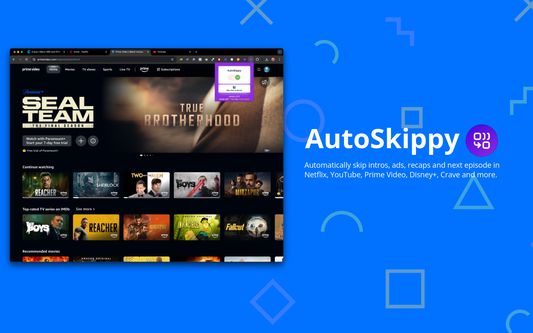
Automatically skip intros, ads, recaps and next episode in Netflix, YouTube, Prime Video, Disney+, Crave and more.
110 brûkers110 brûkers
Metadata útwreiding
Skermôfbyldingen


Oer dizze útwreiding
Automatically skip intros, ads, recaps and next episode in Netflix, YouTube, Prime Video, Disney+, Crave and more.
Transform your streaming experience with AutoSkippy! This Chrome extension makes binge-watching effortless by automatically skipping intros, ads, recaps, and advancing to the next episode. Say goodbye to repetitive clicks and enjoy uninterrupted streaming with just a toggle.
Key Features:
1. Automatic Intros Skip: Effortlessly skips intro screens on Netflix, Netflix, YouTube, Prime Video, Disney+, Crave and other platforms.
2. Ad Skipping: Automatically skips ads on YouTube and more.
3. Recap Skipping: Eliminate recap screens to dive straight into the next episode.
4. Next Episode Button: Automatically advances to the next episode without manual clicks.
5. Sleek Design: Features a stylish toggle button with interactive indicators.
6. Privacy First: Operates securely within streaming platforms while keeping your data private.
How to Use:
1. Toggle AutoSkippy on.
2. Open Netflix, YouTube, Crave, Prime Video or other supported platforms and start watching.
3. Relax—AutoSkippy will handle the rest!
Transform your streaming experience with AutoSkippy! This Chrome extension makes binge-watching effortless by automatically skipping intros, ads, recaps, and advancing to the next episode. Say goodbye to repetitive clicks and enjoy uninterrupted streaming with just a toggle.
Key Features:
1. Automatic Intros Skip: Effortlessly skips intro screens on Netflix, Netflix, YouTube, Prime Video, Disney+, Crave and other platforms.
2. Ad Skipping: Automatically skips ads on YouTube and more.
3. Recap Skipping: Eliminate recap screens to dive straight into the next episode.
4. Next Episode Button: Automatically advances to the next episode without manual clicks.
5. Sleek Design: Features a stylish toggle button with interactive indicators.
6. Privacy First: Operates securely within streaming platforms while keeping your data private.
How to Use:
1. Toggle AutoSkippy on.
2. Open Netflix, YouTube, Crave, Prime Video or other supported platforms and start watching.
3. Relax—AutoSkippy will handle the rest!
Wurdearre: 1 troch 2 beoardielers
Tastimmingen en gegevens
Fereaske machtigingen:
- Jo gegevens foar websites yn it domein netflix.com benaderje
- Jo gegevens foar websites yn it domein youtube.com benaderje
- Jo gegevens foar websites yn it domein primevideo.com benaderje
- Jo gegevens foar websites yn it domein disneyplus.com benaderje
- Jo gegevens foar websites yn it domein crave.ca benaderje
Mear ynformaasje
- Add-on-keppelingen
- Ferzje
- 2.0.12
- Grutte
- 41,03 KB
- Lêst bywurke
- 2 jierren lyn (17 aug. 2024)
- Sibbe kategoryen
- Lisinsje
- Mozilla Public License 2.0
- Ferzjeskiednis
- Tafoegje oan kolleksje