
download chatgpt audio voice troch extsdev
Save the ChatGpt voice audio to your computer
141 brûkers141 brûkers
Metadata útwreiding
Skermôfbyldingen
Oer dizze útwreiding
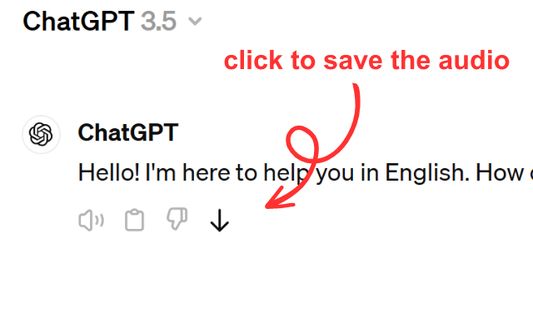
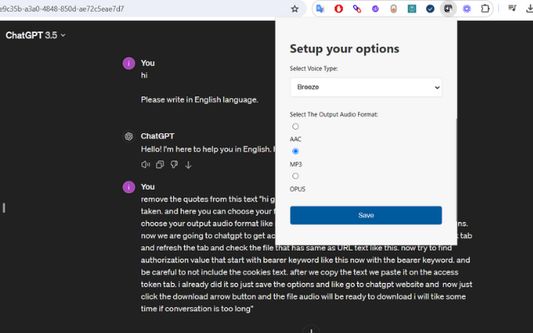
Save ChatGPT voice responses directly to your computer with a single click. This add-on adds a convenient download button next to ChatGPT's voice messages, allowing you to save the audio in your preferred format (AAC, MP3, or OPUS) and voice type. Perfect for language learners, content creators, or anyone who wants to revisit ChatGPT's spoken responses offline.
The extension is lightweight and integrates seamlessly with ChatGPT's interface. Simply click the download icon that appears next to voice messages to save them to your computer. You can customize your preferred voice type and audio format through the extension's options. Supports multiple languages and works on any ChatGPT conversation that includes voice responses.
The extension is lightweight and integrates seamlessly with ChatGPT's interface. Simply click the download icon that appears next to voice messages to save them to your computer. You can customize your preferred voice type and audio format through the extension's options. Supports multiple languages and works on any ChatGPT conversation that includes voice responses.
Wurdearre: 5 troch 1 beoardieler
Tastimmingen en gegevens
Fereaske machtigingen:
- Bestannen downloade en downloadskiednis fan de browser lêze en oanpasse
- Jo gegevens foar websites yn it domein chatgpt.com benaderje
Opsjonele machtigingen:
- Jo gegevens foar chatgpt.com benaderje
Mear ynformaasje
- Add-on-keppelingen
- Ferzje
- 1.0.0
- Grutte
- 62,64 KB
- Lêst bywurke
- ien jier lyn (9 apr. 2025)
- Sibbe kategoryen
- Lisinsje
- MIT-lisinsje
- Ferzjeskiednis
- Tafoegje oan kolleksje