Hide Subscribed Listing troch Asjad
Hide YouTube subscribed videos by clicking on thumbnail of videos on subscription page.
Metadata útwreiding
Skermôfbyldingen
Oer dizze útwreiding
Hide subscribed Listing
Hide YouTube subscribed videos by clicking on thumbnail of videos on subscription page.
How to use
Hide YouTube subscribed videos by clicking on thumbnail of videos on subscription page.
How to use
- Download and Install Extension
- Go to subscription page of YouTube web app
- Wait for the page to load
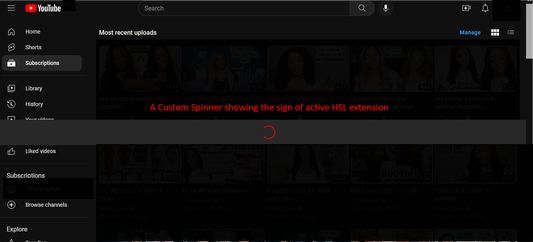
- A custom spinner will appear that will do some page modification
- Wait for the spinner to disappear
- Click on a video's thumbnail
- That video will be hidden from the subscription page
- Enjoy :)
Wurdearre: 3 troch 1 beoardieler
Tastimmingen en gegevens
Fereaske machtigingen:
- Notifikaasjes werjaan
- Browserljepblêden benaderje
- Jo gegevens foar www.youtube.com benaderje
Mear ynformaasje
- Ferzje
- 1.32
- Grutte
- 108,76 KB
- Lêst bywurke
- 3 jierren lyn (31 jul. 2023)
- Sibbe kategoryen
- Lisinsje
- Alle rjochten foarbehâlden
- Ferzjeskiednis
- Tafoegje oan kolleksje