
LeetHub 2.0 for Firefox troch Siddharth Rayabharam
Automatically integrate your Leetcode & GeeksforGeeks submissions to GitHub in Firefox
302 brûkers302 brûkers
Metadata útwreiding
Skermôfbyldingen

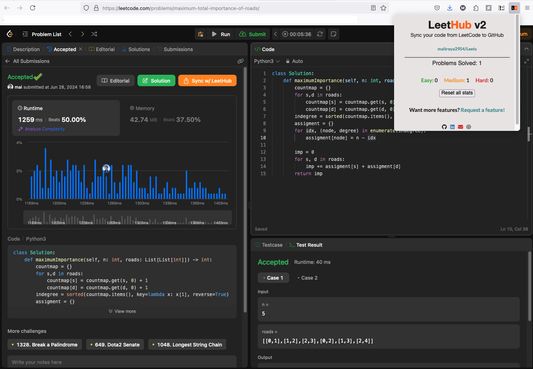
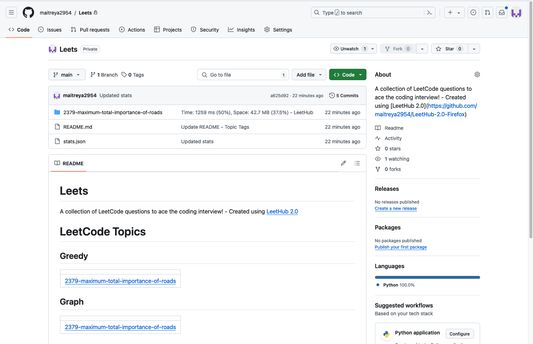
Oer dizze útwreiding
<strong>What is LeetHub 2.0?</strong>
A Firefox Addon that automatically pushes your code to GitHub when you pass all tests on a <a href="http://leetcode.com/">Leetcode</a> problem. It's forked from the original <a href="https://chromewebstore.google.com/detail/leethub-v2/mhanfgfagplhgemhjfeolkkdidbakocm?hl=en">LeetHub v2</a> and made compatible with Firefox. Shout out to <a href="https://github.com/arunbhardwaj/LeetHub-2.0">arunbhardwaj</a> and <a href="https://github.com/QasimWani/LeetHub">QasimWani</a>
<strong>Why LeetHub?</strong>
<strong>1.</strong> Recruiters <em>want</em> to see your contributions to the Open Source community, be it through side projects, solving algorithms/data-structures, or contributing to existing OS projects.
As of now, GitHub is developers' #1 portfolio. LeetHub just makes it much easier (autonomous) to keep track of progress and contributions on the largest network of engineering community, GitHub.
<strong>2.</strong> There's no easy way of accessing your leetcode problems in one place!
Moreover, pushing code manually to GitHub from Leetcode is very time consuming. So, why not just automate it entirely without spending a SINGLE additional second on it?
<strong>How does LeetHub work? </strong>
It's as simple as:
1. After installation, launch LeetHub.
2. Click on "authorize with GitHub" button to automatically set up your account with LeetHub.
3. Setup an existing/new repository with LeetHub (private by default) by clicking "Get Started" button.
4.Begin Leetcoding! To view your progress, simply click on the addon!
<strong>BONUS</strong>: Star this repository for further development of features. If you want a particular feature, simply request for it!
<strong>Let's see you ACE that coding interview!</strong>
<strong> Why did I build Leethub 2.0 for Firefox</strong>
When I started leetcoding to prepare for interviews. I wanted a way to store all my solutions. I found out about LeetHub and LeetHubV2. But being a ardent firefox user, I couldnt find a working firefox addon which does the job. So, I migrated the chrome extension to firefox.
A Firefox Addon that automatically pushes your code to GitHub when you pass all tests on a <a href="http://leetcode.com/">Leetcode</a> problem. It's forked from the original <a href="https://chromewebstore.google.com/detail/leethub-v2/mhanfgfagplhgemhjfeolkkdidbakocm?hl=en">LeetHub v2</a> and made compatible with Firefox. Shout out to <a href="https://github.com/arunbhardwaj/LeetHub-2.0">arunbhardwaj</a> and <a href="https://github.com/QasimWani/LeetHub">QasimWani</a>
<strong>Why LeetHub?</strong>
<strong>1.</strong> Recruiters <em>want</em> to see your contributions to the Open Source community, be it through side projects, solving algorithms/data-structures, or contributing to existing OS projects.
As of now, GitHub is developers' #1 portfolio. LeetHub just makes it much easier (autonomous) to keep track of progress and contributions on the largest network of engineering community, GitHub.
<strong>2.</strong> There's no easy way of accessing your leetcode problems in one place!
Moreover, pushing code manually to GitHub from Leetcode is very time consuming. So, why not just automate it entirely without spending a SINGLE additional second on it?
<strong>How does LeetHub work? </strong>
It's as simple as:
1. After installation, launch LeetHub.
2. Click on "authorize with GitHub" button to automatically set up your account with LeetHub.
3. Setup an existing/new repository with LeetHub (private by default) by clicking "Get Started" button.
4.Begin Leetcoding! To view your progress, simply click on the addon!
<strong>BONUS</strong>: Star this repository for further development of features. If you want a particular feature, simply request for it!
<strong>Let's see you ACE that coding interview!</strong>
<strong> Why did I build Leethub 2.0 for Firefox</strong>
When I started leetcoding to prepare for interviews. I wanted a way to store all my solutions. I found out about LeetHub and LeetHubV2. But being a ardent firefox user, I couldnt find a working firefox addon which does the job. So, I migrated the chrome extension to firefox.
Wurdearre: 5 troch 4 beoardielers
Tastimmingen en gegevens
Fereaske machtigingen:
- Browseraktiviteit wylst navigearjen benaderje
- Jo gegevens foar leetcode.com benaderje
- Jo gegevens foar github.com benaderje
- Jo gegevens foar practice.geeksforgeeks.org benaderje
Mear ynformaasje
- Add-on-keppelingen
- Ferzje
- 2.0.16
- Grutte
- 361,51 KB
- Lêst bywurke
- 7 dagen lyn (28 mrt. 2026)
- Sibbe kategoryen
- Lisinsje
- MIT-lisinsje
- Ferzjeskiednis
- Tafoegje oan kolleksje