
Ui.Vision troch Ocr.Space (Free OCR API)
Open-source browser automation, desktop automation and RPA for Firefox: record macros, scrape data, fill forms, and automate with OCR, image recognition and AI. Created macros run locally in your browser, not in the cloud.
8.700 brûkers8.700 brûkers
Metadata útwreiding
Skermôfbyldingen




Oer dizze útwreiding
Open-source browser automation and RPA for Chrome: record macros, scrape data, fill forms, and automate with OCR, image recognition and AI.
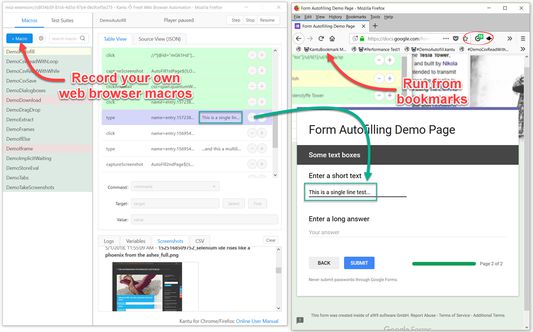
Ui.Vision is a free macro recorder and web automation tool that combines classic browser automation with modern computer vision, OCR, and a built-in AI assistant. Record a macro once and replay it as often as you like - locally, deterministically, no coding required.
NEW in version 10:
★ AI Assistant: Describe what you want in plain English ("Create a macro that fills out this form") and the built-in AI builds, runs, and fixes the macro for you - it reads the page, writes the automation, tests it, and repairs what fails. Unlike an AI agent that re-thinks every run, what you get back is a normal macro: yours to keep, edit, and replay a thousand times without AI costs. A free AI tier is included - no API key or account needed. Or bring your own key (Anthropic, OpenRouter) or a local LLM.
★ JavaScript macros: Macros can now be plain modern JavaScript with a simple uiv.* API - real loops, real if/else, real error handling, breakpoints and step-through debugging. Perfect for CSV-driven work, scraping and conditional logic. Your existing command-table macros keep working exactly as before; nothing is converted.
★ Claude Code and MCP support: Ui.Vision now speaks MCP, so Claude Code and other AI coding tools can build, run and debug macros in your browser while you watch. Everything stays local.
★ Browser Vision: New commands click and type like a real user - with visual targeting by image or text (OCR) - directly inside Chrome and Edge and the browser window can stay in the background while the macro runs.
★ Faster: Script macros run 50-300x faster in loops, and the side panel starts in a fraction of the time.
(1) Browser Automation & Web Macro Recorder
Ui.Vision's visual macro recorder and computer vision commands make automating tasks inside the web browser easy: form filling, web scraping, data extraction, UI testing, and screenshots. Record, edit and run macros right in the browser side panel, next to the page you are automating - the full IDE window is one click away. Existing Selenium IDE scripts can be imported. Conversion help for iMacros scripts is provided, too.
(2) Visual Automation with Image Recognition and OCR
Automate what you can SEE, not just what is in the HTML: click buttons by screenshot, find text on the screen with OCR, and verify page layouts visually. Image recognition and OCR now run directly inside the extension - no additional installs required.
(3) Desktop Automation for Windows, Mac, and Linux
Beyond web browser automation, Ui.Vision can interpret images and text on the desktop, executing actions like clicking, moving, dragging and dropping the mouse, and simulating keyboard inputs.
This desktop automation requires installing the free Ui.Vision XModules, available for Windows, Mac, and Linux. These modules provide Ui.Vision with the necessary capabilities for desktop interaction.
(4) AI Commands & Anthropic Claude Integration
The AI commands allow you to automate complex tasks with a single line of code that would traditionally require hundreds of lines of classic commands. For example, you can teach Ui.Vision to play TicTacToe with just one short "Play this game..." prompt. And the new AI chat assistant in the sidebar creates and repairs complete macros from a plain-language description.
(5) Command Line API
Ui.Vision can be controlled from the command line. Thus it can be used from, and combined with, any programming or scripting language, such as Windows batch files, Linux/Mac shell scripts, Python or PowerShell.
(6) Open-Source
Ui.Vision is Open-Source. The source code is available on Github.
(7) 100% Local Software - Your Data Stays With You
The software does not send any data back to us or any other place. Everything, including image recognition and OCR processing, is done locally on your machine.
The only exception to the "all data is processed locally" rule is if you use the optional AI features. All cloud features are disabled by default - and even for AI you can stay fully local by connecting Ui.Vision to a local LLM. The default computer vision (image recognition and OCR) always runs 100% locally on the machine.
Whether you call it RPA, macro recorder, task automation, web scraping, screen scraping, form filler, or UI testing - if it is repetitive, Ui.Vision can automate it.
Happy Automating!
For questions and suggestions, please visit the Ui.Vision community forum at https://forum.ui.vision.
Ui.Vision is a free macro recorder and web automation tool that combines classic browser automation with modern computer vision, OCR, and a built-in AI assistant. Record a macro once and replay it as often as you like - locally, deterministically, no coding required.
NEW in version 10:
★ AI Assistant: Describe what you want in plain English ("Create a macro that fills out this form") and the built-in AI builds, runs, and fixes the macro for you - it reads the page, writes the automation, tests it, and repairs what fails. Unlike an AI agent that re-thinks every run, what you get back is a normal macro: yours to keep, edit, and replay a thousand times without AI costs. A free AI tier is included - no API key or account needed. Or bring your own key (Anthropic, OpenRouter) or a local LLM.
★ JavaScript macros: Macros can now be plain modern JavaScript with a simple uiv.* API - real loops, real if/else, real error handling, breakpoints and step-through debugging. Perfect for CSV-driven work, scraping and conditional logic. Your existing command-table macros keep working exactly as before; nothing is converted.
★ Claude Code and MCP support: Ui.Vision now speaks MCP, so Claude Code and other AI coding tools can build, run and debug macros in your browser while you watch. Everything stays local.
★ Browser Vision: New commands click and type like a real user - with visual targeting by image or text (OCR) - directly inside Chrome and Edge and the browser window can stay in the background while the macro runs.
★ Faster: Script macros run 50-300x faster in loops, and the side panel starts in a fraction of the time.
(1) Browser Automation & Web Macro Recorder
Ui.Vision's visual macro recorder and computer vision commands make automating tasks inside the web browser easy: form filling, web scraping, data extraction, UI testing, and screenshots. Record, edit and run macros right in the browser side panel, next to the page you are automating - the full IDE window is one click away. Existing Selenium IDE scripts can be imported. Conversion help for iMacros scripts is provided, too.
(2) Visual Automation with Image Recognition and OCR
Automate what you can SEE, not just what is in the HTML: click buttons by screenshot, find text on the screen with OCR, and verify page layouts visually. Image recognition and OCR now run directly inside the extension - no additional installs required.
(3) Desktop Automation for Windows, Mac, and Linux
Beyond web browser automation, Ui.Vision can interpret images and text on the desktop, executing actions like clicking, moving, dragging and dropping the mouse, and simulating keyboard inputs.
This desktop automation requires installing the free Ui.Vision XModules, available for Windows, Mac, and Linux. These modules provide Ui.Vision with the necessary capabilities for desktop interaction.
(4) AI Commands & Anthropic Claude Integration
The AI commands allow you to automate complex tasks with a single line of code that would traditionally require hundreds of lines of classic commands. For example, you can teach Ui.Vision to play TicTacToe with just one short "Play this game..." prompt. And the new AI chat assistant in the sidebar creates and repairs complete macros from a plain-language description.
(5) Command Line API
Ui.Vision can be controlled from the command line. Thus it can be used from, and combined with, any programming or scripting language, such as Windows batch files, Linux/Mac shell scripts, Python or PowerShell.
(6) Open-Source
Ui.Vision is Open-Source. The source code is available on Github.
(7) 100% Local Software - Your Data Stays With You
The software does not send any data back to us or any other place. Everything, including image recognition and OCR processing, is done locally on your machine.
The only exception to the "all data is processed locally" rule is if you use the optional AI features. All cloud features are disabled by default - and even for AI you can stay fully local by connecting Ui.Vision to a local LLM. The default computer vision (image recognition and OCR) always runs 100% locally on the machine.
Whether you call it RPA, macro recorder, task automation, web scraping, screen scraping, form filler, or UI testing - if it is repetitive, Ui.Vision can automate it.
Happy Automating!
For questions and suggestions, please visit the Ui.Vision community forum at https://forum.ui.vision.
Wurdearre: 4,3 troch 52 beoardielers
Tastimmingen en gegevens
Fereaske machtigingen:
- Berjochten mei oare programma’s as Firefox útwikselje
- Blêdwizers lêze en oanpasse
- Gegevens fan it klamboerd ophelje
- Gegevens op it klamboerd pleatse
- Bestannen downloade en downloadskiednis fan de browser lêze en oanpasse
- Notifikaasjes werjaan
- Browserproxyynstellingen beheare
- Browserljepblêden benaderje
- Jo gegevens foar alle websites benaderje
Opsjonele machtigingen:
- Jo gegevens foar alle websites benaderje
Mear ynformaasje
- Add-on-keppelingen
- Ferzje
- 10.0.286
- Grutte
- 2,83 MB
- Lêst bywurke
- 6 dagen lyn (25 sep. 2026)
- Sibbe kategoryen
- Ferzjeskiednis
- Tafoegje oan kolleksje