FetchFox - Curation Collector 作成者: wolfpaw
Collects metadata of the current page and saves it to Local Browser Storage for content curation.
Scan the QR code to open this extension in Firefox for Android

拡張機能メタデータ
スクリーンショット
この拡張機能について
The goal for this browser extension is to allow me to save the metadata of an article, video, or podcast for sharing to browser storage. I can then filter and sort those links and send them where I will end up using them in the format that I want most. The goal is to save articles and save time!
To use the extension:
Metadata collected:
To use the extension:
- Click "Save Metadata" to save the metadata of the current tab
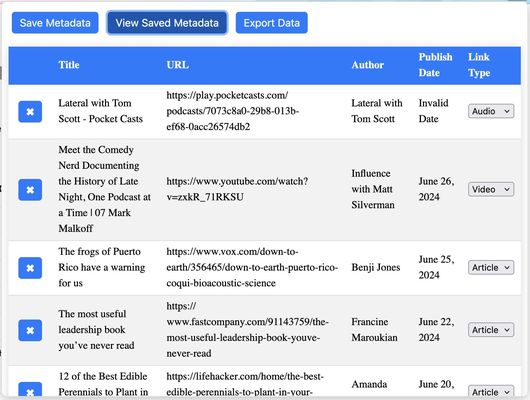
- Click "View Saved Metadata" to see the existing saved pages in a table
- Drag and drop rows into the order that you want
- Click the "x" button next to a row to delete it
- Select a content type to organize your links
- Click "Clear All Data" to delete all rows
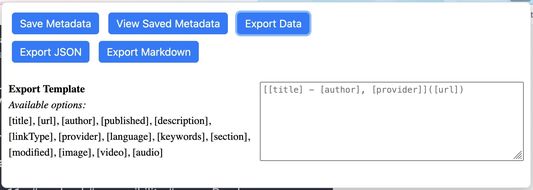
- Click "Export Data" to get export options (currently JSON or Markdown)
- Click "Export JSON" to get a JSON file of all saved metadata
- Click "Export Markdown" to get a markdown file of select metadata
- Use the input and shortcodes under the export buttons to design the format of the Markdown that is exported
Metadata collected:
- title
- description
- url
- author
- language
- type
- provider
- keywords
- section
- published date
- modified date
- copyright
- image
- video
- audio
- link sorting type
1 人のレビュー担当者が 5 と評価しました
権限とデータ
必要な権限:
- ファイルのダウンロードおよびブラウザーのダウンロード履歴の読み取りと変更
- ブラウザーのタブへのアクセス
- すべてのウェブサイトの保存されたデータへのアクセス
データ収集:
- 開発者によると、この拡張機能はデータ収集を必要としません。
詳しい情報
- バージョン
- 0.5.1
- サイズ
- 118.96 KB
- 最終更新日
- 8日前 (2026年7月4日)
- ライセンス
- MIT License
- バージョン履歴
- コレクションへ追加