Last.FM Unscrobbler 作成者: guytepper
Delete multiple scrobbles from your Last.FM profile.
1,258 人のユーザー1,258 人のユーザー
拡張機能メタデータ
スクリーンショット
この拡張機能について
Last.FM does not allow deleting multiple scrobbles - only one at a time. Last.FM Unscrobbler adds this missing feature.
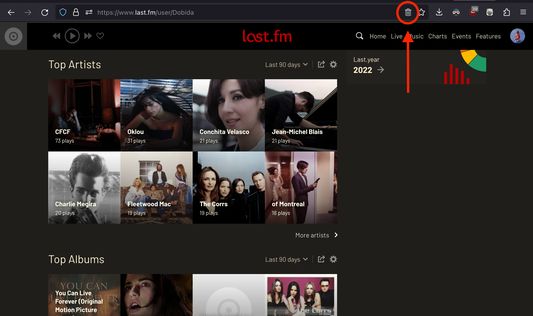
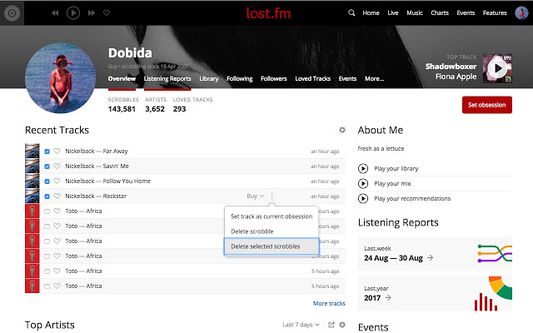
Simply click the extension icon from the address bar, tick the checkboxes near the scrobbles you want to delete, go to the track menu and press "Delete selected scrobbles".
NOTE: The extension trash bin icon will appear on the address bar (where the URL is) only when you visit Last.fm.
You have to click on this icon (and not on the toolbar extension icon) in order for the extension to run.
Simply click the extension icon from the address bar, tick the checkboxes near the scrobbles you want to delete, go to the track menu and press "Delete selected scrobbles".
NOTE: The extension trash bin icon will appear on the address bar (where the URL is) only when you visit Last.fm.
You have to click on this icon (and not on the toolbar extension icon) in order for the extension to run.
25 人のレビュー担当者が 4.3 と評価しました
詳しい情報
- バージョン
- 1.6.4
- サイズ
- 32.88 KB
- 最終更新日
- 1年前 (2025年4月15日)
- 関連カテゴリー
- バージョン履歴
- コレクションへ追加