
Popup Blocker (Lite) 作成者: ilGur、 Martin
A fast, easy and secure way to block all unwanted popups and pop-unders!
128 人のユーザー128 人のユーザー
拡張機能メタデータ
スクリーンショット


この拡張機能について
Popup Blocker (Lite) is a browser extension for blocking all annoying pop-ups and pop-unders. When the addon detects a popup, it deals with it immediately, and the toolbar badge shows how many popups have been stopped. If you would like a desktop notification each time a popup is handled, you can enable desktop notifications from the options page.
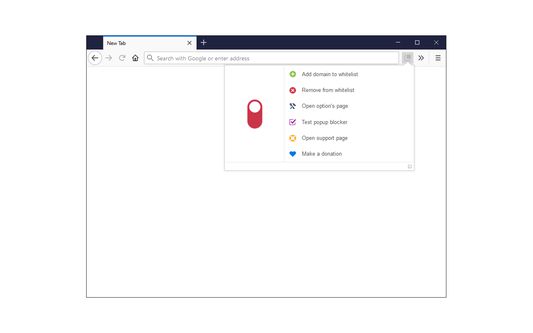
The addon has an ON/OFF switch in the toolbar popup for quickly turning it on or off, plus a full options page with several settings to adjust.
There are two protection types to choose from. Normal protection is less intrusive: a popup is briefly opened and closed right away by the addon. Advanced protection goes one step further and prevents popups before they open — so nothing ever appears on your screen — but it can feel more intrusive while browsing, and every prevented popup is counted on the toolbar badge. Besides the protection type, you can set the addon to work on all websites (Global) or only per site (Per-site). From the popup interface you can add the current website to the exclude list (Global mode) or the include list (Per-site mode) to allow or block popups for that site whenever you want.
When you first install the addon, a few well-known websites are already added to the whitelist by default — open the options page to see or edit the list at any time. The toolbar button's icon color tells you the current state at a glance: green means the current website is whitelisted, dark gray means the addon is disabled or the page is a non-standard URL (i.e. chrome://), and red means popups are being blocked. While browsing, keep an eye on the icon color to make sure the addon is set the way you want.
If you have a feature request or would like to report a bug, please use the bug report form on the addon's homepage (https://mybrowseraddon.com/popup-blocking.html)
The addon has an ON/OFF switch in the toolbar popup for quickly turning it on or off, plus a full options page with several settings to adjust.
There are two protection types to choose from. Normal protection is less intrusive: a popup is briefly opened and closed right away by the addon. Advanced protection goes one step further and prevents popups before they open — so nothing ever appears on your screen — but it can feel more intrusive while browsing, and every prevented popup is counted on the toolbar badge. Besides the protection type, you can set the addon to work on all websites (Global) or only per site (Per-site). From the popup interface you can add the current website to the exclude list (Global mode) or the include list (Per-site mode) to allow or block popups for that site whenever you want.
When you first install the addon, a few well-known websites are already added to the whitelist by default — open the options page to see or edit the list at any time. The toolbar button's icon color tells you the current state at a glance: green means the current website is whitelisted, dark gray means the addon is disabled or the page is a non-standard URL (i.e. chrome://), and red means popups are being blocked. While browsing, keep an eye on the icon color to make sure the addon is set the way you want.
If you have a feature request or would like to report a bug, please use the bug report form on the addon's homepage (https://mybrowseraddon.com/popup-blocking.html)
18 人のレビュー担当者が 3.1 と評価しました
権限とデータ
必要な権限:
- 通知の表示
- ブラウザーのタブへのアクセス
- すべてのウェブサイトの保存されたデータへのアクセス
任意の許可設定:
- すべてのウェブサイトの保存されたデータへのアクセス
データ収集:
- 開発者によると、この拡張機能はデータ収集を必要としません。
詳しい情報
- バージョン
- 0.2.2
- サイズ
- 88.19 KB
- 最終更新日
- 17日前 (2026年9月13日)
- 関連カテゴリー
- バージョン履歴
- コレクションへ追加