
Socxo Advocacy 作成者: Socxo
Share the Page URL with your comment to your Social channels and also Suggest it to your brand advocacy program admin.
1 人のユーザー1 人のユーザー
拡張機能メタデータ
スクリーンショット

この拡張機能について
Discover, Suggest & Share content on the go.
Socxo extension helps you in improving your personal & professional brand by enabling you to share interesting content with your company Admin as well as your social media channels such as LinkedIn & Twitter.
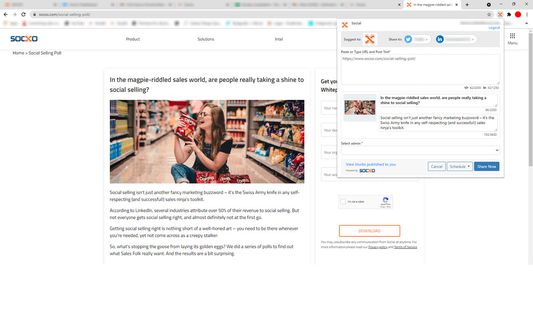
Suggest - Suggest interesting content you came across to your company Admin
Share - Instant share / Schedule content to you connected social media channels like LinkedIn / Twitter
Note: To use the Socxo extension, you should be a registered Socxo user.
How Socxo extension works
1) Install the Socxo extension from the Firefox Add-on store
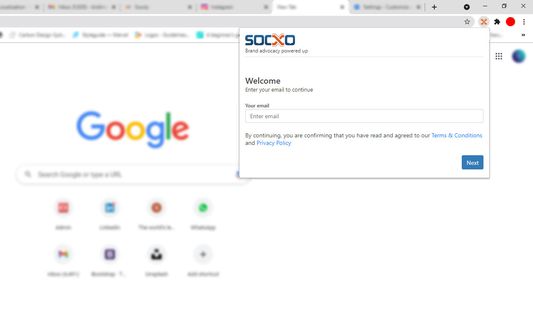
2) After installing, click on the Socxo extension icon to open
3) Login using using your Socxo login
4) On login, the Socxo extension will be visible for you in the extension list. Make sure to pin the extension for easier access
Once logged in, you can just click on the Socxo extension icon from the Browser tab that you would like to Suggest / Share.
Note: Socxo Mozilla Firefox extension can be currently used only in email based login. SSO based login will be incorporated soon.
Socxo extension helps you in improving your personal & professional brand by enabling you to share interesting content with your company Admin as well as your social media channels such as LinkedIn & Twitter.
Suggest - Suggest interesting content you came across to your company Admin
Share - Instant share / Schedule content to you connected social media channels like LinkedIn / Twitter
Note: To use the Socxo extension, you should be a registered Socxo user.
How Socxo extension works
1) Install the Socxo extension from the Firefox Add-on store
2) After installing, click on the Socxo extension icon to open
3) Login using using your Socxo login
4) On login, the Socxo extension will be visible for you in the extension list. Make sure to pin the extension for easier access
Once logged in, you can just click on the Socxo extension icon from the Browser tab that you would like to Suggest / Share.
Note: Socxo Mozilla Firefox extension can be currently used only in email based login. SSO based login will be incorporated soon.
0 人のレビュー担当者が 0 と評価しました
権限とデータ
詳しい情報
- バージョン
- 1.2
- サイズ
- 1.65 MB
- 最終更新日
- 5年前 (2021年11月15日)
- 関連カテゴリー
- ライセンス
- All Rights Reserved
- プライバシーポリシー
- このアドオンのプライバシーポリシーを読む
- バージョン履歴
- コレクションへ追加