
HTMLRemover 제작자: MagiKirby
Easily Remove HTML elements by clicking them
사용자 144명사용자 144명
확장 메타 데이터
스크린샷



정보
This extension is a fork of: Remove HTML Elements by Sevina
https://addons.mozilla.org/en-US/firefox/addon/remove-html-elements/
===================This Fork Updated===================
*Added the ability to click Links and Buttons, and not have the webpage change.
*Changed the new cursor to better match your mouse position & size.
===================================================
Source Code: https://github.com/MagiKirby/HTMLRemover
This extension allows you to remove HTML Elements.
Optionally First, Pin the Add-on to the Toolbar for quick access.
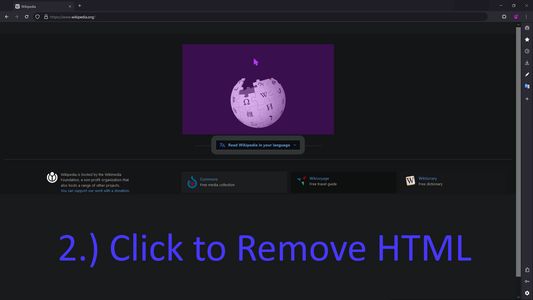
You can then activate the extension by clicking on the icon in the toolbar to activate and turn on the Add-on. Once it is active, your mouse cursor will turn purple. When the mouse pointer is over any HTML5 element, it will highlighted Pink indicating that the element is selected. Then, when you click on the highlighted element, it will be removed from the page. If you would like to bring the element back you can press Ctrl + Z.
Please note that, this add-on does not delete the elements from the page, instead, it changes the display property to "none". The add-on supports undo operation via (Ctrl + Z) keyboard combination.
Please note that this add-on requires "user action" permission to be activate.
https://addons.mozilla.org/en-US/firefox/addon/remove-html-elements/
===================This Fork Updated===================
*Added the ability to click Links and Buttons, and not have the webpage change.
*Changed the new cursor to better match your mouse position & size.
===================================================
Source Code: https://github.com/MagiKirby/HTMLRemover
This extension allows you to remove HTML Elements.
Optionally First, Pin the Add-on to the Toolbar for quick access.
You can then activate the extension by clicking on the icon in the toolbar to activate and turn on the Add-on. Once it is active, your mouse cursor will turn purple. When the mouse pointer is over any HTML5 element, it will highlighted Pink indicating that the element is selected. Then, when you click on the highlighted element, it will be removed from the page. If you would like to bring the element back you can press Ctrl + Z.
Please note that, this add-on does not delete the elements from the page, instead, it changes the display property to "none". The add-on supports undo operation via (Ctrl + Z) keyboard combination.
Please note that this add-on requires "user action" permission to be activate.
리뷰어 1명이 5점으로 평가함
추가 정보
- 부가 기능 링크
- 버전
- 0.96
- 크기
- 28.6 KB
- 최근 업데이트
- 2년 전 (2024년 12월 14일)
- 관련 카테고리
- 버전 목록
- 모음집에 추가