
nextpage 제작자: sylecn
use SPC key to go to next page when at the bottom of a page
사용자 587명사용자 587명
확장 메타 데이터
스크린샷


정보
When reading online documents or novels, I usually use SPC to scroll page. But SPC doesn't go to next page automatically. This add-on rebinds SPC key so that it scrolls page when there is more on the page, it goes to next page when you are at the bottom of a page. You can also press n key anytime to go to next page directly. From v2.12.0, it also prerender or prefetch next page link to speed up page load.
nextpage is free software released under GPLv3. The source code is hosted at github.
BUG Report
===================
If you found a problem and would like to get it fixed, please report it here:
https://github.com/sylecn/ff-nextpage/issues
nextpage tries hard to not get in your way. If you find nextpage breaks your blog admin panel, some online registration form, or any kind of cool web application, please report a bug. You can also use (ignore-on "URL_REGEXP") in user config to disable this add-on on given website.
Currently English, Chinese and German web pages are supported.
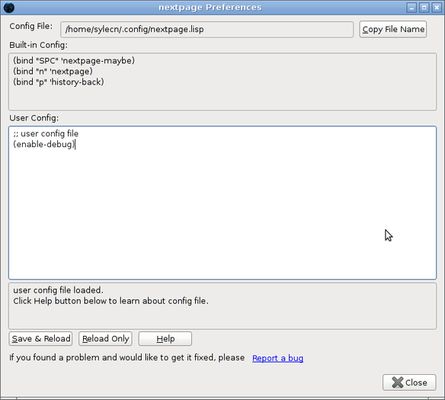
nextpage allows you to bind keys to some nextpage related functions. Here is the default key-bindings:
You can disable/overwrite built-in bindings and define your own bindings easily. Read the built-in help document with the installed add-on for more information. Click help button in add-on option.
In user preferences page,
You can bind p to previous-page:
You can bind c to copy page title and url:
This add-on is only 30K zipped.
Privacy Policy
===================
- nextpage add-on does not collect any user data.
- If you have customized user preferences, and have loged in to
Firefox/Chrome/Edge, your user preferences will be synchronized across your
browsers. nextpage add-on does not store your user preferences.
nextpage is free software released under GPLv3. The source code is hosted at github.
BUG Report
===================
If you found a problem and would like to get it fixed, please report it here:
https://github.com/sylecn/ff-nextpage/issues
nextpage tries hard to not get in your way. If you find nextpage breaks your blog admin panel, some online registration form, or any kind of cool web application, please report a bug. You can also use (ignore-on "URL_REGEXP") in user config to disable this add-on on given website.
Currently English, Chinese and German web pages are supported.
nextpage allows you to bind keys to some nextpage related functions. Here is the default key-bindings:
- SPC scroll up/next page
- n next page
- p history back
(bind "SPC" 'nextpage-maybe)
(bind "n" 'nextpage)
(bind "p" 'history-back)
You can disable/overwrite built-in bindings and define your own bindings easily. Read the built-in help document with the installed add-on for more information. Click help button in add-on option.
In user preferences page,
You can bind p to previous-page:
(bind "p" 'previous-page)
You can bind c to copy page title and url:
(bind "c" 'copy-title-and-url-maybe)
This add-on is only 30K zipped.
Privacy Policy
===================
- nextpage add-on does not collect any user data.
- If you have customized user preferences, and have loged in to
Firefox/Chrome/Edge, your user preferences will be synchronized across your
browsers. nextpage add-on does not store your user preferences.
리뷰어 18명이 4.7점으로 평가함
권한 및 데이터
추가 정보
- 부가 기능 링크
- 버전
- 3.2.0
- 크기
- 58.76 KB
- 최근 업데이트
- 7달 전 (2026년 1월 19일)
- 관련 카테고리
- 개인정보처리방침
- 이 부가 기능에 대한 개인정보처리방침 읽기
- 버전 목록
- 모음집에 추가
if you'd like to add words in other languages that's equivalent to "next" in English, please file a bug report [see description for URL] and I'll add it in the source file directly.