YouTube Drag Shot 제작자: Ajay Dhiman
Stop pausing, taking separate screenshots, finding files, and importing! This extension revolutionizes how you capture visual information from YouTube videos directly into your notes on Any device
사용자 1명사용자 1명
확장 메타 데이터
스크린샷
정보
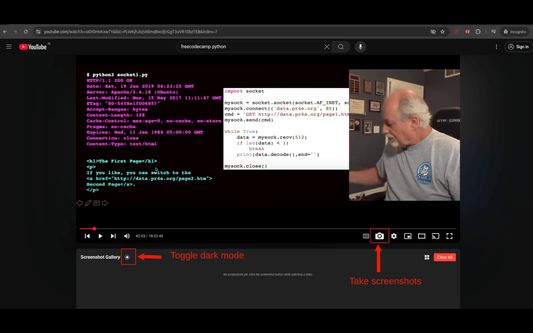
Take screenshots of YouTube videos and view them in a gallery below the player
YouTube Screenshot Gallery & Drag-and-Drop
Enhance your note-taking on Any device including Android! This extension adds a dedicated screenshot button to the YouTube player controls.
One-Click Capture: Instantly grab the current video frame.
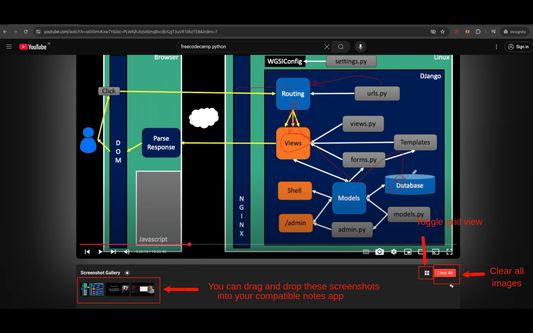
Instant Gallery: Screenshots appear in a convenient gallery below the player.
Direct Drag & Drop: Simply drag screenshots from the gallery and drop them into your notes app (or other compatible apps).
No File Saving Needed: Streamlines adding visuals to your notes without cluttering downloads.
Kiwi Browser Tested: Designed for Android browsers supporting extensions like Kiwi.
Note: Drop compatibility depends on your specific note-taking app.
YouTube Screenshot Gallery & Drag-and-Drop
Enhance your note-taking on Any device including Android! This extension adds a dedicated screenshot button to the YouTube player controls.
One-Click Capture: Instantly grab the current video frame.
Instant Gallery: Screenshots appear in a convenient gallery below the player.
Direct Drag & Drop: Simply drag screenshots from the gallery and drop them into your notes app (or other compatible apps).
No File Saving Needed: Streamlines adding visuals to your notes without cluttering downloads.
Kiwi Browser Tested: Designed for Android browsers supporting extensions like Kiwi.
Note: Drop compatibility depends on your specific note-taking app.
0명이 0점으로 평가함
권한 및 데이터
추가 정보
- 부가 기능 링크
- 버전
- 1.0
- 크기
- 27.26 KB
- 마지막 업데이트
- 일 년 전 (2025년 4월 25일)
- 관련 카테고리
- 라이선스
- MIT 라이선스
- 버전 목록
- 모음집에 추가