
Add Link to qBittorrent WebUI 제작자: CR
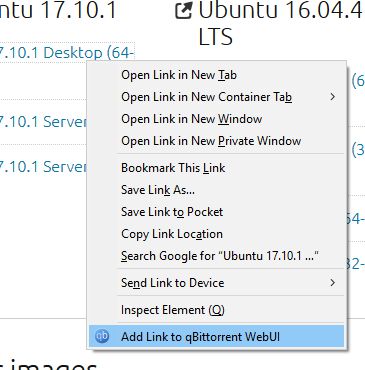
*WARNING*: ADDON UNSUPPORTED Add torrent link directly to qBittorrent WebUI from context menu. Supports HTTP, Magnet, and BitComet Tracker links.
사용자 189명사용자 189명
확장 메타 데이터
스크린샷
정보
*WARNING*: ADDON UNSUPPORTED
It seems that this addon breaks on latest FF (85). Since I don't have the time to maintain this addon, there will be no fix. USE AT YOUR OWN RISK.
Add torrent link directly to a local and public qBittorrent WebUI from context menu. Supports HTTP, Magnet, and BitComet Tracker links, and includes options from the WebUI API.
Features:
Disclaimer: the author is not in any way affiliated with qBittorrent development team.
Another disclaimer: This extension needs to use third-party cookie setting for authentication. Setting the Content Blocking -> Custom -> Cookie to "All third-party cookies" will break the authentication process. Please refer to https://support.mozilla.org/id/kb/disable-third-party-cookies for instructions on how to modify the setting. Firefox may need to be restarted for the new setting to be applied.
It seems that this addon breaks on latest FF (85). Since I don't have the time to maintain this addon, there will be no fix. USE AT YOUR OWN RISK.
Add torrent link directly to a local and public qBittorrent WebUI from context menu. Supports HTTP, Magnet, and BitComet Tracker links, and includes options from the WebUI API.
Features:
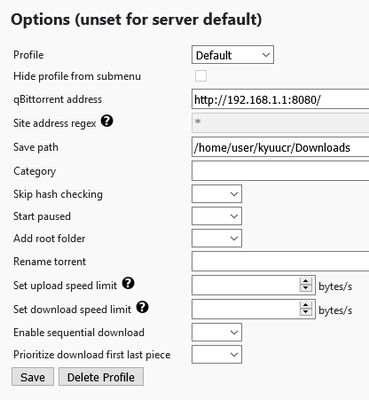
- Sending HTTP, Magnet, or BitComet Tracker links with full support of qBt WebUI's options
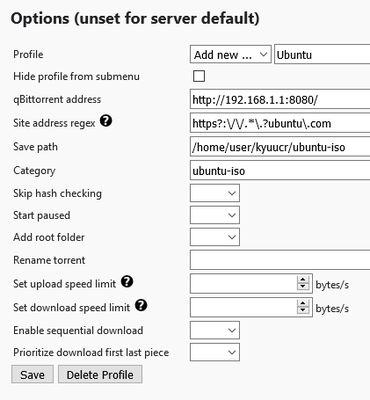
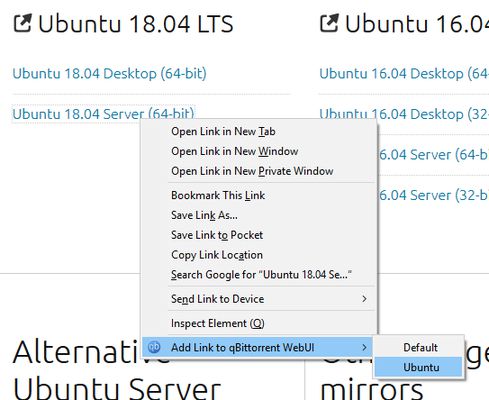
- Multiple profiles, each with its own option. You can even set different WebUI address!
- Regex matching for profile: Set regex string on a profile, and when using Default profile, Tab URL will be matched to the regex. If it's matched, the associated profile will be used instead of Default profile. Combine with hide profile option to automate link sending!
- Toolbar button to open the URL defined in the "Default" profile
Disclaimer: the author is not in any way affiliated with qBittorrent development team.
Another disclaimer: This extension needs to use third-party cookie setting for authentication. Setting the Content Blocking -> Custom -> Cookie to "All third-party cookies" will break the authentication process. Please refer to https://support.mozilla.org/id/kb/disable-third-party-cookies for instructions on how to modify the setting. Firefox may need to be restarted for the new setting to be applied.
리뷰어 7명이 4.4점으로 평가함
권한 및 데이터
추가 정보
- 부가 기능 링크
- 버전
- 6
- 크기
- 20.74 KB
- 마지막 업데이트
- 6년 전 (2020년 6월 6일)
- 관련 카테고리
- 라이선스
- MIT 라이선스
- 버전 목록
- 모음집에 추가