AddMoreTextToClipboard 제작자: copan31
Append selected text to clipboard. [Demo(21second)] http://www.youtube.com/watch?v=l5XugrizY-A&feature=youtu.be
사용자 29명사용자 29명
확장 메타 데이터
스크린샷
정보
Append selected text to clipboard.
(Clipboard is save area for items that we copied.)
[Usage (Use shortcut key)]
Only two step!
1. Select text by drag.
2-1("Append"). Push Alt+C(on Windows) or Option+C(on Mac).
2-2("Append with newline"). Push Alt+Shift+C(on Windows) or Option+Shift+C(on Mac).
[Usage (Use context menu)]
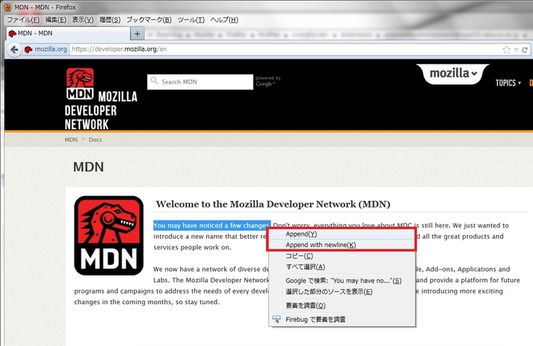
1. Select text by drag.
2. Open context menu by right click.
3. Click "Append" or "Append with newline".
[Other(Clear clipboard)]
+ You can clear clipboard to push Alt+(Shift+)C(on Windows) or Option+(Shift+)C(on Mac) when no text selected.
[Demo]
http://www.youtube.com/watch?v=l5XugrizY-A&feature=youtu.be
(Clipboard is save area for items that we copied.)
[Usage (Use shortcut key)]
Only two step!
1. Select text by drag.
2-1("Append"). Push Alt+C(on Windows) or Option+C(on Mac).
2-2("Append with newline"). Push Alt+Shift+C(on Windows) or Option+Shift+C(on Mac).
[Usage (Use context menu)]
1. Select text by drag.
2. Open context menu by right click.
3. Click "Append" or "Append with newline".
[Other(Clear clipboard)]
+ You can clear clipboard to push Alt+(Shift+)C(on Windows) or Option+(Shift+)C(on Mac) when no text selected.
[Demo]
http://www.youtube.com/watch?v=l5XugrizY-A&feature=youtu.be
1명이 5점으로 평가함
권한 및 데이터
추가 정보
- 부가 기능 링크
- 버전
- 3.0.2resigned1
- 크기
- 16.91 KB
- 마지막 업데이트
- 2년 전 (2024년 4월 25일)
- 관련 카테고리
- 라이선스
- MIT 라이선스
- 버전 목록
- 모음집에 추가