
Aggregate Tabs to Main Window 제작자: Piro (piro_or)
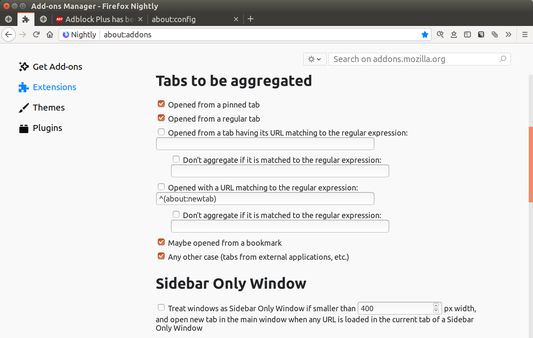
Aggregate new tabs to a window which has most many tabs and largest size.
사용자 33명사용자 33명
확장 메타 데이터
스크린샷
정보
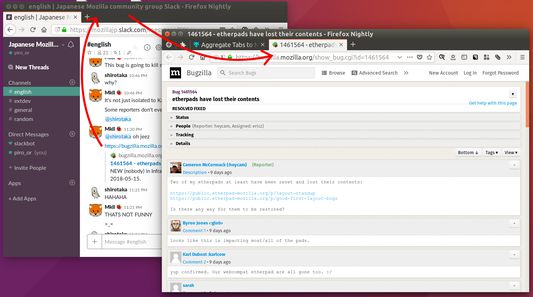
This addon will help you to use multiple windows with specific usages parallelly like: window 1 is for Twitter, window 2 is for main browsing. In such case, new tabs opened from Twitter will be moved to the main window automatically.
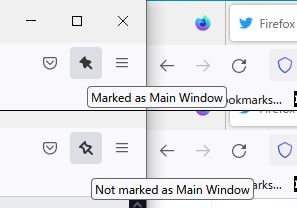
What is the "main browsing window"? This addon regards most largest window as that. If there are multiple largest windows, the tab which has most largest number of tabs is detected as the main. Moreover you can mark a specific window as the main window via the toolbar button.
# Useful example 1: parallel use of multiple sidebars, Tree Style Tab and Bookmarks
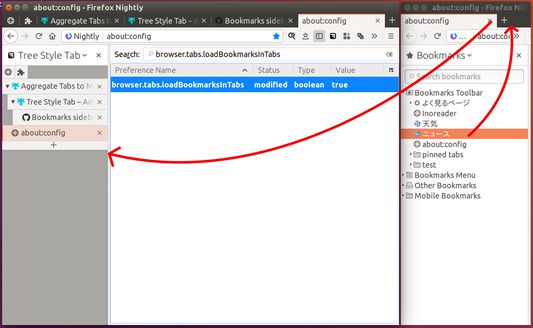
1. Go to `about:config` and set `browser.tabs.loadBookmarksInTabs` to `true`.
2. Show "Tree Style Sidebar" sidebar in the main window.
https://addons.mozilla.org/firefox/addon/tree-style-tab/
3. Open a new window, and show "Bookmarks" sidebar in the window.
4. Reduce width of the window for Bookmarks sidebar to enough width for the sidebar area.
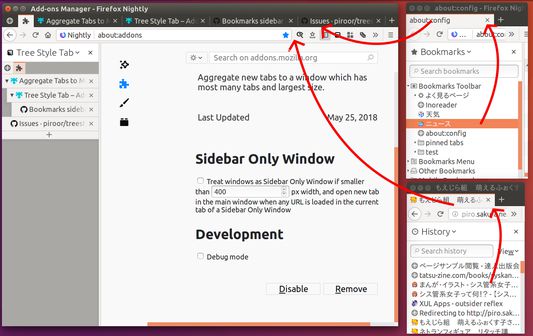
Then, new tabs opened from the Bookmarks sidebar by clicking are automatically moved to the main window, thus it will work like multiple sidebar panels.
If you cannot shrink the width of a browser window small, you need to use "userChrome.css" to reduce minimum size of browser windows, for example:
------
:root, #urlbar-container { min-width: 0 !important; }
------
What is the "main browsing window"? This addon regards most largest window as that. If there are multiple largest windows, the tab which has most largest number of tabs is detected as the main. Moreover you can mark a specific window as the main window via the toolbar button.
# Useful example 1: parallel use of multiple sidebars, Tree Style Tab and Bookmarks
1. Go to `about:config` and set `browser.tabs.loadBookmarksInTabs` to `true`.
2. Show "Tree Style Sidebar" sidebar in the main window.
https://addons.mozilla.org/firefox/addon/tree-style-tab/
3. Open a new window, and show "Bookmarks" sidebar in the window.
4. Reduce width of the window for Bookmarks sidebar to enough width for the sidebar area.
Then, new tabs opened from the Bookmarks sidebar by clicking are automatically moved to the main window, thus it will work like multiple sidebar panels.
If you cannot shrink the width of a browser window small, you need to use "userChrome.css" to reduce minimum size of browser windows, for example:
------
:root, #urlbar-container { min-width: 0 !important; }
------
리뷰어 12명이 4.5점으로 평가함
권한 및 데이터
추가 정보
- 부가 기능 링크
- 버전
- 1.7.3
- 크기
- 38.25 KB
- 최근 업데이트
- 3달 전 (2026년 7월 2일)
- 개인정보처리방침
- 이 부가 기능에 대한 개인정보처리방침 읽기
- 버전 목록
- 모음집에 추가