
amgiflol 제작자: sm17p
Match web layouts with Figma designs through real-time element inspection, measurements, and visual overlays
사용자 3명사용자 3명
확장 메타 데이터
스크린샷

정보
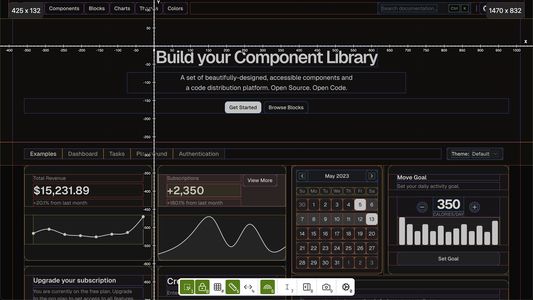
Tired of tedious manual checks and endless back-and-forth when verifying web designs? The Amgif Inspector streamlines the process, empowering designers and developers to achieve pixel-perfect implementations on any live webpage. Inspired by the "Inspect" functionality found in leading design tools, this extension bridges the gap between design mockups and live web implementations.
This tool focuses on providing robust debugging for standard HTML tags and their computed CSS properties, giving you a foundational understanding of any webpage's structure and styling. (Note: Framework-specific debugging is not supported at this time, ensuring a focused and lightweight experience).
Target Audience
Front-end Developers: Debug layouts and catch spacing issues as you code
UI/UX Designers: Validate live implementations against design specifications
QA Engineers: Identify visual inconsistencies during testing cycles
Product Managers: Review features with precise measurements and documentation
Key Features
Precision Tools
Distance Measurements - Instantly see precise measurements between elements and parents
Layer-to-Layer Measurements - Hold Alt/Option key to measure distances between any two elements
Dynamic Rulers - Mouse-following coordinate system for precise pixel positioning
Visual Overlays - Highlight elements and parent relationships for DOM understanding
Smart Inspection
Real-time Detection - Hover for immediate element information (tag, ID, classes)
Side Panel - Detailed properties, computed styles, and attributes with auto-move
Lock/Unlock Mode - Persistently track specific elements without losing focus
Productivity Features
Keyboard Shortcuts - Quick access to all features with intuitive shortcuts
Design Mode - Edit text directly on screen for quick content adjustments
Screenshot Capture - Save page state with active overlays for sharing
Smart UI Positioning - Auto-hide/move interface to avoid obstructing view
Advanced Visual Tools
Rainbow Layouts - Colorful nested layer visualization for complex structures
Floating Toolbar - Smart auto-positioning interface with minimal interference
Feature Voting - Vote for features you want developed next
Usage Scenarios
During Development: Catch spacing/alignment issues while coding - eliminate guesswork, reduce debugging time
Design Reviews: Verify implementation vs specifications with precise measurements and visual overlays
QA Testing: Identify visual inconsistencies across browsers using systematic inspection tools
Final Polish: Perfect pixel-level details before shipping with comprehensive measurement data
Quick Start Guide
Why Choose Amgif Inspector?
Free & Open Source - Completely free to use with open source code available on GitHub
No External Dependencies - Works entirely in browser, no login required for prototyping tools
Instant Setup - No data sent to external servers, immediate productivity gains
Workflow Integration - Active visual debugger for real-time development and design audits
Professional Grade - Built for workflows where precision matters and time is valuable
Current Status
Keyboard Shortcuts: Continually refining for industry-standard usability
Rainbow Layouts: Optimized for Chrome, Firefox enhancements in development
Framework Support: Focused on standard HTML/CSS for lightweight experience
User Feedback: Actively welcomed to shape future development
Ready to achieve pixel-perfect web designs with ease? Install Figma Inspector today and transform your visual debugging workflow.
This tool focuses on providing robust debugging for standard HTML tags and their computed CSS properties, giving you a foundational understanding of any webpage's structure and styling. (Note: Framework-specific debugging is not supported at this time, ensuring a focused and lightweight experience).
Target Audience
Front-end Developers: Debug layouts and catch spacing issues as you code
UI/UX Designers: Validate live implementations against design specifications
QA Engineers: Identify visual inconsistencies during testing cycles
Product Managers: Review features with precise measurements and documentation
Key Features
Precision Tools
Distance Measurements - Instantly see precise measurements between elements and parents
Layer-to-Layer Measurements - Hold Alt/Option key to measure distances between any two elements
Dynamic Rulers - Mouse-following coordinate system for precise pixel positioning
Visual Overlays - Highlight elements and parent relationships for DOM understanding
Smart Inspection
Real-time Detection - Hover for immediate element information (tag, ID, classes)
Side Panel - Detailed properties, computed styles, and attributes with auto-move
Lock/Unlock Mode - Persistently track specific elements without losing focus
Productivity Features
Keyboard Shortcuts - Quick access to all features with intuitive shortcuts
Design Mode - Edit text directly on screen for quick content adjustments
Screenshot Capture - Save page state with active overlays for sharing
Smart UI Positioning - Auto-hide/move interface to avoid obstructing view
Advanced Visual Tools
Rainbow Layouts - Colorful nested layer visualization for complex structures
Floating Toolbar - Smart auto-positioning interface with minimal interference
Feature Voting - Vote for features you want developed next
Usage Scenarios
During Development: Catch spacing/alignment issues while coding - eliminate guesswork, reduce debugging time
Design Reviews: Verify implementation vs specifications with precise measurements and visual overlays
QA Testing: Identify visual inconsistencies across browsers using systematic inspection tools
Final Polish: Perfect pixel-level details before shipping with comprehensive measurement data
Quick Start Guide
- Install - Add extension from Firefox Add-ons
- Navigate - Go to any webpage you want to inspect
- Activate - Click the extension icon in toolbar
- Inspect - Hover over elements for instant measurements
- Advanced - Use shortcuts or floating toolbar for more features
- Track - Lock elements for persistent monitoring
Why Choose Amgif Inspector?
Free & Open Source - Completely free to use with open source code available on GitHub
No External Dependencies - Works entirely in browser, no login required for prototyping tools
Instant Setup - No data sent to external servers, immediate productivity gains
Workflow Integration - Active visual debugger for real-time development and design audits
Professional Grade - Built for workflows where precision matters and time is valuable
Current Status
Keyboard Shortcuts: Continually refining for industry-standard usability
Rainbow Layouts: Optimized for Chrome, Firefox enhancements in development
Framework Support: Focused on standard HTML/CSS for lightweight experience
User Feedback: Actively welcomed to shape future development
Ready to achieve pixel-perfect web designs with ease? Install Figma Inspector today and transform your visual debugging workflow.
리뷰어 0명이 0점으로 평가함
권한 및 데이터
추가 정보