
AmoyShare Screen Recorder – HD Video Records 제작자: AmoyShare Team
Capture your screen with the robust AmoyShare screen recorder extension. Record tutorials, gameplay, and more with voice & webcam.
사용자 93명사용자 93명
확장 메타 데이터
스크린샷
정보
With AmoyShare Screen Recorder extension, you can effortlessly capture screen activities in one simple click due to its user-friendly interface. What's more, this feature-packed add-on allows you to record screen, webcam, and audio at the same time, providing you with engaging videos that you can save without any trouble for later review.
When it comes to capturing a specific screen area, our extension must be your top choice. Not only does it offer predetermined recording areas, but it also empowers you to select a custom area manually based on your requirements. Your recordings can be saved in various formats, including MP4, MOV, FLV, AVI, MP3, etc.
🔥Key Features🔥:
🎥 Record screen, webcam, and audio together or separately
🔴 Enjoy unlimited screen, webcam and voice recording
🚀 Easy and simple to use with intuitive & user-friendly interface
🖱️ Record your browser tab, window, desktop, or entire screen
🆓 Free and safe to store videos up to 30 minutes
⏮️ Replay recorded videos with the built-in media player
🌐 Capture streaming videos from 1000+ video-sharing sites
🛑How to Use the screen recorder add-on:
1. Install AmoyShare Screen Recorder and then find it on the extension toolbar. Open by clicking its icon.
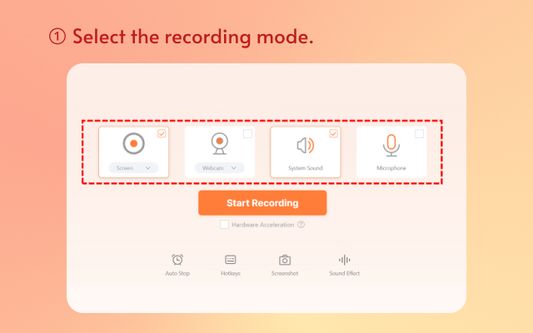
2. Choose your desired recording mode, such as screen, webcam, microphone and system sound.
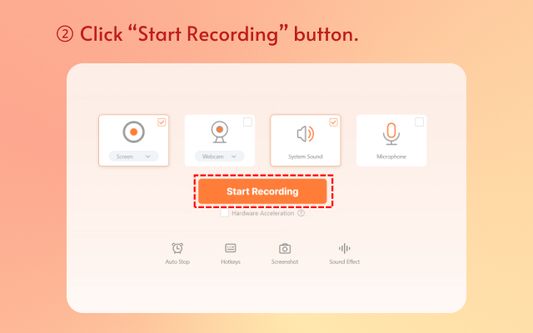
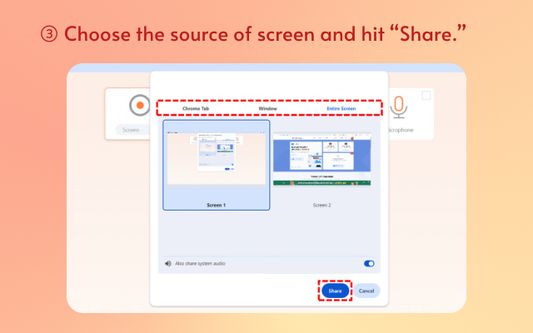
3. Hit the Start Recording button. Then select the source of your screen: tab, window or entire screen.
4. Click the Share button to initiate the screen recording.
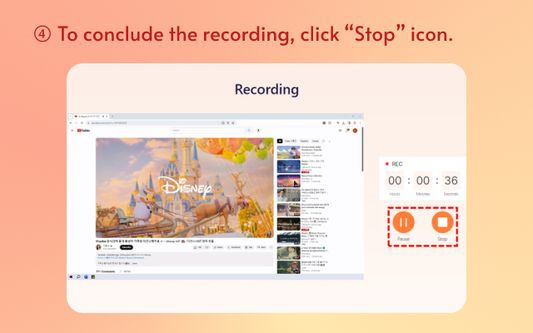
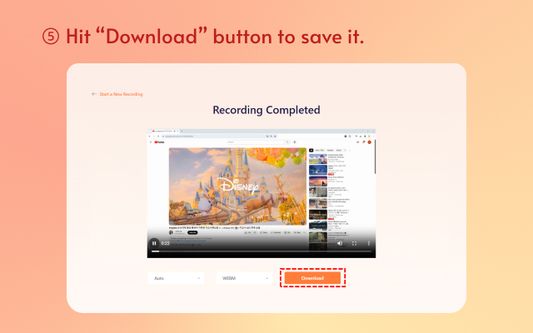
5. Once you've finished your recording, hit the Stop icon. After that, review and download the recorded video as needed.
📧 Contact Us:
If you have any technical questions, suggestions or feature requests, please feel free to contact us via support@amoyshare.com. We are here to assist and value your feedback for enhancing our screen recorder extension.
📚 More Info.
FAQ: https://www.amoyshare.com/screen-recorder/guide/
Desktop version: https://www.amoyshare.com/pro-screen-recorder/ 🖥️
When it comes to capturing a specific screen area, our extension must be your top choice. Not only does it offer predetermined recording areas, but it also empowers you to select a custom area manually based on your requirements. Your recordings can be saved in various formats, including MP4, MOV, FLV, AVI, MP3, etc.
🔥Key Features🔥:
🎥 Record screen, webcam, and audio together or separately
🔴 Enjoy unlimited screen, webcam and voice recording
🚀 Easy and simple to use with intuitive & user-friendly interface
🖱️ Record your browser tab, window, desktop, or entire screen
🆓 Free and safe to store videos up to 30 minutes
⏮️ Replay recorded videos with the built-in media player
🌐 Capture streaming videos from 1000+ video-sharing sites
🛑How to Use the screen recorder add-on:
1. Install AmoyShare Screen Recorder and then find it on the extension toolbar. Open by clicking its icon.
2. Choose your desired recording mode, such as screen, webcam, microphone and system sound.
3. Hit the Start Recording button. Then select the source of your screen: tab, window or entire screen.
4. Click the Share button to initiate the screen recording.
5. Once you've finished your recording, hit the Stop icon. After that, review and download the recorded video as needed.
📧 Contact Us:
If you have any technical questions, suggestions or feature requests, please feel free to contact us via support@amoyshare.com. We are here to assist and value your feedback for enhancing our screen recorder extension.
📚 More Info.
FAQ: https://www.amoyshare.com/screen-recorder/guide/
Desktop version: https://www.amoyshare.com/pro-screen-recorder/ 🖥️
리뷰어 1명이 2점으로 평가함
추가 정보
- 부가 기능 링크
- 버전
- 1.2
- 크기
- 151.61 KB
- 최근 업데이트
- 3년 전 (2024년 1월 5일)
- 라이선스
- All Rights Reserved
- 버전 목록
- 모음집에 추가