
AnkiLingoFlash 제작자: Victor Piriou
Automatically generate Anki flashcards with pronunciation guide and mnemonic for language learning.
확장 메타 데이터
스크린샷
정보
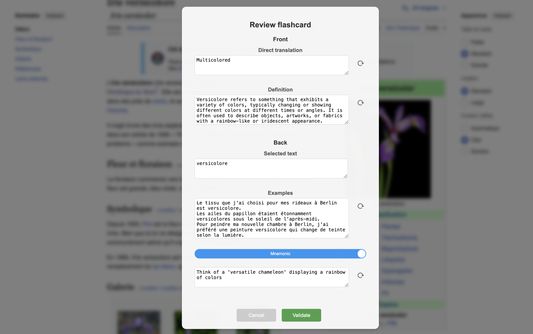
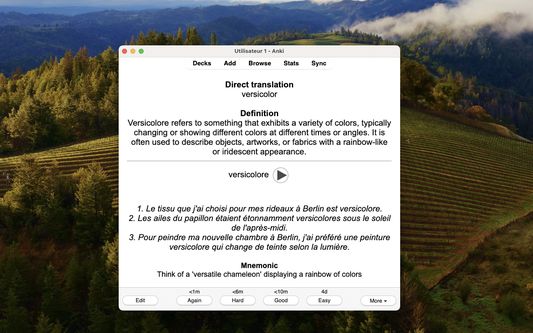
📚 Anki uses spaced repetition to enhance learning, but creating a quality deck of flashcards can be time-consuming. Fortunately, AnkiLingoFlash is here to simplify the process! Once installed, AnkiLingoFlash allows you to generate flashcards from any word or phrase you select on a webpage. The front of the flashcard features a definition and direct translation, while the back includes the selected term (with an audio pronunciation guide), three example sentences, and a mnemonic — all AI-generated.
✨ How It Works:
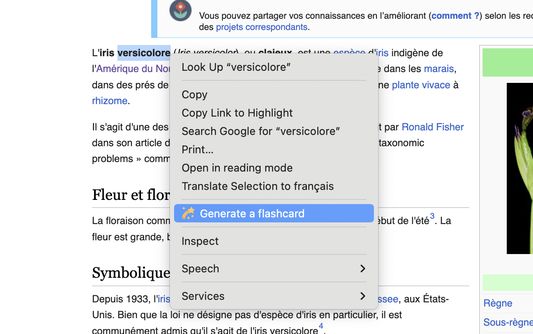
1. Select text and right-click: Highlight a word or phrase, right-click, and choose the option to generate a flashcard.
2. Review the flashcard: Check the definition, direct translation, example sentences, and mnemonic. You can regenerate any part of the flashcard or edit it manually if needed.
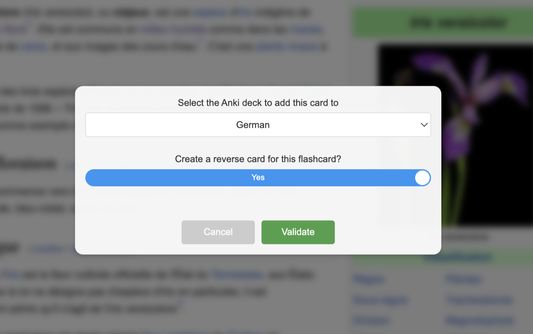
3. Choose the deck: Select the Anki deck to add your new flashcard to, and you're done!
🧩 Key Features:
- No ads - enjoy a clean, distraction-free experience
- Free trial mode uses gpt-4o model from OpenAI
- Option to use your own OpenAI API key for access to other models
- Create flashcards in multiple languages (see below)
🌍 Flashcard Content Languages:
While the extension interface is currently available only in English, you can create flashcards in the following languages:
- Arabic (Standard, Egyptian)
- Cantonese
- Dutch (Netherlands, Belgium)
- English (US, UK, Australia, Canada)
- French (France, Canada)
- German (Germany, Switzerland)
- Hindi
- Italian (Italy, Switzerland)
- Japanese
- Korean
- Mandarin Chinese (Simplified, Traditional)
- Portuguese (Portugal, Brazil)
- Russian
- Spanish (Spain, Latin America)
🧠 Whether you're an elementary student, a university scholar, or just someone looking to accelerate your language learning journey, AnkiLingoFlash is your perfect companion. It offers a limited number of free flashcards, and after that, you can use an OpenAI API key, which is very cost-effective (a dollar can generate thousands of flashcards). Your API key is encrypted before being stored locally, ensuring your data remains secure.
⚠️ PLEASE NOTE:
- Initial setup takes less than 5 minutes, a step-by-step tutorial is available at https://ankilingoflash.com/quick-tutorial.html, and a Google account is required for free trial mode
- This is a beta version - your patience and feedback are appreciated as I work to improve the extension
- The quality of flashcards may vary significantly between languages depending on the performance of the AI model used.
- If you encounter any issues during setup, please contact support@ankilingoflash.com (response within 48 hours)
✨ How It Works:
1. Select text and right-click: Highlight a word or phrase, right-click, and choose the option to generate a flashcard.
2. Review the flashcard: Check the definition, direct translation, example sentences, and mnemonic. You can regenerate any part of the flashcard or edit it manually if needed.
3. Choose the deck: Select the Anki deck to add your new flashcard to, and you're done!
🧩 Key Features:
- No ads - enjoy a clean, distraction-free experience
- Free trial mode uses gpt-4o model from OpenAI
- Option to use your own OpenAI API key for access to other models
- Create flashcards in multiple languages (see below)
🌍 Flashcard Content Languages:
While the extension interface is currently available only in English, you can create flashcards in the following languages:
- Arabic (Standard, Egyptian)
- Cantonese
- Dutch (Netherlands, Belgium)
- English (US, UK, Australia, Canada)
- French (France, Canada)
- German (Germany, Switzerland)
- Hindi
- Italian (Italy, Switzerland)
- Japanese
- Korean
- Mandarin Chinese (Simplified, Traditional)
- Portuguese (Portugal, Brazil)
- Russian
- Spanish (Spain, Latin America)
🧠 Whether you're an elementary student, a university scholar, or just someone looking to accelerate your language learning journey, AnkiLingoFlash is your perfect companion. It offers a limited number of free flashcards, and after that, you can use an OpenAI API key, which is very cost-effective (a dollar can generate thousands of flashcards). Your API key is encrypted before being stored locally, ensuring your data remains secure.
⚠️ PLEASE NOTE:
- Initial setup takes less than 5 minutes, a step-by-step tutorial is available at https://ankilingoflash.com/quick-tutorial.html, and a Google account is required for free trial mode
- This is a beta version - your patience and feedback are appreciated as I work to improve the extension
- The quality of flashcards may vary significantly between languages depending on the performance of the AI model used.
- If you encounter any issues during setup, please contact support@ankilingoflash.com (response within 48 hours)
리뷰어 2명이 5점으로 평가함
권한 및 데이터
추가 정보
- 부가 기능 링크
- 버전
- 0.5.1
- 크기
- 228.37 KB
- 최근 업데이트
- 일 년 전 (2025년 6월 2일)
- 관련 카테고리
- 개인정보처리방침
- 이 부가 기능에 대한 개인정보처리방침 읽기
- 버전 목록
- 모음집에 추가