
ChatGPT assistant for Google Meet 제작자: Alex
Meeting assistant that provides instant answers and speech explanations during Google Meet calls, Powered by ChatGPT-4.
사용자 18명사용자 18명
확장 메타 데이터
스크린샷
정보
No more internet searching for unfamiliar questions during calls. With Ask_me, get instant answers and explanations exactly when you need them. Whether it's a job interview, standup, requirements meeting, sales call, team gathering, online class, customer interview, product research, presentation, or masterclass, Ask_me has got you covered! 🙌
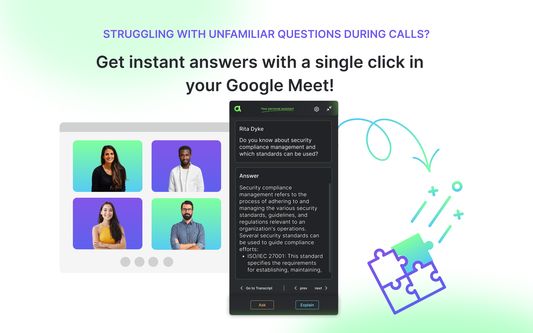
How does Ask_me work? During your Google Meet call, Ask_me diligently records all spoken words by all participants, creating a detailed transcript. If there are unfamiliar topics being discussed on the call, with just one simple click, you can ask Ask_me for assistance, and it will quickly provide you with clear and concise answers. We use OpenAI ChatGPT-4 to generate these responses, and your data remains entirely private, never used to enhance the models. Ask_me serves as your personal assistant, visible only to you; no other meeting participants can see or hear it.
Try Ask_me today for more productive and efficient meetings 💪
🔎 WHAT YOU CAN DO WITH ASK_ME:
Record Google Meet Live Captions
Get a transcript with speaker identification and timestamps(For privacy protection and to focus on delivering real-time answers and explanations, we do not save meeting transcripts)
Search the transcript by Google Meet participants
Get instant answers to any questions you might have during the call
🤙 HOW TO USE ASK_ME ON GOOGLE MEET:
Download Ask_me Chrome extension (it's free forever for meeting transcription and captions)
Join your Google Meet meeting
Record and follow meeting transcript in real-time
If you need answer on any question during the call, select the relevant message in the transcript, and choose one of two options:
Ask: Request a direct answer to the question.
Explain: Receive a comprehensive explanation for more context on the topic.
Ask_me currently supports English language conversations.
⭐️ USE ASK_ME FOR:
Interview Meetings
Online classes/lectures
Team Meetings
Client Meetings
Webinars
Remote Workshops & Conferences
Training Sessions
Sales Presentations
🔓 PRIVACY POLICY:
We do not store or process any data from your conversationsOpenAI does not use data submitted via the API to train OpenAI models
💜 HELP & FEEDBACK:
if you have any questions or suggestions to enhance your Ask_me experience, feel free to reach out to us at contact.us@amadeo.tech.
How does Ask_me work? During your Google Meet call, Ask_me diligently records all spoken words by all participants, creating a detailed transcript. If there are unfamiliar topics being discussed on the call, with just one simple click, you can ask Ask_me for assistance, and it will quickly provide you with clear and concise answers. We use OpenAI ChatGPT-4 to generate these responses, and your data remains entirely private, never used to enhance the models. Ask_me serves as your personal assistant, visible only to you; no other meeting participants can see or hear it.
Try Ask_me today for more productive and efficient meetings 💪
🔎 WHAT YOU CAN DO WITH ASK_ME:
Record Google Meet Live Captions
Get a transcript with speaker identification and timestamps(For privacy protection and to focus on delivering real-time answers and explanations, we do not save meeting transcripts)
Search the transcript by Google Meet participants
Get instant answers to any questions you might have during the call
🤙 HOW TO USE ASK_ME ON GOOGLE MEET:
Download Ask_me Chrome extension (it's free forever for meeting transcription and captions)
Join your Google Meet meeting
Record and follow meeting transcript in real-time
If you need answer on any question during the call, select the relevant message in the transcript, and choose one of two options:
Ask: Request a direct answer to the question.
Explain: Receive a comprehensive explanation for more context on the topic.
Ask_me currently supports English language conversations.
⭐️ USE ASK_ME FOR:
Interview Meetings
Online classes/lectures
Team Meetings
Client Meetings
Webinars
Remote Workshops & Conferences
Training Sessions
Sales Presentations
🔓 PRIVACY POLICY:
We do not store or process any data from your conversationsOpenAI does not use data submitted via the API to train OpenAI models
💜 HELP & FEEDBACK:
if you have any questions or suggestions to enhance your Ask_me experience, feel free to reach out to us at contact.us@amadeo.tech.
3명이 1점으로 평가함
권한 및 데이터
추가 정보
- 부가 기능 링크
- 버전
- 0.1.6
- 크기
- 328.21 KB
- 마지막 업데이트
- 3년 전 (2023년 8월 2일)
- 관련 카테고리
- 버전 목록
- 모음집에 추가