Audible Library Extractor 제작자: joonaspaakko
Extracts your Audible library metadata and automatically generates a locally viewable gallery that can also be uploaded online. Note: this extension is not affiliated with Audible.
사용자 187명사용자 187명
확장 메타 데이터
스크린샷
정보
Link to documentation.
Usage instructions:
Usage instructions:
- Go to your Audible library,
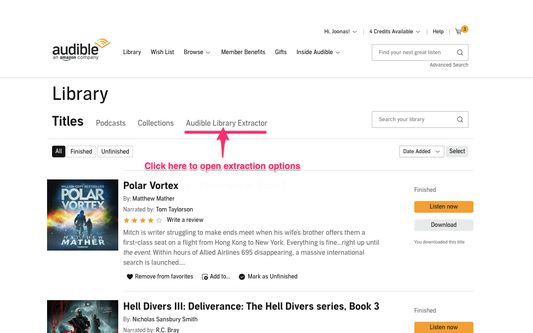
- Click the
Audible Library Extractorlink or the extension icon.- If you can't find the link, check this screenshot.
- In the next view you can choose what to extract and start the extraction process by clicking the big blue button: screenshot
- The extraction will take a few minutes. It depends on the size of your library and any of the other things you choose to extract.
- After the extraction is done the current tab is closed and a new output page for the gallery is opened.
- You can choose to save the gallery as a standalone web gallery using the floppy disk button at the top right corner.
1명이 5점으로 평가함
권한 및 데이터
필수 권한:
- www.googleapis.com에서 사용자의 데이터에 접근
- m.media-amazon.com에서 사용자의 데이터에 접근
- www.audible.com에서 사용자의 데이터에 접근
- www.audible.ca에서 사용자의 데이터에 접근
- www.audible.co.uk에서 사용자의 데이터에 접근
- www.audible.de에서 사용자의 데이터에 접근
- www.audible.it에서 사용자의 데이터에 접근
- www.audible.com.au에서 사용자의 데이터에 접근
- www.audible.in에서 사용자의 데이터에 접근
- www.audible.co.jp에서 사용자의 데이터에 접근
- www.audible.fr에서 사용자의 데이터에 접근
추가 정보