Auto Save HTML 제작자: nunoarruda
Auto Save HTML is a small extension which can be used to automatically download the HTML document(s) of a specified website when browsing that same website.
사용자 265명사용자 265명
확장 메타 데이터
스크린샷
정보
HOW TO USE
1. Install the extension
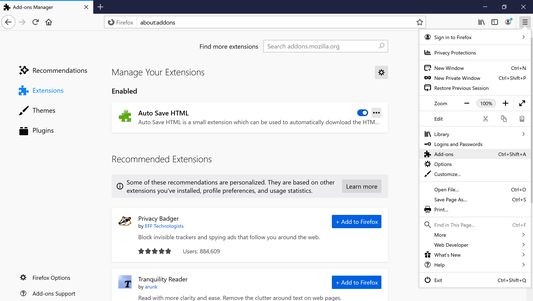
2. Click on menu (3-stripes) button -> Add-ons -> Extensions
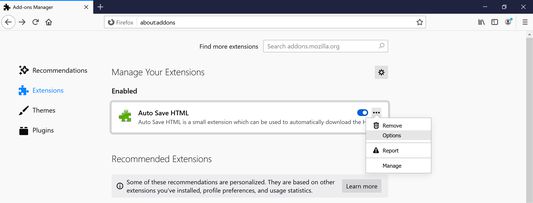
3. Click the ellipsis (3-dot) menu and then Options (Windows) or Preferences (macOS/Linux)
4. Add target sites (use a match pattern)
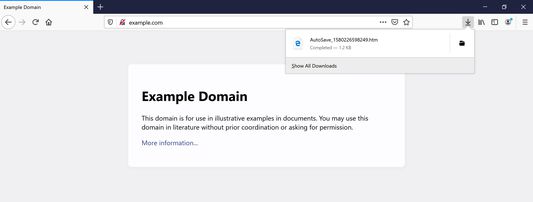
5. Navigate to the target sites. The extension will dump HTML files from a target site into the browser's Downloads folder as AutoSave_{TIMESTAMP}.htm
This extension is inspired by Auto Save Document and the development motivated by the Auto Save Document's non-compatibility with Firefox Quantum.
1. Install the extension
2. Click on menu (3-stripes) button -> Add-ons -> Extensions
3. Click the ellipsis (3-dot) menu and then Options (Windows) or Preferences (macOS/Linux)
4. Add target sites (use a match pattern)
5. Navigate to the target sites. The extension will dump HTML files from a target site into the browser's Downloads folder as AutoSave_{TIMESTAMP}.htm
This extension is inspired by Auto Save Document and the development motivated by the Auto Save Document's non-compatibility with Firefox Quantum.
9명이 4.1점으로 평가함
권한 및 데이터
추가 정보
- 부가 기능 링크
- 버전
- 2.0.3
- 크기
- 12.45 KB
- 마지막 업데이트
- 6년 전 (2020년 3월 16일)
- 라이선스
- MIT 라이선스
- 버전 목록
- 모음집에 추가