
Auto Tab Opener 제작자: Pixelcode
Auto Tab Opener lets you open multiple websites at once with one click.
사용자 85명사용자 85명
확장 메타 데이터
스크린샷
정보
A simple Firefox addon that allows you to open multiple URLs at once and to store them locally.
Purpose
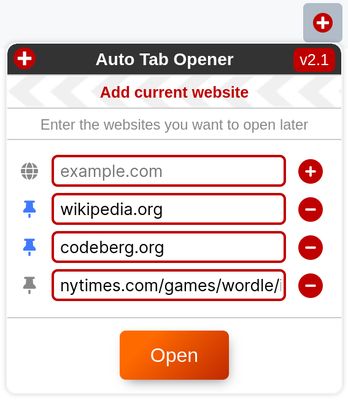
Use Auto Tab Opener for example if you have several social media pages open all the time and don't want to open them manually every time you restart Firefox or your computer. After the restart you only have to click “open” because Auto Tab Opener saves all your URLs locally right after you enter them.
Add new URLs
Pin tabs
If you want to pin a tab, click on the pin icon next to the respective URL input field.
Remove a URL
To remove a URL, simply click the corresponding minus icon. You can delete all websites by clicking on the “Reset” button in the options under
Backup
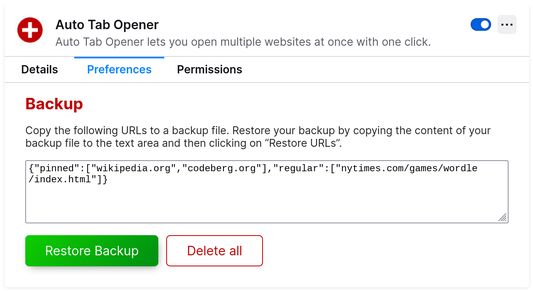
If you want to export your URLs to a backup file go to Auto Tab Opener's about:addons page and click on "Settings". There you can export and restore your URLs.
Source code
Since Auto Tab Opener is ethical open source software, you can find its source code on Codeberg (privacy-friendly GitHub alternative).
You have found a bug?
Please open a new issue on Codeberg or write a review here on Mozilla. Thank you!
Purpose
Use Auto Tab Opener for example if you have several social media pages open all the time and don't want to open them manually every time you restart Firefox or your computer. After the restart you only have to click “open” because Auto Tab Opener saves all your URLs locally right after you enter them.
Add new URLs
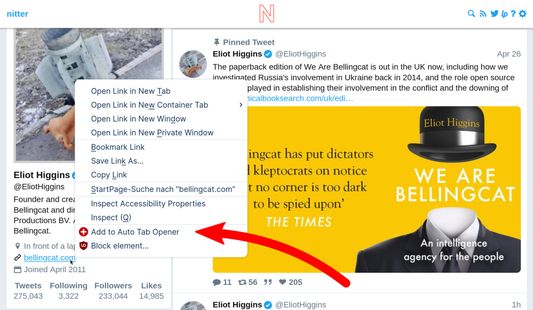
- In the addon’s popup: Enter URL and click on the ➕ icon
- In the addon’s popup: Click on “
Add current website” button - On any website: Right-click on link and select “
Add to Auto Tab Opener”
Pin tabs
If you want to pin a tab, click on the pin icon next to the respective URL input field.
Remove a URL
To remove a URL, simply click the corresponding minus icon. You can delete all websites by clicking on the “Reset” button in the options under
about:addons.Backup
If you want to export your URLs to a backup file go to Auto Tab Opener's about:addons page and click on "Settings". There you can export and restore your URLs.
Source code
Since Auto Tab Opener is ethical open source software, you can find its source code on Codeberg (privacy-friendly GitHub alternative).
You have found a bug?
Please open a new issue on Codeberg or write a review here on Mozilla. Thank you!
리뷰어 3명이 3.3점으로 평가함
권한 및 데이터
추가 정보