
AWS Login Helper 제작자: penchala services inc
Streamline your AWS login experience with AWS Login Helper. Log in once to AWS IAM Identity Center (IIC), SSO, or AWS Apps, and access multiple AWS accounts and roles using Firefox containers in new tabs or windows.
사용자 8명사용자 8명
확장 메타 데이터
스크린샷


정보
AWS Login Helper is a Firefox extension designed to enhance your login experience into AWS (Amazon Web Services). Say goodbye to repetitive logins; simply log in once to the AWS IAM Identity Center (IIC), Single Sign-On (SSO), or AWS Apps, and then access the Management Console of any account and role for which you have permission using Firefox containers in a new tab or window.
The extension offers several features to streamline your AWS Console experience:
Privacy & Security
We take the privacy and security of our users very seriously. This extension does not store or leak any information. All the code is open source, and you can verify that.
Features
Supported AWS Services
AWS Login Helper is designed to work seamlessly with AWS IAM Identity Center (IIC) and AWS Single Sign-On (SSO) for a streamlined login experience.
AWS #SSO #IIC #IAM Identity Center #AWS Roles #AWS Account #AWS IAM #AWS Single Sign-On #Single Sign-On #Single SignOn #AWS Login #AWS Apps #Apps #Container #Role #Account #Accounts #Multi Account #Switch Roles #SAML #STS #Tabs #Multiple Accounts #Color #Console #Session #Expiration #Expire #Timeout #Easy #helper #Title #profile #profiles #history #recent #services #quick #nav #navigation #account #fav #favorite #AWS #Amazon #AWS #AWS #Extend #Switch
The extension offers several features to streamline your AWS Console experience:
Privacy & Security
We take the privacy and security of our users very seriously. This extension does not store or leak any information. All the code is open source, and you can verify that.
Features
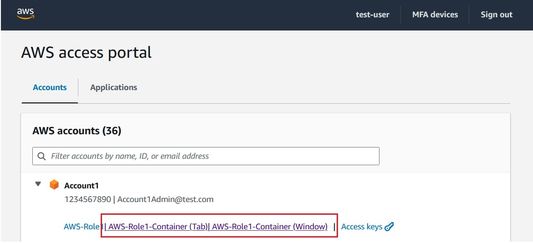
Authenticate Once, Sign into Multiple Accounts: AWS Login Helper simplifies the login process by enabling you to authenticate once. After signing in using AWS IAM Identity Center (IIC) or SSO, the extension enables you to log into different accounts using Firefox containers without repeatedly entering credentials. You can open the account you want to log into in a new tab or a window using the additional links added by the extension.

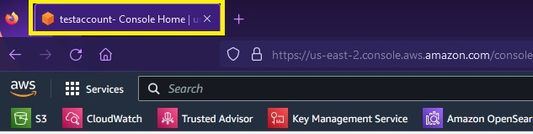
Tab/Window Title Updates: The extension updates the title of your Firefox tabs or windows to display the name of the currently active AWS account. This makes it easier to identify and manage your AWS sessions, especially when you have multiple AWS accounts open simultaneously.

Account Name Addition: AWS Login Helper enhances the AWS Management Console by adding the account name to the role and user information displayed within the console. This feature simplifies navigation and ensures that you're always aware of the AWS account you're working in.

Recent Login History: The Recent Login History feature in our Firefox extension for AWS login management showcases the five most recent role logins directly on the IIC login page. This saves users time and effort by eliminating the need to search for recent roles manually.

Seamless Console Page Reload Post-Authentication: Users need not tediously reopen console pages after session expiration. They can simply click the reload button in the AWS console, following re-authentication from the AWS IIC page, users stay on the same page, eliminating unnecessary steps and enhancing productivity.
Supported AWS Services
AWS Login Helper is designed to work seamlessly with AWS IAM Identity Center (IIC) and AWS Single Sign-On (SSO) for a streamlined login experience.
AWS #SSO #IIC #IAM Identity Center #AWS Roles #AWS Account #AWS IAM #AWS Single Sign-On #Single Sign-On #Single SignOn #AWS Login #AWS Apps #Apps #Container #Role #Account #Accounts #Multi Account #Switch Roles #SAML #STS #Tabs #Multiple Accounts #Color #Console #Session #Expiration #Expire #Timeout #Easy #helper #Title #profile #profiles #history #recent #services #quick #nav #navigation #account #fav #favorite #AWS #Amazon #AWS #AWS #Extend #Switch
리뷰어 1명이 5점으로 평가함
권한 및 데이터
필수 권한:
- 브라우저 탭에 접근
- awsapps.com 도메인의 사이트에서 사용자의 데이터에 접근
- console.aws.amazon.com 도메인의 사이트에서 사용자의 데이터에 접근
추가 정보
- 부가 기능 링크
- 버전
- 3.1.0
- 크기
- 668.62 KB
- 최근 업데이트
- 5달 전 (2026년 4월 26일)
- 버전 목록
- 모음집에 추가