
Blitz Web2PDF 제작자: Amorichy
Free save web pages as PDF with one click and keep the original structure of the web pages.
사용자 250명사용자 250명
확장 메타 데이터
스크린샷
정보
The best Web Page PDF Saver Add-on for Firefox, save web pages as PDF in one click.
This add-on lets you save web pages to PDF. It uses the https://pdfcrowd.com HTML to PDF web service API.
The extension works right out of the box using the default settings. If you want to customize the PDF you can sign up for a paid account at Pdfcrowd. The available options include page size, page orientation, margins, password protection, initial view, etc.
★ Conversions in Browser
Blitz Web2PDF provides the online conversion form and the browser add-on that you can use to convert web pages and HTML documents in your browser.
You can use these tools for free, you don't need a Pdfcrowd account. However, if you are a power user and want to customize PDFs beyond the defaults you might consider obtaining the Browser License.
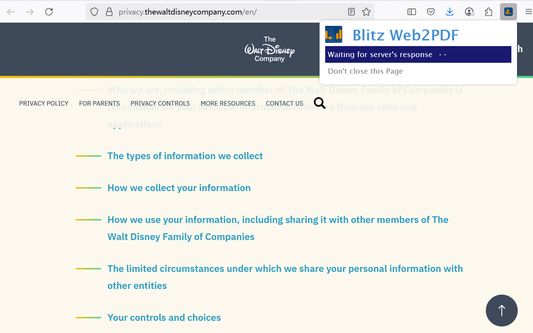
Open the web page you want to convert to PDF in the browser and click the extension icon. The popup-page open which indicates that the conversion is in process. If the conversion succeeds, the resulting PDF is downloaded to your computer.
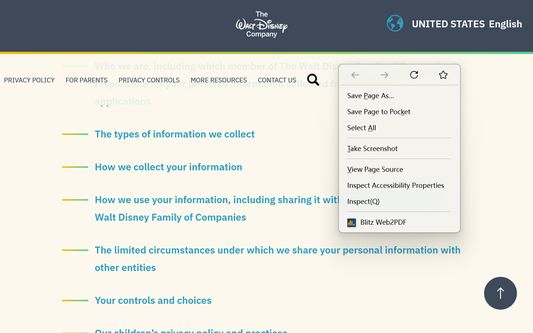
This version adds a right-click menu, allowing you to more easily convert the current page to PDF. Remember not to close the pop-up page when converting the file.
The toolbar add-ons icon is updated after each conversion:
- A red rectangle indicates an error. Hover your mouse over the button and a tooltip will display the error message.
- A little red dot indicates that you are not logged in at Pdfcrowd, hence the default settings were used.
★ Limitations
Blitz Web2PDF does not support:
- Password protected web pages.
- Web pages whose contents depends on cookies, server-side or client-side session.
- Local changes made to a web page.
- Frameset web pages.
- Flash and videos.
Please note, that for security reasons it is not possible to create PDF from pages that use a server-based session to identify a user, e.g. your webmail inbox, online banking, shopping cart content, payment checkout, and the likes.
This add-on lets you save web pages to PDF. It uses the https://pdfcrowd.com HTML to PDF web service API.
The extension works right out of the box using the default settings. If you want to customize the PDF you can sign up for a paid account at Pdfcrowd. The available options include page size, page orientation, margins, password protection, initial view, etc.
★ Conversions in Browser
Blitz Web2PDF provides the online conversion form and the browser add-on that you can use to convert web pages and HTML documents in your browser.
You can use these tools for free, you don't need a Pdfcrowd account. However, if you are a power user and want to customize PDFs beyond the defaults you might consider obtaining the Browser License.
Open the web page you want to convert to PDF in the browser and click the extension icon. The popup-page open which indicates that the conversion is in process. If the conversion succeeds, the resulting PDF is downloaded to your computer.
This version adds a right-click menu, allowing you to more easily convert the current page to PDF. Remember not to close the pop-up page when converting the file.
The toolbar add-ons icon is updated after each conversion:
- A red rectangle indicates an error. Hover your mouse over the button and a tooltip will display the error message.
- A little red dot indicates that you are not logged in at Pdfcrowd, hence the default settings were used.
★ Limitations
Blitz Web2PDF does not support:
- Password protected web pages.
- Web pages whose contents depends on cookies, server-side or client-side session.
- Local changes made to a web page.
- Frameset web pages.
- Flash and videos.
Please note, that for security reasons it is not possible to create PDF from pages that use a server-based session to identify a user, e.g. your webmail inbox, online banking, shopping cart content, payment checkout, and the likes.
5명이 4.6점으로 평가함
권한 및 데이터
필수 권한:
- 모든 페이지의 콘텐츠 차단
- 파일을 다운로드하고 브라우저의 다운로드 기록을 읽고 수정
- 컴퓨터에 다운로드된 파일 열기
- 브라우저 탭에 접근
- 모든 웹사이트에서 사용자의 데이터에 접근
선택적 권한:
- 모든 웹사이트에서 사용자의 데이터에 접근
데이터 수집:
- 개발자가 이 확장 기능은 데이터 수집이 필요하지 않다고 합니다.
추가 정보
- 부가 기능 링크
- 버전
- 11.3
- 크기
- 159.15 KB
- 마지막 업데이트
- 8달 전 (2025년 9월 9일)
- 관련 카테고리
- 버전 목록
- 태그
- 모음집에 추가