
Bloxta 제작자: Venturex
A productivity add-on that blocks distracting websites during scheduled hours
사용자 1명사용자 1명
확장 메타 데이터
스크린샷
정보
Bloxta – Focus, Uncompromised
Bloxta is a simple, powerful browser extension designed to help you reclaim your focus and productivity—without sacrificing your freedom or privacy. Built by remote workers for remote workers, Bloxta gives you the discipline to stay on track during work hours, while letting you enjoy your favorite sites when the workday is done.
Why Bloxta?
Working from home is liberating, but it comes with a unique challenge: the same device you use for work is also your gateway to endless distractions. Even with the best intentions, it's easy to slip into the familiar spiral of social media, news, or entertainment sites—sometimes without even realizing it. The team at VentureX faced this problem daily, and existing solutions were either too rigid, too invasive, or just didn't fit the way they worked. So, they built Bloxta.
How Bloxta Works
Bloxta is designed to be as simple and transparent as possible:
Blocklist via Bookmarks:
- Bloxta uses a special bookmarks folder called "Bloxta" as your blocklist. To block a site, just add it to this folder. To unblock, remove it. You're always in control.
Customizable Schedule:
- Define your own blocking hours for each day of the week. Want to block distractions only during work hours, or just on weekdays? You decide.
Strict by Design:
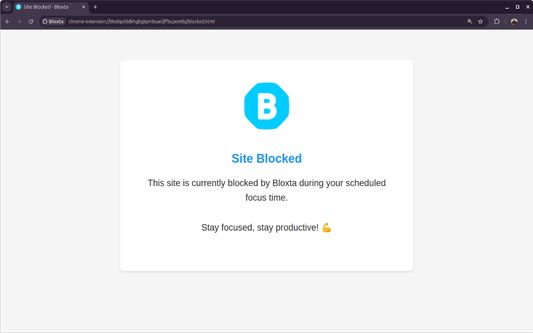
- There's no snooze, override, or quick bypass. If you want to unblock a site, you have to remove it from the folder—making it a conscious, intentional act.
Visual Feedback:
- The Bloxta icon in your browser toolbar changes color to show when blocking is active, so you always know your focus mode status at a glance.
Features
Easy Blocklist Management:
- Use your browser's bookmarks to manage blocked sites. No complicated settings or hidden lists.
Flexible Scheduling:
- Set multiple blocking periods per day, for any combination of days. Perfect for complex work routines or split shifts.
No Data Leaves Your Computer:
- All your settings, blocklists, and schedules are stored locally. Bloxta never sends any data anywhere. Your privacy is absolute.
Privacy & Security
Bloxta is built with privacy as a core principle:
How to Use Bloxta
1.Install the Extension:
2. Add Sites to Block using the toolbar popup or add sites directly to the "Bloxta" bookmarks folder.
3. Set Your Schedule using the settings page to define your blocking hours for each day.
4. Stay Focused
5. Unblock When You Want by removing a site from the "Bloxta" folder to unblock it. No hidden overrides or backdoors.
Frequently Asked Questions
Q: Does Bloxta collect or share any of my data?
- No. All data stays on your device. Nothing is ever sent anywhere.
Q: Can I temporarily disable blocking?
- Yes
Q: Can I use Bloxta for free?
- Yes. Bloxta is and always will be free, with no ads or paid features.
Q: Who is Bloxta for?
- Anyone who wants to reclaim their focus—especially remote workers, freelancers, and anyone who uses the same device for both work and leisure.
Bloxta – Focus, Uncompromised. Free, private, and built for real people who want to get things done.
Bloxta is a simple, powerful browser extension designed to help you reclaim your focus and productivity—without sacrificing your freedom or privacy. Built by remote workers for remote workers, Bloxta gives you the discipline to stay on track during work hours, while letting you enjoy your favorite sites when the workday is done.
Why Bloxta?
Working from home is liberating, but it comes with a unique challenge: the same device you use for work is also your gateway to endless distractions. Even with the best intentions, it's easy to slip into the familiar spiral of social media, news, or entertainment sites—sometimes without even realizing it. The team at VentureX faced this problem daily, and existing solutions were either too rigid, too invasive, or just didn't fit the way they worked. So, they built Bloxta.
How Bloxta Works
Bloxta is designed to be as simple and transparent as possible:
Blocklist via Bookmarks:
- Bloxta uses a special bookmarks folder called "Bloxta" as your blocklist. To block a site, just add it to this folder. To unblock, remove it. You're always in control.
Customizable Schedule:
- Define your own blocking hours for each day of the week. Want to block distractions only during work hours, or just on weekdays? You decide.
Strict by Design:
- There's no snooze, override, or quick bypass. If you want to unblock a site, you have to remove it from the folder—making it a conscious, intentional act.
Visual Feedback:
- The Bloxta icon in your browser toolbar changes color to show when blocking is active, so you always know your focus mode status at a glance.
- Quick Add:
- Instantly add the current site to your blocklist with a single click from the toolbar popup.
Features
Easy Blocklist Management:
- Use your browser's bookmarks to manage blocked sites. No complicated settings or hidden lists.
Flexible Scheduling:
- Set multiple blocking periods per day, for any combination of days. Perfect for complex work routines or split shifts.
No Data Leaves Your Computer:
- All your settings, blocklists, and schedules are stored locally. Bloxta never sends any data anywhere. Your privacy is absolute.
- Free Forever:
No subscriptions, no upsells, no ads. Bloxta was built for the VentureX team, and is shared with the world for free.
Privacy & Security
Bloxta is built with privacy as a core principle:
- Local-Only: All logic runs in your browser. Nothing is ever uploaded, tracked, or shared.
- No Analytics: Bloxta does not collect usage data, browsing history, or any personal information.
- Open Source: The code is open for anyone to inspect, so you can verify exactly how it works.
How to Use Bloxta
1.Install the Extension:
2. Add Sites to Block using the toolbar popup or add sites directly to the "Bloxta" bookmarks folder.
3. Set Your Schedule using the settings page to define your blocking hours for each day.
4. Stay Focused
5. Unblock When You Want by removing a site from the "Bloxta" folder to unblock it. No hidden overrides or backdoors.
Frequently Asked Questions
Q: Does Bloxta collect or share any of my data?
- No. All data stays on your device. Nothing is ever sent anywhere.
Q: Can I temporarily disable blocking?
- Yes
Q: Can I use Bloxta for free?
- Yes. Bloxta is and always will be free, with no ads or paid features.
Q: Who is Bloxta for?
- Anyone who wants to reclaim their focus—especially remote workers, freelancers, and anyone who uses the same device for both work and leisure.
Bloxta – Focus, Uncompromised. Free, private, and built for real people who want to get things done.
리뷰어 1명이 5점으로 평가함
권한 및 데이터
추가 정보