
Bookmark Info 제작자: Pavel Poroskov
The extension improves the browser's capabilities for working with bookmarks.
사용자 11명사용자 11명
확장 메타 데이터
스크린샷
정보
The extension improves the browser's capabilities for working with bookmarks.
additional functionality for bookmarks
flat folder structure for bookmarks
The extension allows you to quickly switch to a flat folder structure for bookmarks.
The flat folder structure allows you to quickly find the desired folder since all folders are on the first level and sorted.
In this mode on every browser start:
* folders with name starting with 'todo' are moved to root folder 'Bookmarks Toolbar'
* other folders are moved to root folder 'Other Bookmarks'
* nested folders are moved to root folder. Empty nested folders are deleted.
* folders are sorted
* folders with equal names (case and plural insensitive) are merged
* folders with not descriptive names (name starts with 'New folder', '[Folder Name]') are merged to 'Other bookmarks\zz-bookmark-info--unclassified'
extra functionality
- fast add bookmarks:
- from selection in page.
Shortcut Ctrl+Shift+Period(dot) and context command.
Selection is used as folder name for new bookmark.
The extension is looking for folder (case and plural insensitive) or create new. - from user input.
Shortcut Ctrl+Shift+Comma and context command. - from last used list.
Last used list contains up to 50 last used folders.
Standard browser last used list contains only 5 items.
User can pin selected items in last used list.
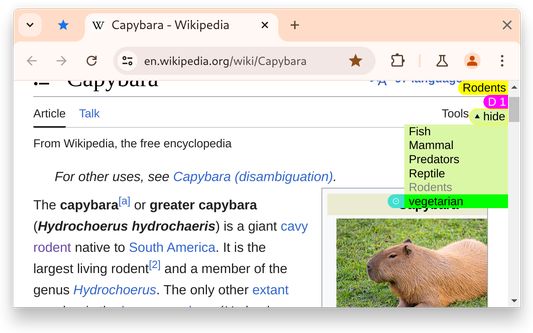
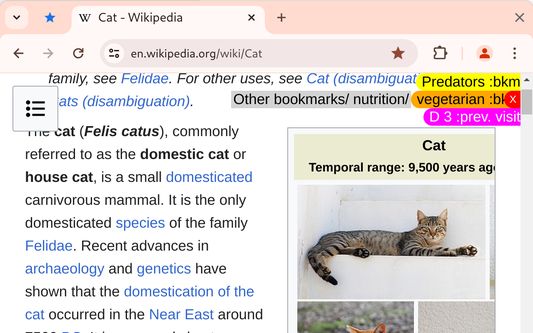
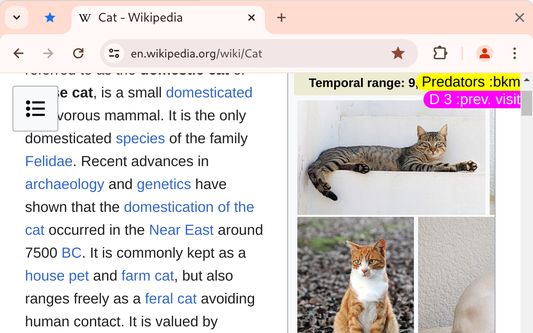
User can delete bookmark using last used list. Click on tag second time. - extension shows existing bookmarks for active page in the right top corner.
- fast delete bookmark
Hover over bookmark and click small red button - mark visited links in page
additional functionality for bookmarks
- User can hide bookmark labels by clicking on label.
To get access to buttons and links on the page under this labels - Dated Bookmark Folders
Dated folders are folders that have "@D" at the end of their name.
When a user adds a bookmark to a dated folder "DONE @D", this extension replaces the @D with the actual date.
I use "DONE @D" to mark a list of news items or a list of author publications that I have finished
I use "Selected @D" to mark a page that I don't have time to rate right now. - Option "Show author bookmarks with post bookmarks"
This feature implemented for dev.to, freecodecamp.org, linkedin.com, youtube.com and can be extended to other sites. - Option 'Show bookmark title'.
flat folder structure for bookmarks
The extension allows you to quickly switch to a flat folder structure for bookmarks.
The flat folder structure allows you to quickly find the desired folder since all folders are on the first level and sorted.
In this mode on every browser start:
* folders with name starting with 'todo' are moved to root folder 'Bookmarks Toolbar'
* other folders are moved to root folder 'Other Bookmarks'
* nested folders are moved to root folder. Empty nested folders are deleted.
* folders are sorted
* folders with equal names (case and plural insensitive) are merged
* folders with not descriptive names (name starts with 'New folder', '[Folder Name]') are merged to 'Other bookmarks\zz-bookmark-info--unclassified'
extra functionality
- The extension clears url from search params on opening for defined sites.
- Command 'clear url from hash and all search params' in page context menu.
- Option 'Shows the previous visits'
User can distinguish between visited and new pages. New page don't have previous visits. - Command 'Close duplicate tabs' in page context menu.
- Option 'Hide html-tags header, footer, aside, nav on printing.'.
- Option 'Hide page header for youtube channel'.
리뷰어 2명이 5점으로 평가함
권한 및 데이터
추가 정보
- 부가 기능 링크
- 버전
- 2.26.4
- 크기
- 73.34 KB
- 최근 업데이트
- 4달 전 (2026년 5월 29일)
- 라이선스
- All Rights Reserved
- 버전 목록
- 모음집에 추가