
Bookmark2Toolbar 제작자: Darv
Add a bookmark to the toolbar
사용자 9명사용자 9명
확장 메타 데이터
스크린샷




정보
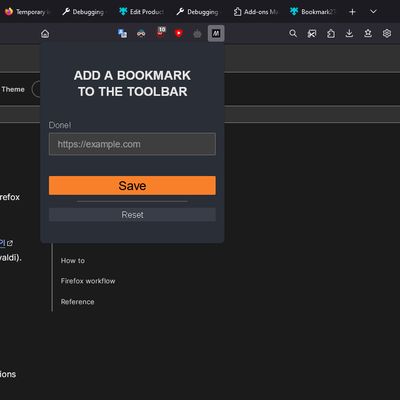
You can bookmark your favorite site in the toolbar:
1. Install this web extension;
2. Right-click on the extension icon;
3. Click Add current page;
OR
2. Left-click on the extension icon;
3. Add and save your favorite URL address;
4. The yellow star icon will be replaced with the favicon of the added site;
5. The next click on the icon will open your favorite site in a new tab.
Enjoy it ;)
1. Install this web extension;
2. Right-click on the extension icon;
3. Click Add current page;
OR
2. Left-click on the extension icon;
3. Add and save your favorite URL address;
4. The yellow star icon will be replaced with the favicon of the added site;
5. The next click on the icon will open your favorite site in a new tab.
Enjoy it ;)
This is the first extension out of 3 possible. So you can bookmark more different sites to the toolbar.
리뷰어 3명이 5점으로 평가함
추가 정보