
Boomi Platform Enhancer 제작자: Mitchell Franklin
This extension enhances Boomi Web Platform in multiple ways to provide a more robust experience
사용자 7명사용자 7명
확장 메타 데이터
스크린샷
정보
Boomi Platform Enhancer is designed to provide UI and Usage enhancements to provide a more streamlined use of the Boomi Web Platforms UI and process.
Disclaimer:Boomi has no affiliation with this extension and does not support it, endorse its use, or provide any promises or warranties (as per legal requirements)
Images only show some of the available items, to much to show :)
The following provides the current abilities of the released extension for use within the Boomi Web Platform:
* Keyboard Shortcuts
* Ctrl+Alt + S = Save Current Flow
* Ctrl+Alt + T = Test Current Flow
* ~ = Toggle Full Screen - On/Off
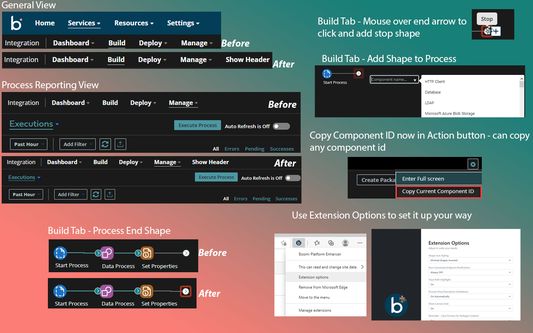
* Adjustments to the portal for integration around font sizing, header and menu sizing to provide more build and processing space within the default view.
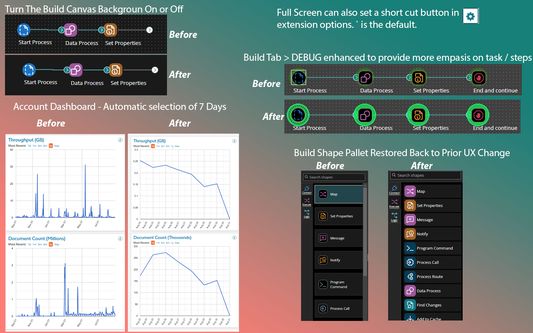
* Account dashboard now defaults to 7 days instead of the maximum value.
* Shapes that don't have a end connection will glow.
* Quickly add stop shape to flow by hovering over end arrow and clicking stop.
* Add components directly within the build tab by double clicking the flow and selecting from a drop down.
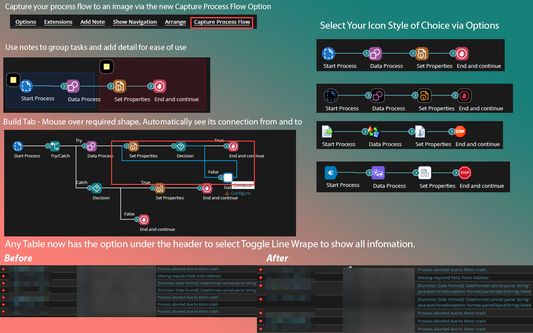
* Capture the entire flow without resize and save to a local image by using the "Capture Process Flow" button above the build canvas.
* Hover over flow shape to see the connection points it make.
* Use notes to group tasks and provide information relating to multiple areas of the flow.
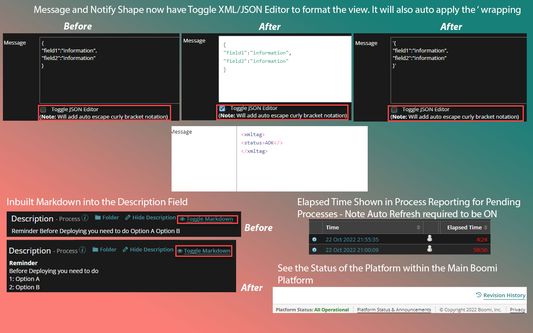
* Add Markdown in the process description or notes to show better visual formatting.
* When tables (for example Process Reporting list view) is displayed there's an option to "Toggle Line Wrapping" available to maximize screen real estate.
* Ability to assign keyboard button to easily go into and out of Full Screen Mode - default is the `~` key.
* JSON & XML Viewing toggle added to Message and Notify Shapes; will format the JSON and add the ' quote padding automatically.
* SQL Viewing toggle added to Command shape.
* Capture a diagram of your process flow easily via the "Capture Process Flow" button; will capture the entire flow and save an image to a local file.
* Options available are - Use Transparent Background, Zoom Size and Ability to Expand all notes to capture the note detail
* Debug has been enhanced to provide more robust coloring, this includes glowing colors, item selection and error emphasis.
* Ability to Remove the Canvas Build Background (dots) which works well with dark modes.
* Save Reminder – When packaging a component you will be reminded to save the process as Boomi doesn't save automatically when packaging.
* Schedule Reminder - Once a deployment has occurred or been deployed to another environment the notification message will also provide a reminder to setup a schedule (if enabled).
* Easily copy the current Component URL/ID using the Copy Component ID Button (In the ⚙️ action button above the build canvas).
* Build Shape "connector" Pallet has been restored back to its better life before Boomi UX decided to change it and make it unusable.
* Enable the selection of Icon Sets within the option to define user experience instead of default Boomi UX.
* In Process Reporting, Pending Executions runtime clock/timer now auto-updates - Note: Auto Refresh must be turned on for this to work.
* Define a custom refresh period and have process reporting auto refresh to your needs.
* Expand the Element Selection Screen within Shapes to provide more visual room for ease of use.
* Platform Status Detail - Shows if operational or if any Boomi systems are not operational.
* Brand new code editor attached to Message, Notify and Command Shape, click Edit message to open up a dedicated code window with choice of code display
* Tab names remove the account name to enable better display of tabs function i.e. Build, Reporting etc. Toggle Option Available.
* New Icon against Drop Down Menu items i.e. Manage to allow you to click and open in new tab instead of the same window.
* Default SQL Editor in Data Base Operation code area is now resizable for use with larger screens.
* Connector Operation Screen for HTTP has increased sizing on Request details for better use.
Disclaimer:Boomi has no affiliation with this extension and does not support it, endorse its use, or provide any promises or warranties (as per legal requirements)
Images only show some of the available items, to much to show :)
The following provides the current abilities of the released extension for use within the Boomi Web Platform:
* Keyboard Shortcuts
* Ctrl+Alt + S = Save Current Flow
* Ctrl+Alt + T = Test Current Flow
* ~ = Toggle Full Screen - On/Off
* Adjustments to the portal for integration around font sizing, header and menu sizing to provide more build and processing space within the default view.
* Account dashboard now defaults to 7 days instead of the maximum value.
* Shapes that don't have a end connection will glow.
* Quickly add stop shape to flow by hovering over end arrow and clicking stop.
* Add components directly within the build tab by double clicking the flow and selecting from a drop down.
* Capture the entire flow without resize and save to a local image by using the "Capture Process Flow" button above the build canvas.
* Hover over flow shape to see the connection points it make.
* Use notes to group tasks and provide information relating to multiple areas of the flow.
* Add Markdown in the process description or notes to show better visual formatting.
* When tables (for example Process Reporting list view) is displayed there's an option to "Toggle Line Wrapping" available to maximize screen real estate.
* Ability to assign keyboard button to easily go into and out of Full Screen Mode - default is the `~` key.
* JSON & XML Viewing toggle added to Message and Notify Shapes; will format the JSON and add the ' quote padding automatically.
* SQL Viewing toggle added to Command shape.
* Capture a diagram of your process flow easily via the "Capture Process Flow" button; will capture the entire flow and save an image to a local file.
* Options available are - Use Transparent Background, Zoom Size and Ability to Expand all notes to capture the note detail
* Debug has been enhanced to provide more robust coloring, this includes glowing colors, item selection and error emphasis.
* Ability to Remove the Canvas Build Background (dots) which works well with dark modes.
* Save Reminder – When packaging a component you will be reminded to save the process as Boomi doesn't save automatically when packaging.
* Schedule Reminder - Once a deployment has occurred or been deployed to another environment the notification message will also provide a reminder to setup a schedule (if enabled).
* Easily copy the current Component URL/ID using the Copy Component ID Button (In the ⚙️ action button above the build canvas).
* Build Shape "connector" Pallet has been restored back to its better life before Boomi UX decided to change it and make it unusable.
* Enable the selection of Icon Sets within the option to define user experience instead of default Boomi UX.
* In Process Reporting, Pending Executions runtime clock/timer now auto-updates - Note: Auto Refresh must be turned on for this to work.
* Define a custom refresh period and have process reporting auto refresh to your needs.
* Expand the Element Selection Screen within Shapes to provide more visual room for ease of use.
* Platform Status Detail - Shows if operational or if any Boomi systems are not operational.
* Brand new code editor attached to Message, Notify and Command Shape, click Edit message to open up a dedicated code window with choice of code display
* Tab names remove the account name to enable better display of tabs function i.e. Build, Reporting etc. Toggle Option Available.
* New Icon against Drop Down Menu items i.e. Manage to allow you to click and open in new tab instead of the same window.
* Default SQL Editor in Data Base Operation code area is now resizable for use with larger screens.
* Connector Operation Screen for HTTP has increased sizing on Request details for better use.
0명이 0점으로 평가함
권한 및 데이터
추가 정보
- 부가 기능 링크
- 버전
- 1.7.3.6
- 크기
- 522.07 KB
- 마지막 업데이트
- 3년 전 (2022년 12월 1일)
- 관련 카테고리
- 버전 목록
- 모음집에 추가